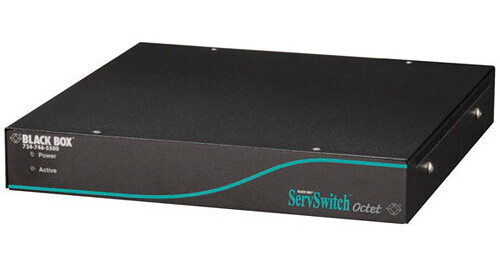
Black Box ServSwitch Octet Enhanced Video User Station

BH #BLKV1712AR2 • MFR #KV1712A-R2
Print
Black Box ServSwitch Octet Enhanced Video User Station
Key Features
  • Supports Resolution 1280 x 1024
  • Port Selection via On-Screen Display
  • 2 x RJ-45 Connectors
  • 2 x 6-Pin Mini-DIN Female Connectors
The ServSwitch Octet Enhanced Video User Station from Black Box is a remote access console for the ServSwitch Octet. The remote access console works when it is connected to the ServSwitch. The user station adjusts for skew between RGB signals, each time a server is switched. It offers resolutions of up to 1280 x 1024, and the maximum resolution at 328' is 1600 x 1200 @ 75 Hz. The User Station has KVM connectors that connect to the KVM connectors on the user's PC.

For each CPU server that you attach to the ServSwitch, you need one Server Access Module (SAM). Each SAM is a small box with a pigtail cable attached that has keyboard-video-mouse (KVM) connectors on the end. Simply connect the KVM connectors on the SAM to the KVM connectors on your PS/2, USB, Sun HD15, or serial RS-232/V.24 server. Dual RJ-45 SAM with audio/serial RS-232 support are also available for PS/2, USB, or Sun HD15. Use one of these modules to connect two CPU servers to the ServSwitch.
More Details
No Longer Available
No Store Display
Ask an Expert
800-606-6969

Black Box KV1712A-R2 Overview

The ServSwitch Octet Enhanced Video User Station from Black Box is a remote access console for the ServSwitch Octet. The remote access console works when it is connected to the ServSwitch. The user station adjusts for skew between RGB signals, each time a server is switched. It offers resolutions of up to 1280 x 1024, and the maximum resolution at 328' is 1600 x 1200 @ 75 Hz. The User Station has KVM connectors that connect to the KVM connectors on the user's PC.

For each CPU server that you attach to the ServSwitch, you need one Server Access Module (SAM). Each SAM is a small box with a pigtail cable attached that has keyboard-video-mouse (KVM) connectors on the end. Simply connect the KVM connectors on the SAM to the KVM connectors on your PS/2, USB, Sun HD15, or serial RS-232/V.24 server. Dual RJ-45 SAM with audio/serial RS-232 support are also available for PS/2, USB, or Sun HD15. Use one of these modules to connect two CPU servers to the ServSwitch.

Access multiple CPUs from a remote PC over CAT5, CAT5e, or CAT6 UTP cable
With an RJ-45 port connect a local computer, using a Server Access Module (SAM), at distances of up to 984.2'
Control and configure the ServSwitch locally, through an attached user-console PC
Works with PS/2, USB, Sun HD15, or serial RS-232/V.24 CPUs

Black Box KV1712A-R2 Specs

Chassis
Metal case
Convection
Cooling Fan
Distance
Distance to Keyboard/Monitor/Mouse (Maximum): 984.2' (300.0 m)
Distance to Server (Maximum): 984.2' (300.0 m)
Extension Options
Up to 984.2' (300.0 m), included
Supported Mice
User and CPU: Wheel mouse, PS/2, Sun
Maximum Resolution
1280 x 1024 @ 984.2' (300.0 m), 1600 x 1200 @ 75 Hz and 328.0' (100.0 m)
Platforms Supported
IBM PC and compatible with PS/2, Sun, Sun USB, serial
Port Selection
Via on-screen display
Connectors
2 x RJ-45
2 x 6-pin mini-DIN female
2 x USB type A female
1 x HD15 female
1 x DB9 female
1 x IEC 320
Security
Password, user profiles, auto time logout, event log, LDAP
Operating Temperature
32 to 122°F (0 to 50°C)
Humidity Range
10 to 95% (non condensing)
Power
100 to 240 VAC, 50 to 60 Hz, internal, autosensing
Dimensions
11.00 x 1.75 x 11.50" (27.90 x 4.40 x 29.20 cm)
Weight
4.4 lb (2 kg)
Packaging Info
Package Weight
8.093 lb

Black Box KV1712A-R2 Reviews

See any errors on this page?
Whatever You Need, We've Got It