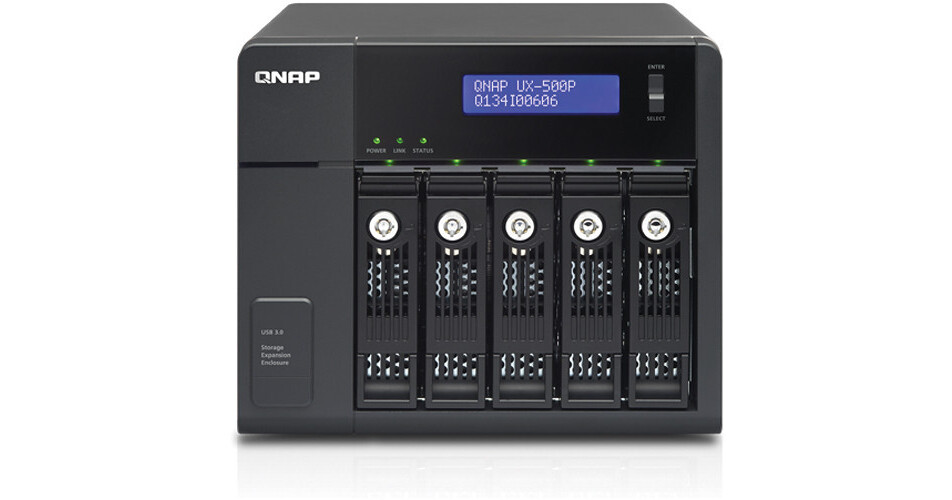
QNAP UX-500P 5-Bay RAID Expansion Enclosure

BH #QNUX500P • MFR #UX-500P
Print
QNAP UX-500P 5-Bay RAID Expansion Enclosure
Key Features
  • 5 x SATA III 6 Gb/s Drive Bays
  • 1 x USB 3.0 Port (Rear)
  • Smart Power Design
  • Missing Mode Protection
The UX-500P 5-Bay RAID Expansion Enclosure from QNAP provides additional space for five hard drives for select QNAP NAS devices, making it useful for data backup, digital media collections, video surveillance, and more. This expansion enclosure is a budget-friendly alternative designed with easy setup in mind for expanding the total storage space of your NAS for general applications. It offers a hassle-free storage expansion for home/small office use.
More Details
No Longer Available
No Store Display
Ask an Expert
866-839-7214

QNAP UX-500P Overview

The UX-500P 5-Bay RAID Expansion Enclosure from QNAP provides additional space for five hard drives for select QNAP NAS devices, making it useful for data backup, digital media collections, video surveillance, and more. This expansion enclosure is a budget-friendly alternative designed with easy setup in mind for expanding the total storage space of your NAS for general applications. It offers a hassle-free storage expansion for home/small office use.

Your NAS NAS will automatically detect the hard drives in the enclosure as newly installed local drives. With the missing mode protection, the NAS enters missing mode and blocks I/O access to protect the stored data. It automatically powers on and off with your Turbo NAS, allowing for total convenience and energy saving. The QTS 4.1 Storage manager neatly presents tools and options for managing system storage with an intuitive graphical interface.

Easily Add Additional Drive Capacity to a Turbo NAS
Simply connect the enclosure to a Turbo NAS* and power it on. The Turbo NAS will automatically detect the hard drives in the enclosure as newly installed local drives. Its capacity can then be expanded as a large volume seamlessly and economically by using the powerful QTS Storage Manager.
Note:
*QTS 4.1.0 or newer is required for the Turbo NAS.
Missing Mode Protection
If the enclosure is accidentally disconnected, the Turbo NAS enters missing mode and blocks I/O access to protect the stored data. The system can then recover from the missing mode to the normal state with data staying intact.
Powerful QTS Storage Manager
The QTS Storage Manager neatly presents tools and options for managing system storage with a modern and intuitive graphical user interface, which simplifies the process of NAS capacity expansion and enclosure management. No matter if you are an IT administrator or Home user, you can easily monitor the health status of enclosure and the disks within it. When multiple expansion enclosures are connected, the Locate Disk and Locate Enclosure functions assist you in quick maintenance*.
Note:
*Not applicable to TS-x51 & TS/SS-x53 Pro series.
Flexible RAID Configuration
The enclosure features five hot-swap drive bays for easy installation and removal. The automatic insertion/removable detection and rebuild allow easy management. Featuring RAID 0, 1, 5, 6 and 10, support and managed by the powerful QTS Storage Manager, it ensures maximum performance and data security.
An Optimal Backup Solution for Turbo NAS
The enclosure can be used as a budget-friendly external storage to perform speedy and secure backup tasks for the Turbo NAS. The administrator can backup the Turbo NAS data to the enclosure on a real-time or scheduled basis.
Smart Power Design
It automatically powers on and off with your Turbo NAS, allowing for total convenience and energy saving.
Optimal Hardware Design
The enclosure includes a full 250W internal PSU to provide ample power even under sustained full load. The well-ventilated chassis and smart fan help to provide efficient cooling for better stability and reliability, with the fan enabling efficient heat removal even when all five drives are under full operation simultaneously.
Expansion Enclosure Management
The functions listed below are managed via the QNAP QTS operating system:
Support for hard disk's S.M.A.R.T. capacity
Location indication of expansion enclosure
Location indication of hard disks on expansion enclosure
Smart fan control
QNAP Flexible Volume
The disks, RAID groups, storage pools, and volumes in the expansion enclosures are configured via the QTS operating system. Support for multiple RAID groups in a storage pool to ensure data safety
Online storage pool expansion*
Online volume expansion
Block-based iSCSI LUN*
Support for thin-provisioned volume with space reclamation*
Support for thin-provisioned iSCSI LUN with space reclamation*
Note:
*These feature is only available on certain models.
Intelligent Storage Manager
The QTS 4.1 Storage manager neatly presents tools and options for managing system storage with an intuitive graphical interface. From reviewing the system storage allocation in the Dashboard, to managing volumes, Storage Pools*, disks and iSCSI storage, the Storage Manager provides a centralized place to ease the work of storage management.

QNAP UX-500P Specs

General
Number of Bays
5 x 2.5"/3.5"
Media Card Slots
No
I/O
1 x USB Type-A (USB 3.1 / USB 3.2 Gen 1 (5 Gb/s))
Form Factor
Desktop
Hot-Swap Support
Yes
Drives
Total Raw Capacity
No
Type
No
Flash Memory
No
Electrical
Power Source
Internal Power Supply
PSU Wattage
1 x 250 W
AC Input Power
100 to 240 VAC, 50 / 60 Hz
Security
Security Features
Kensington Security Slot, Lockable Bay Door
Environmental
Operating Temperature
41 to 95°F / 5 to 35°C
Operating Humidity
5 to 95%
Physical
Cooling
1 x 120 mm Fan
Status Monitoring
LCD Screen, LED Indicator
Dimensions
8.29 x 7.29 x 9.27" / 210.6 x 185.2 x 235.4 mm
Weight
11.2 lb / 5.1 kg
Packaging Info
Package Weight
12.4 lb
Box Dimensions (LxWxH)
15.1 x 13.4 x 9.9"

QNAP UX-500P Reviews

See any errors on this page?
Whatever You Need, We've Got It