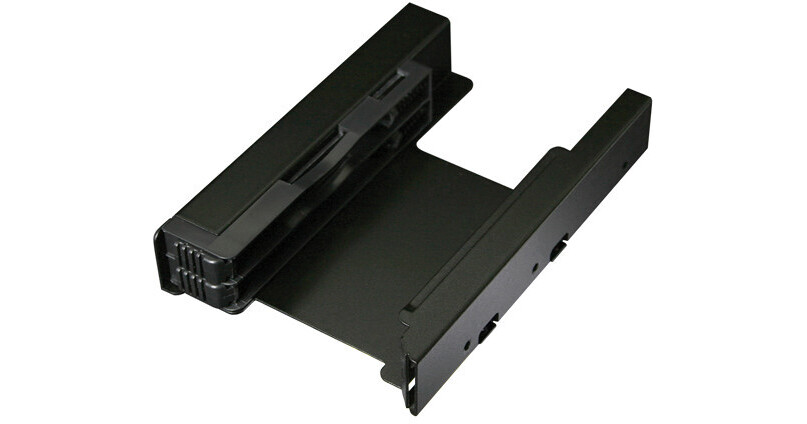
Icy Dock EZ-Fit PRO Dual 2.5" to 3.5" SSD/HDD Mounting Bracket (Matte Black)

BH #ICMB082SP • MFR #MB082SP
Print
Icy Dock EZ-Fit PRO Dual 2.5" to 3.5" SSD/HDD Mounting Bracket (Matte Black)
Key Features
  • Fits 2 x 2.5" SSDs/HDDs in 1 x 3.5" Bay
  • Supports SSDs/HDDs with 9.5mm Height
  • EZ-Lock Tool-Less System
  • Heavy Duty Full Metal Construction
The matte black EZ-Fit PRO Dual 2.5" to 3.5" SSD/HDD Mounting Bracket from Icy Dock fits two 2.5" SATA orIDE Solid State Drives (SSDs) or Hard Disk Drives (HDDs) into one 3.5" drive bay. It supports SSDs or HDDs with 9.5mm height and fits into most PC cases. The screw placement on both the sides and bottom of the bracket match the exact locations of the screws on a standard 3.5" hard drive.The EZ-Fit PRO is made of metal to protect your drives, and has a matte finish.
More Details
In Stock
No Store Display
Ask an Expert
800-606-6969

Icy Dock EZ Fit Pro Overview

The matte black EZ-Fit PRO Dual 2.5" to 3.5" SSD/HDD Mounting Bracket from Icy Dock fits two 2.5" SATA orIDE Solid State Drives (SSDs) or Hard Disk Drives (HDDs) into one 3.5" drive bay. It supports SSDs or HDDs with 9.5mm height and fits into most PC cases. The screw placement on both the sides and bottom of the bracket match the exact locations of the screws on a standard 3.5" hard drive.The EZ-Fit PRO is made of metal to protect your drives, and has a matte finish.

Tool-less drive installation makes it simple way to install your SSDs/HDDs in the bracket - slide the SSDs or HDDs in, and the drives will automatically lock into place by an EZ-Lock mechanism. Once that is done,  install the bracket as you would a normal 3.5" hard drive. The EZ-Lock design is also useful when you need to replace a failed SSD or hard drive. You can simply toggle the EZ-Lock, pop up the drive, and replace the failed drive in no time. This is ideal for a system that uses RAID.

To reduce the amount of vibration in the drives and the case, the EZ-Fit PROhas a built-in unique anti-vibration technology for each bay of the device.

Fits two 2.5" SATA/IDE SSDs or HDDs into one 3.5" drive bay
EZ-Lock mechanism for tool-less drive installation
Heavy duty full metal construction with matte black finish
Compatible with SSD or hard drives with 9.5mm height
Anti-vibration design for improved reliability
Universally designed screw placement for maximum compatibility
UPC: 884826001638

Icy Dock EZ Fit Pro Specs

Key Specs
Drive Size
1x 2.5"
System Bay Size
1x 3.5"
Hot-Swap Support
No
System Connection
SATA (1.5 Gb/s), SAS (3 Gb/s)
Drive Size
1x 2.5"
Maximum 2.5" SATA Drive Height
9.5 mm
System Bay Size
1x 3.5"
Hot-Swap Support
No
RAID Support
No
Insertion Rating
10,000
System Connection
SATA (1.5 Gb/s), SAS (3 Gb/s)
Data I/O
2x 7-Pin SATA
Power I/O
1x 15-Pin SATA
Cooling Fan
No
Material of Construction
Metal
Security
No
Operating Conditions
32 to 140°F / 0 to 60°C
Storage Conditions
-31 to 158°F / -35 to 70°C
Certifications
CE, REACH, RoHS
Dimensions
5.7 x 4 x 1" / 146 x 102 x 25 mm
Weight
7.8 oz / 220 g
Packaging Info
Package Weight
0.6 lb
Box Dimensions (LxWxH)
6.3 x 4.5 x 1.4"

Icy Dock EZ Fit Pro Reviews

Excellent product!

By Andrew
Rated 5 out of 5
Date: 2023-12-09

Was super simple to attach using the supplied screws and the two SSD's fit with little effort and it provides a good feedback sound when fully inserted. There is also a nicely visible and easy to use release for easy removal of either drive.

Well-made, beware of design specifics

By MICHAEL
Rated 3 out of 5
Date: 2021-09-02

This thing seems to be made of steel on the outer bracket, nice material. Holes did not line up quite right with my 3.5 drive bay so I was only able to use 3 mount points, might just be my case but that worked OK. Mounting 7mm drives in this is fiddly, they give you little foam pads to stand off your drive so it fits snugly, I wouldn't recommend it for 7mm drives, it's really designed for 9.5mm drives. With the pads though it does work to click in the drives. When removing a drive, the springs are fairly strong and they kinda shoot the drive out of the slot, which wasn't my cup of tea.

See any errors on this page?
Whatever You Need, We've Got It