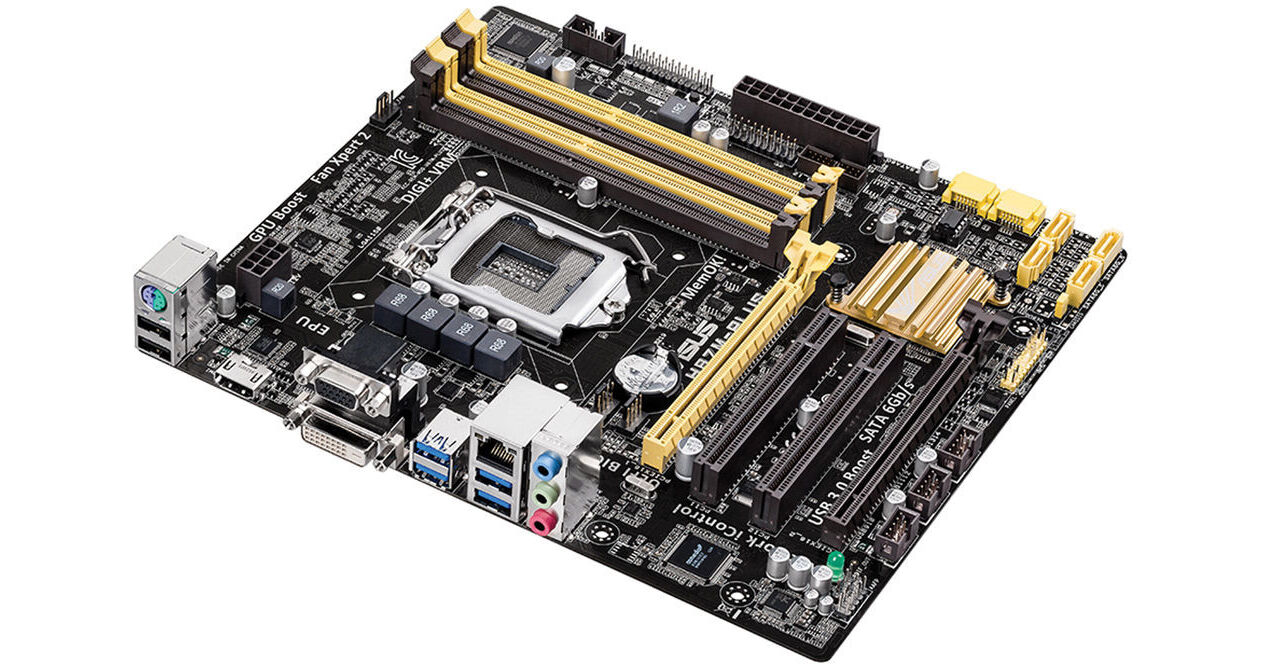
ASUS H87M-PLUS Micro-ATX Motherboard

BH #ASH87MPLUS • MFR #H87M-PLUS
Print
ASUS H87M-PLUS Micro-ATX Motherboard
Key Features
  • Micro-ATX Form Factor
  • Intel LGA1150 Socket
  • Intel H87 Chipset
  • Supports 4th Gen Intel Processors
The H87M-PLUS Micro-ATX Motherboard from ASUS ties all your PC components together in building a mini tower or desktop PC. This 9.6 x 8.6 inch motherboard supports 4th generation Intel Core i7/i5/i3, Pentium, and Celeron processors in the LGA1150 socket. These CPUs combine dual or quad-core processing power with integrated Intel graphics that offers 4K video via HDMI. For additional graphics power, this motherboard supports CrossFireX technology by offering two PCI Express x16 slots. ASUS also features 5X protection that provides stability and reliability for your PC by including a voltage regulator module, 5K solid-state capacitors, ESD guards, and more. Other features offered are Q-slots and Q-DIMM, which allows easier installation of PCI Express cards and RAM chips.
More Details
No Longer Available
No Store Display
Ask an Expert
800-952-1815

ASUS H87M-PLUS Overview

The H87M-PLUS Micro-ATX Motherboard from ASUS ties all your PC components together in building a mini tower or desktop PC. This 9.6 x 8.6 inch motherboard supports 4th generation Intel Core i7/i5/i3, Pentium, and Celeron processors in the LGA1150 socket. These CPUs combine dual or quad-core processing power with integrated Intel graphics that offers 4K video via HDMI. For additional graphics power, this motherboard supports CrossFireX technology by offering two PCI Express x16 slots. ASUS also features 5X protection that provides stability and reliability for your PC by including a voltage regulator module, 5K solid-state capacitors, ESD guards, and more. Other features offered are Q-slots and Q-DIMM, which allows easier installation of PCI Express cards and RAM chips.

This motherboard allows you to add up to 32GB of RAM across 4 memory slots for running multiple applications at the same time. For connecting to optical and storage drives, six SATA III connectors are available and allow for data transfers up to 6 Gb/s. Four USB 3.0 and two USB 2.0 ports are located on the back I/O for connecting to other peripherals. These USB 3.0 ports also support USB Attached SCSI Protocol in Windows 8 and 8.1 that boost transmission speeds up to 170%. It also comes with two PCI slots for adding additional hardware such as FireWire, parallel, and serial ports. For audio and networking needs, the motherboard is built with the Realtek Audio ALC887 and the Realtek 8111G Gigabit LAN controller. Included with the H87M-PLUS motherboard are a support disk, SATA cables, and an I/O shield.

5X Protection
DIGI+ VRM
Voltage regulator modules are among the most essential motherboard components. The VRM intelligently delivers APU power based on actual needs at any given time. ASUS has created a digital power design featuring faster sensing and response, to deliver precise APU power on demand. This reduces energy waste and improves system stability thanks to more consistent delivery.
Enhanced DRAM Overcurrent Protection
Onboard resettable fuses prevent overcurrent and short-circuit damage. This extends beyond I/O ports to DRAM, to safeguard system and device lifespan.
ESD Guards
ASUS ESD Guards offer an active protective circuit design that ensures electrostatic discharges are properly grounded, providing greater component longevity.
5K-Hour Solid-State Capacitors
These solid-state capacitors assure a 5,000-hour lifespan, equivalent to 2.5 times longer than traditional capacitors. All capacitors pass testing under temperatures as high as 105 degrees centigrade and meet Japanese industrial standards to provide greater durability and enhanced thermal capacity.
Stainless Steel Back I/O
Back I/O panels are made from strong and corrosion-resistant stainless steel, which is bonded with a thin layer of chromium oxide to enhance anti-corrosive properties. Passing 72-hour spray salt endurance tests, ASUS stainless steel back I/O panels have a usage life three times longer compared to ordinary panels.
UEFI BIOS
BIOS
UEFI BIOS from ASUS provides a mouse-controlled graphical BIOS. It features more intuitive functions to quickly take you to your favorite BIOS pages and frequently accessed settings through custom shortcuts. You can even write quick notes in-BIOS for future reference, view an activity log of setting changes and modifications, and rename SATA ports.
EZ Mode
  • Fast Clock Adjustment: Change the time and date in EZ Mode using the mouse.
  • EZ XMP Settings: Quickly apply XMP settings in UEFI BIOS EZ Mode, achieving better DRAM performance.
  • EZ Fan Setting: Detailed fan controls are offered in EZ Mode, so you can switch fan profiles for quick cooling and noise-level supervision.
  • SATA Information: Each SATA port has details displayed, so you can easily recognize devices.
  • My Favorites
    F4 or right click to add settings to My Favorites under Advanced Mode, which cuts time spent on searching and further speeds up system tuning.
    Shortcut
    Customize your own shortcut log by pressing F4 or right clicking to create shortcuts to frequently-used settings. Instantly access them by simply hitting the F3 hotkey.
    Quick Note
    Create and save notes within the BIOS to help remember important settings and save time on trial and error.
    Last Modified
    This function creates a tuning log to track your BIOS setting history, which can be saved onto a USB drive.
    SATA Port Renaming
    Rename the SATA ports for easy identification, including by usage scenario. You will spend less time finding the right devices when you want to change its settings.
    Fan Xpert 2
    Fan Auto Tuning Mode
    With a single click, the automatic speed detection scans the fans parameters and creates custom settings to provide the best cooling for your components. Fan Xpert 2 provides individual data and control for each fan connected to your motherboard as well as built-in fan profiles to deliver cooling that is as automated or as customizable as you need it to be.
    RPM Fixed Mode
    RPM Fixed Mode is for users who wish to reduce noise levels to near 0 dB with highly specific fan speed control. It reacts to system loads for greater response.
    Informative Fan Controls
    Delivers complete information that allows you to take advanced control over each fan.
    Performance Optimization
    USB 3.0 Boost (UASP Support)
    ASUS USB 3.0 Boost technology supports USB Attached SCSI Protocol in Windows 8. With USB 3.0 Boost technology, a USB device's transmission speed is increased up to 170%, adding to already fast USB 3.0 performance. ASUS software automatically accelerates data rates for compatible USB 3.0 peripherals without any user interaction.
  • Complete USB 3.0 Solution: Performance boost under Turbo Mode or UASP Mode for most USB devices.
  • Simple Plug and Boost: Auto detection design ensures best performance.
  • GPU Boost
    The user-friendly interface facilitates flexible frequency adjustments to accelerate the integrated GPU. It easily delivers stable system-wide upgrades for every use.
    Network iControl
    One click to prioritize network traffic for applications you're currently using or set up favorite profiles to run at specific times. Avoid network congestion, speed up downloading, and make sure online gaming runs optimized, all through an intuitive user interface.
    PCI Express 3.0
    PCI Express 3.0 uses improved encoding that provides twice the performance of PCI Express 2.0. Total bandwidth for an x16 link reaches 32 GB/s, delivering fast data speeds combined with the convenience and seamless transition offered by complete backward compatibility.
    USB 3.0 Integration
    Plug-n-play connectivity at speeds up to 10 times faster than USB 2.0.
    SATA III Ports
    ASUS provides SATA III 6.0 Gb/s ports with enhanced scalability, faster data retrieval, and double the bandwidth of SATA II 3Gb/s.
    EZ DIY
    MemOK!
    This troubleshooting feature saves you time and annoyance by automatically loading failsafe settings to enable basic functionality with a simple push of a button on the motherboard.
    Q-DIMM
    Plugging in memory is easy with one-sided clips that are right at the edge of the board and always accessible. Just push down on the clip and push or pull RAM modules in or out
    Q-Slot
    Press the Q-Slot clip lightly, and the graphics card pops out. The large winged clip is easily reachable, so you don't have to struggle with installing or removing the biggest graphics card.
    Additional Features
    Probe II Sense
    Displays real-time system information through a live tile on the Windows 8 start screen and allows you to make quick adjustments. Probe II Sense is a free app available from the Windows Store.
    AI Suite 3
    ASUS AI Suite 3 offers a clearer and more attractive interface with support for larger monitors. It consolidates all ASUS features into one simple-to-use package, allowing you to supervise overclocking, energy consumption, fan speeds, voltages and more. This all-in-one app offers diverse and easy-to-use functionality, with no need to switch back and forth between different utilities.
    EPU
    Tap into the real-time PC power saving chip through the AI Suite 3 utility. Get system-wide energy optimization by automatically detecting current PC loadings and intelligently moderates power consumption. You can manually switch it to Away Mode, so you can download and stream content or backup data when away from your PC, which minimizes power draw to save money, creating a more efficient PC.
    BIOS Maintenance
    CrashFree BIOS 3: Allows users to restore corrupted BIOS data from a USB flash drive or support CD containing a BIOS file. This utility saves you the cost and hassle of buying a replacement BIOS chip.

    EZ Flash 2: Update your BIOS using an USB flash drive.
    4K HDMI Support
    This motherboard offers native 4K support with a GPU that can provide 4K resolutions via an HDMI port.
    Connect up to 3 Displays
    Connect up to three independent monitors at once using video outputs such as HDMI, DVI, or VGA. Choose your outputs and set displays to either mirror mode or collage mode.
    AMD CrossFireX Support
    Features the Intel H87 platform to optimize PCI Express allocation in multi-GPU CrossFireX, giving you gaming enjoyment.
    CPU and Chipset Features
    Intel LGA1150 4th Generation Processor Ready
    This motherboard supports Intel 4th generation Core i7/i5/i3/Pentium/Celeron processors in the LGA1150 package, with iGPU, memory and PCI Express controllers integrated to support onboard graphics output with dedicated chipsets, 2-channel 4 DIMM DDR3 memory and 16 PCI Express 3.0/2.0 lanes. Intel 4th generation processors are also energy efficient.
    Intel H87 Express Chipset
    The Intel H87 Express provides improved performance by utilizing serial point-to-point links, allowing increased bandwidth and stability. It natively supports up to six USB 3.0 ports for up to ten times faster transfer rates than USB 2.0. Moreover, the Intel Express chipset also supports iGPU functionality, letting users enjoy the latest Intel integrated graphics performance.
    Intel Smart Response Technology
    Requires at least 18.6GB on an installed SSD as cache for frequently-accessed data. Key benefits include reduced load and wait times, and lower power consumption through the elimination of unnecessary hard drive spin. This technology combines SSD performance with hard drive capacity, operating up to 6X faster than a hard drive-only system.
    Intel Smart Connect Technology
    Your computer can receive web updates with fresh content for selected applications, even when the system is in sleep mode. This means less time waiting for applications to update and sync with the cloud, leading to a more efficient computing experience.
    Intel Rapid Start Technology
    Allows your computer to quickly resume from a low-power hibernate state in seconds. Saving your system memory to the designated SSD, it provides your computer a faster wake-up response time, while still keeping energy use low.
    GreenASUS
    Motherboards are EU Energy-related Products ready, which requires products meet high efficiency standards with regards to energy consumption. This is in line with the ASUS vision of creating environmentally-friendly and energy-efficient products through design and innovation that reduce the carbon footprint of products and thus mitigate ecological impact.
    Bundled Software
    Drivers
    ASUS utilities
    EZ update

    ASUS H87M-PLUS Specs

    Form Factor
    Micro-ATX
    Socket Type
    LGA1150
    CPU Support
    4th Generation Intel Core i7 / i5 / i3 / Pentium / Celeron processors
    Supports Intel 22 nm CPU
    Supports Intel Turbo Boost Technology 2.0
    BIOS
    64 Mb Flash ROM
    UEFI AMI BIOS
    PnP
    DMI 2.0
    WfM 2.0
    SM BIOS 2.7
    ACPI 2.0a
    Multi-language BIOS
    ASUS EZ Flash 2
    ASUS CrashFree BIOS 3
    My Favorites
    Quick Note
    Last Modified Log
    F12 PrintScreen function
    F3 Shortcut functions
    ASUS DRAM SPD (Serial Presence Detect) memory information
    Manageability
    WfM 2.0
    DMI 2.0
    WOL by PME
    PXE
    Memory
    RAM Slots
    4 x DIMM

    Type
    1066 MHz DDR3
    1333 MHz DDR3
    1600 MHz DDR3

    Max Size
    32 GB

    Other Features
    Dual channel memory architecture
    Supports non-ECC, un-buffered memory
    Supports Intel Extreme Memory Profile (XMP)
    Due to Intel chipset limitation, DDR3 1600 MHz and higher memory modules on XMP mode will run at the maximum transfer rate of DDR3 1600 MHz.
    Hyper DIMM support is subject to the physical characteristics of individual CPUs.
    Graphics
    Integrated Graphics Processor
    Multi-VGA output support : HDMI/DVI/RGB ports
  • Supports HDMI with max. resolution 4096 x 2160 @ 24 Hz / 1920 x 1080 @ 60 Hz
  • Supports DVI with max. resolution 1920 x 1200 @ 60 Hz
  • Supports RGB with max. resolution 1920 x 1200 @ 60 Hz
    Maximum shared memory of 1024 MB
    Supports Intel InTru 3D, Quick Sync Video, Clear Video HD Technology, Insider
    Supports up to 3 displays simultaneously

    Multi-GPU Support
    Supports AMD Quad-GPU CrossFireX Technology
  • Expansion Slots
    1 x PCIe 3.0/2.0 x16 (x16 mode, yellow)
    1 x PCIe 2.0 x16 (x4 mode, dark brown)
    2 x PCI
    Storage
    Intel H87 chipset
    6 x SATA 6 Gb/s ports, yellow
    Supports Raid 0, 1, 5, 10
    Supports Intel Smart Response Technology, Intel Rapid Start Technology, Intel Smart Connect Technology
    Audio
    Realtek ALC887 8-Channel High Definition Audio CODEC
    Supports: Jack-detection, Multi-streaming, Front Panel Jack-retasking
    LAN
    Realtek 8111GR
    1 x Gigabit LAN Controller
    USB Ports
    Intel H87 chipset
    6 x USB 3.0/2.0 ports (4 at back panel, blue, 2 at mid-board)
    8 x USB 2.0/1.1 ports (2 at back panel, black, 6 at mid-board)
    Internal I/O Connectors
    1 x USB 3.0 connector supports additional 2 USB 3.0 ports
    3 x USB 2.0 connectors supports additional 6 USB 2.0 ports
    1 x TPM header
    1 x COM port connector
    6 x SATA 6 Gb/s connectors
    1 x CPU Fan connector
    2 x Chassis Fan connectors
    1 x S/PDIF out header
    1 x 24-pin EATX Power connector
    1 x 4-pin ATX 12 V Power connector
    1 x Parallel port connector
    1 x Front panel audio connector (AAFP)
    1 x System panel
    1 x MemOK! button
    1 x Clear CMOS jumper
    Back Panel I/O Ports
    1 x PS/2 keyboard/mouse combo port
    1 x DVI
    1 x D-Sub
    1 x HDMI
    1 x LAN (RJ45) port
    4 x USB 3.0
    2 x USB 2.0
    3 x Audio jacks
    Compatible Operating Systems
    Windows 8.1
    Windows 8
    Windows 7
    Dimensions
    9.6 x 8.6" / 24.4 x 21.9 cm
    Packaging Info
    Package Weight
    2.3 lb
    Box Dimensions (LxWxH)
    10.709 x 10.315 x 2.047"

    ASUS H87M-PLUS Reviews

    See any errors on this page?
    Whatever You Need, We've Got It