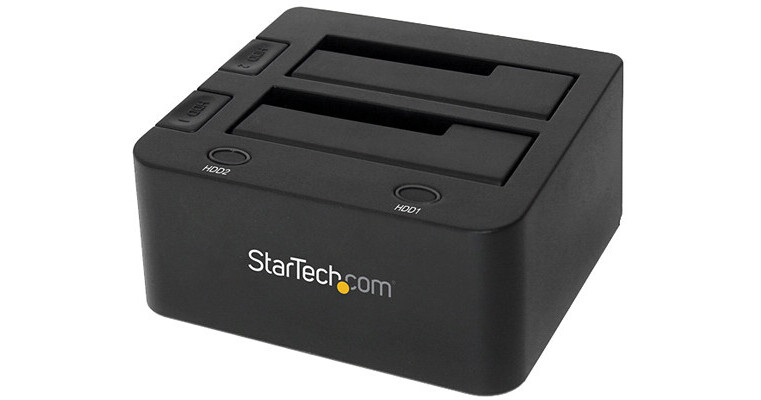
With a USB 3.0 connection, the USB 3.0 to Dual 2.5/3.5" HDD/SSD Docking Station with UASP from StarTech makes it simple to connect both 2.5" and 3.5" SATA III drives to a system running Windows, Mac, or Google Chrome OS. Once connected this drive dock supports both SATA III (6 Gbps) and UASP connectivity ensuring optimal performance. The dual bay, top slot loading design allows the drives to be easily installed and removed while the integrated slot doors protect the slots when not in use.
Ask Our Experts800-606-6969
Hello, Log InAccount & Orders
Key Features
- Holds Dual 2.5/3.5" HDDs or SSDs
- USB 3.0 Connectivity
- Backwards Compatible with USB 2.0/1.1
- Supports SATA III (6 Gbps) & UASP
With a USB 3.0 connection, the USB 3.0 to Dual 2.5/3.5" HDD/SSD Docking Station with UASP from StarTech makes it simple to connect both 2.5" and 3.5" SATA III drives to a system running Windows, Mac, or Google Chrome OS. Once connected this drive dock supports both SATA III (6 Gbps) and UASP connectivity ensuring optimal performance. The dual bay, top slot loading design allows the drives to be easily installed and removed while the integrated slot doors protect the slots when not in use.
More DetailsIn Stock
Protect Your Gear
Add a protection plan from $8.99
See Options
StarTech SDOCK2 Overview
Supports SATA III (6 Gbps) and UASP for optimal performance
Independent power buttons for each hard drive
Compatible with SATA revision I/II/III (1.5/3.0/6.0 Gbps) drives
Compatible with USB 3.0/2.0/1.1 (5 Gbps / 480 Mbps / 1.5 Mbps)
Supports both 2.5" and 3.5" form factor hard drives (HDD) and solid state drives (SSD)
Dual bay, top slot-loading design with drive doors
UPC: 065030856928
StarTech SDOCK2 Specs
General
| Number of Bays | |
| Inputs/Outputs |
Physical
| Operating Conditions | |
| Storage Conditions | |
| Material of Construction | |
| Dimensions | |
| Weight |
Packaging Info
| Package Weight | |
| Box Dimensions (LxWxH) |
StarTech SDOCK2 Reviews
Great for drives from older computers.
By Ian
Rated 5 out of 5
Date: 2026-01-18
My new drives are formatted differently than my 2008 mac pro drives and what the old operating system would recognize. So to copy all my mac Pro 2008 drives to my new computer it helped me to pull drives from the 2008 machine and play them in this player.
Wouldn't power up.
By Dan
Rated 1 out of 5
Date: 2024-10-03
Anxious to do an archival backup of data for a documentary project, the dock would not power up. StarTech is sending me a replacement and will see how I feel about it then!
See any errors on this page?
Any problems reported using Samsung 870 EVO 2TB ...
Any problems reported using Samsung 870 EVO 2TB and 4TB
SSD's? Thanks.
I have not used those specific drives, but I have used several different drives including Samsung SSD's and had no trouble.
Date published: 2022-04-14
Yes please, what is the largest drive supported?
Currently tested with up to 4TB 7200 RPM 3.5" hard drives per bay (8TB total) and 2TB 5900 RPM 2.5" hard drives (2TB total)
Date published: 2022-06-17
question
Can this device be used as a RAID-0 with two 2.5 SSD drives mounted? Mac user, v10.8
The drives cannot be raided.
Date published: 2019-01-25
What is the largest size drive that will work? I ...
What is the largest size drive that will work?
I have seen one answer for "4TB", and someone else wrote "10TB".
Has anyone successfully used anything larger?
The StarTech USB 3.0 to Dual 2.5/3.5" HDD/SSD Docking Station with UASP
BH #STSDOCK2U33 supports 2.5/3.5" SATA HDDs & SSDs of any capacity according to Startech.
Date published: 2023-06-21
Do it support cloning drives offline?
No, the StarTech USB 3.1 Dual-Bay Dock for 2.5"/3.5" SATA SSDs/HDDs
BH #STSDOCK2U313 is not a standalone duplicator. It needs to be connected to a computer if you want to be able to clone a drive.
Date published: 2022-07-13
What's the difference between tbe SDOCK2U33EB and ...
What's the difference between tbe SDOCK2U33EB and the SDOCK2U313 ?
The two units are similar in function but the BH #STSDOCK2U313 uses a faster USB protocol.
Date published: 2023-06-21
Is this Mac and PC compatible?
Yes it is Mac and PC compatible. Mac may need an adapter. And some PC might need an adapter.
Date published: 2021-01-28
hi what is the maximum drive copy size for this ...
hi what is the maximum drive copy size for this dock can it take a 8tb drive can these dock accept any drive bigger than 6tb thanks?
The StarTech USB 3.0/eSATA to Dual 2.5/3.5" HDD/SSD Docking Station with UASP
BH #STSDOCK2U33E is currently tested with up to 4TB drives according to Startech. We could not guarantee that a larger drive would work 100%.
Date published: 2020-10-01
