The black 2.5" SATA/SAS SSD/HDD to 3.5" SATA HDD Converter from StarTech provides a versatile solution for 2.5" drive installations, enabling you to install a 2.5" SATA/SAS drive in a 3.5" bay, drive drawer caddy/tray, or into a 3.5" drive enclosure. To maximize performance and utilize the full speed potential of your SATA III hard drives, this hard disk drive backplane supports SATA III for transfer speeds up to 6 Gb/s when paired with a compatible controller. This convertor is suitable for drives with a height of up to 15mm, virtually any 2.5" SATA or SAS hard drive can be made to look and function like a 3.5" hard disk drive. It is complete with standard mounting points along the sides and the bottom (including three points along the sides for compatibility with some Dell systems).
The drive converter features a trayless design for simple drive installation and removal. It is constructed of durable and lightweight plastics, with ventilation openings to aid airflow and help keep hard drives running cooler.
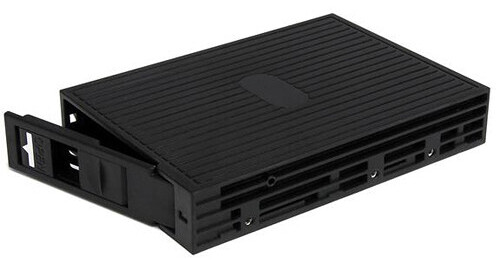
- Trayless Design
- Supports SAS and SATA Drive Type
- 1 x 2.5" Bay
- Removable Drive Installation
StarTech 25SATSAS35 Overview
StarTech 25SATSAS35 Specs
| Drive Size | |
| System Bay Size | |
| Hot-Swap Support | |
| System Connection |
| Drive Size | |
| Maximum 2.5" SATA Drive Height | |
| System Bay Size | |
| Hot-Swap Support | |
| System Connection | |
| Data I/O | |
| Power I/O | |
| Material of Construction | |
| Certifications | |
| Dimensions | |
| Weight |
| Package Weight | |
| Box Dimensions (LxWxH) |
StarTech 25SATSAS35 Reviews
Worked brilliantly until ....
... I installed Windows 10 64 bit on my PC. Nothing hot swap about it now that I can find. Under Windows 7 64 bit it was genuinely hot swap. It was the simplest thing to install and use. With Win 10 I need to power off the PC, remove the HDD installed, insert the required HDD and power on again. I can't find a solution so this is a last resort :-( . From what I've found it is a problem with Win 10 not the device. Nonetheless, with 4 HDDs ranging from 3 to 6 TB, it is a pain in the sitting apparatus it won't hot swap now. If there is a solution I'd love to know what it is.
Did not work for me
First: could not just slide in the 2.5 drive into the converter, (about 1/2 an inch stuck out the back) in the end I just removed the 8 or 9 screws placed the drive and reassembled the converter. Second: the mounting holes did match the pins on my Dell’s mount.