
Black Friday Week

AZIO KB506 Vision Backlit USB Keyboard

BH #AZKB506 • MFR #KB506
Print
AZIO KB506 Vision Backlit USB Keyboard
Key Features
  • Large-Print Keys
  • Changeable Five-Color Backlight
  • Adjustable Backlight Brightness
  • Plug and Play
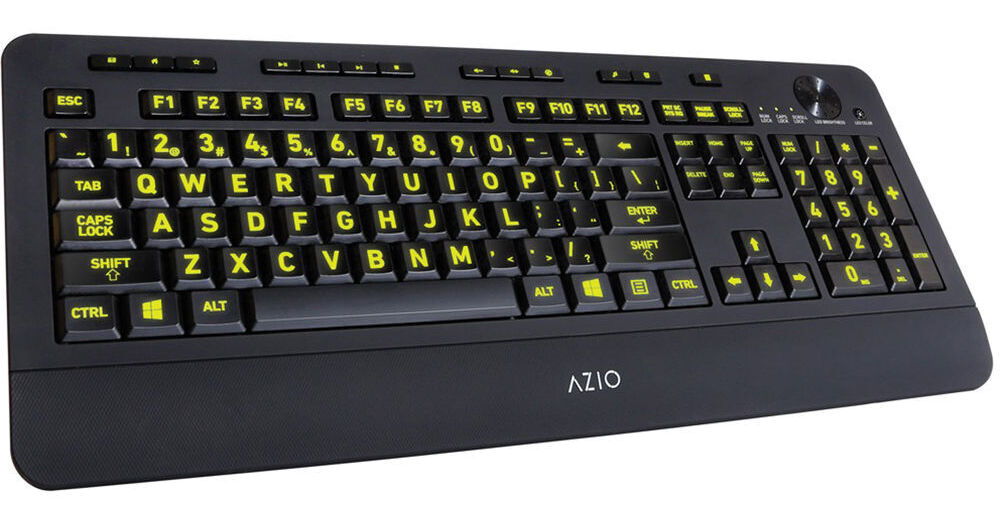
The KB506 Vision Backlit USB Keyboard from AZIO features large-print keys to reduce eyestrain and promote productivity. To further promote visibility, this keyboard features five backlight colors including red, pink, blue, cyan, and chartreuse. The backlight brightness is easily adjustable by simply turning the brightness wheel. Productivity is further simplified with dedicated Internet and multimedia hot-keys.
More Details
In Stock
No Store Display
Free Delivery: Mon, Nov 30
to
Protect Your Gear
Add a protection plan from $5.99
Ask an Expert
800-606-6969

AZIO KB506 Overview

The KB506 Vision Backlit USB Keyboard from AZIO features large-print keys to reduce eyestrain and promote productivity. To further promote visibility, this keyboard features five backlight colors including red, pink, blue, cyan, and chartreuse. The backlight brightness is easily adjustable by simply turning the brightness wheel. Productivity is further simplified with dedicated Internet and multimedia hot-keys.

Easy-to Read Keys
Large-print keys reduce eyestrain and promote productivity
Five-Color Backlight
Select between red, pink, blue, cyan, chartreuse*
Note:
The color Chartreuse sits directly in the middle of the frequencies of visible light, making it the most visible color to the human eye.
Change Backlight Color
You can change the backlight color by pressing the "LED color" button located next to the backlight brightness adjustment wheel
Adjust Backlight Brightness
Adjust the brightness of the backlight by turning the "LED brightness" wheel. To turn the backlight off, rotate the wheel counter-clockwise, until the light is off
Plug and Play
Connect the keyboard to an available USB port and the keyboard will automatically install all necessary drivers
UPC: 851104001055

AZIO KB506 Specs

Key Specs
LED Illumination
Yes: Blue, Green, Pink, Red
Wrist Rest
Integrated
Full-Functionality OS Support
Windows
Keyboard
Mechanical Switch
No
Dedicated Multimedia Keys
Yes
Built-In Control Device
No
LED Illumination
Yes: Blue, Green, Pink, Red
Wrist Rest
Integrated
Connectivity
Connection
Wired: USB-A Cable (Non-Removable)
Full-Functionality OS Support
Windows
General
Material of Construction
Plastic
Color
Black
Cable Length
5.6' / 1.7 m
Dimensions
18.3 x 7.7 x 1.1" / 465 x 196 x 28 mm
Weight
2 lb / 1 kg
Packaging Info
Package Weight
2.8 lb
Box Dimensions (LxWxH)
19.75 x 9.5 x 2.1"

AZIO KB506 Reviews

Good Keyboard

By Jak
Rated 5 out of 5
Date: 2026-07-29

The keyboard large, bold key lettering and is easy to use and see in dim light. Change color to something that works for you. The brightness is adjustable with a linear adjustment wheel (which could have been just up and down buttons). I have two keyboards and am using one now.

Easy to see the keys

By Paul
Rated 4 out of 5
Date: 2022-11-18

Makes identifying the keys when viewed from an angle much easier than other illuminated keyboards I have used. Keypresses not quite as satisfying as some mechanical keyboards, but a quality of life upgrade none the less

See any errors on this page?

question

Does it have key rollover?
Asked by: Anonymous
does it have antighosting keys?
Answered by: Carlos
Date published: 2020-07-20

How long is the wired cord?

How long is the wired cord?
Asked by: Michael
Unfortunately we do not have an exact length for the cable provided by the manufacturer. We do however have extension USB cables available, such as B&H # PEUSB3AA6.
Answered by: Calvin M
Date published: 2022-08-12

does it have antighosting keys?

does it have antighosting keys?
Asked by: Carlos
It does not have anti-ghosting keys.
Answered by: Daniel
Date published: 2020-07-20
  • y_2026, m_11, d_21, h_6CST
  • bvseo_bulk, prod_bvqa, vn_bulk_3.0.50
  • cp_1, bvpage1
  • co_hasquestionsanswers, tq_3
  • loc_en_US, sid_1075526, prod, sort_[SortEntry(order=HAS_STAFF_ANSWERS, direction=DESCENDING)]
  • clientName_bhphotovideo
Whatever You Need, We've Got It