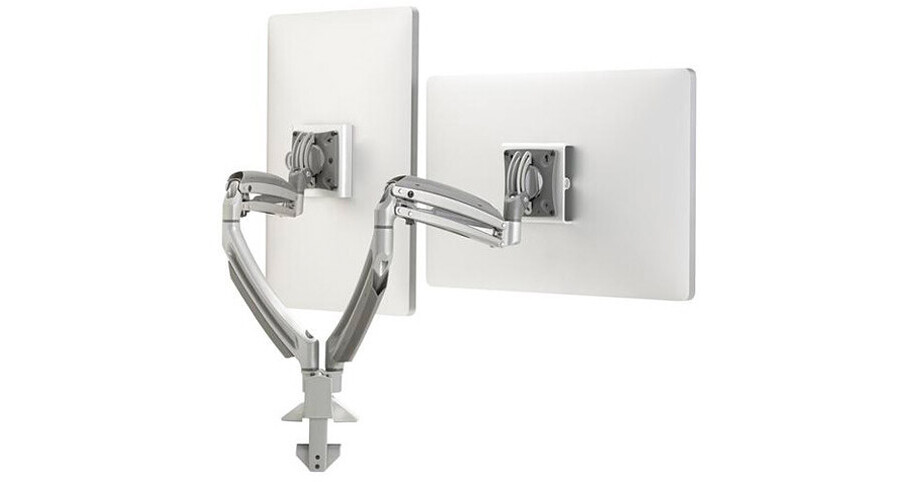
Chief K1D220SXDL Kontour K1D220S with Dell Quick-Connect Interfaces (Silver)

BH #CHK1D220SXDL • MFR #K1D220SXDL
Print
Chief K1D220SXDL Kontour K1D220S with Dell Quick-Connect Interfaces (Silver)
Monitor(s) Not Included
Key Features
  • Clamp Mount for Two Monitors
  • Forged Aluminum Arms
  • -10 to +75° Tilt
  • 13" Dynamic Height Adjustment
The silver K1D220SXDL Kontour K1D220S with Dell Quick-Connect Interfaces from Chief includes the K1D220S K1D Dynamic Desk Clamp Mount for 2 Monitors, and the KSA1250B Quick-Connect Bracket for Dell UltraSharp Series Monitors.
More Details
Special Order
Expected availability: 3-7 Business Days
No Store Display
$438.40
Free Standard Shipping
Ask an Expert
800-606-6969

Chief K1D220 Overview

The silver K1D220SXDL Kontour K1D220S with Dell Quick-Connect Interfaces from Chief includes the K1D220S K1D Dynamic Desk Clamp Mount for 2 Monitors, and the KSA1250B Quick-Connect Bracket for Dell UltraSharp Series Monitors.

The K1D220 allows you to mount two monitors. It features Chief's patented Centris Extreme Tilt technology for fingertip monitor positioning. It allows +75 to -10° of effortless tilt, for optimal viewing comfort whether sitting or standing. It also allows for 13" of dynamic height adjustment.

The KSA1250B Quick-Connect Bracket allows fast and easy installation of any Dell UltraSharp monitor onto the K1D220B. It interfaces with the click-in interface on a Dell Ultrasharp monitor for a hardware-free connection.

UPC: 841872160221

Chief K1D220 Specs

Display/Device Compatibility
Displays
• Supports 2 Simultaneously (Side-by-Side)
• Screen Sizes 10 to 32"
Load Capacity
25 lb / 11.3 kg
Mounting-Hole Pattern
75 x 75 mm / 100 x 100 mm
Mounting Compatibility
Desk Clamp: 0.5 to 2.5" / 12.7 to 63.5 mm
Adjustments
Swivel
Tilt: 85° (-10 to 75°)
Height Up to 13" / 330 mm
Depth/Extension Up to 21.67" / 55.04 cm
Orientation
Landscape, Portrait
Materials
Aluminum

Chief K1D220 Reviews

The best monitor mount I've had!

By Kathy
Rated 5 out of 5
Date: 2017-09-26

I admit that I almost passed this product by, because I could find only 1 review, but the Kontour monitor mounts was definitely worth the risk, and well worth the money. This is a very sturdy mounting system -- it has no trouble supporting my 2 Dell 24 monitors. It took me less than 15 minutes to set the mounts up -- the hardest part was figuring out how to remove the plastic wire cover. There are tension adjustment screws that control vertical, rotational and horizontal movement, and a few minutes of tweaking was all it took to stabilize my monitors. To move the monitors, all it takes is a gentle touch, but they stay put, which is not true of some mounts I've used. Even after several weeks of use, the monitors are in the exact position I originally set them in. What I love about the Kontour mount is the endless possibilities for monitor placement. Each monitor can be placed at a completely different height from the desk, distance from the keyboard, horizontal/vertical angle and the monitor can be angled down or up. Honestly, I can't imagine a monitor layout that you can't set up using this mount. I have the clamp mounted on the back of a 30 wide table top, and with this mount, I now have full use of the desktop. FYI The bottom edge of the monitor can drop as low as about 5 above the desk top, to about 17 off the table. The only negative is that there can be a little shake in the monitors if you're aggressively typing. I found that tightening the tension screws minimized the shake, as did setting the keyboard on a pad, and it's been fine since. FYI - I have a height-adjustable one with sturdy table top resting on steel legs. One final word -- the wire management is good, and the all-black arms are sleek and fairly unobtrusive.

See any errors on this page?
Whatever You Need, We've Got It