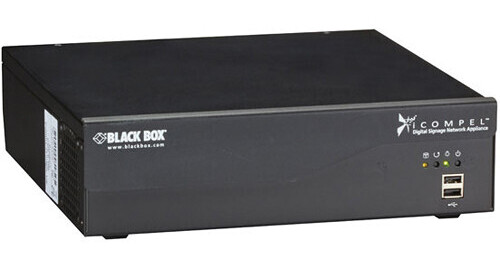
Black Box iCOMPEL Content Commander Appliance for 500 Subscribers

BH #BLICCAP500 • MFR #ICC-AP-500
Print
Black Box iCOMPEL Content Commander Appliance for 500 Subscribers
Key Features
  • Supports Up to 500 Simultaneous Users
  • Digital Content Management
  • Web-Based User Interface
  • Intel Xeon E3 Processor
Effectively manage your digital signage content with the Black Box iCOMPEL Content Commander Appliance for 500 Subscribers. This all-in-one publishing platform supports up to 500 simultaneous users and offers automatic playlists and flexible scheduling. Additionally, it features a multilingual web-based user-interface for creating, scheduling, and distributing your businesses content. As an added convenience, digital signage content can also be created locally on the player.
More Details
No Longer Available
No Store Display
Ask an Expert
800-606-6969

Black Box AP-500 Overview

Effectively manage your digital signage content with the Black Box iCOMPEL Content Commander Appliance for 500 Subscribers. This all-in-one publishing platform supports up to 500 simultaneous users and offers automatic playlists and flexible scheduling. Additionally, it features a multilingual web-based user-interface for creating, scheduling, and distributing your businesses content. As an added convenience, digital signage content can also be created locally on the player.

For processing power, the iCOMPEL Content Commander features an Intel Xeon E3 CPU. It has 16 GB of RAM for multi-tasking and 500GB of built-in storage. High-speed Internet connectivity is enabled by the device's Ethernet interface. Furthermore, this system supports Live TV, high-definition video, and external data integration. It also supports a wide variety of multimedia formats such as MPEG, JPEG, MP3, WMA, AC3, and more.

Layout Manager
This tool enables users to create unique layouts for digital media content. Layers can be closely controlled, then can overlap, they support transparency, and zones can be programmed to sync with one another through a browser based drag and drop interface.
Channel Manager
The channel manager offers enterprise-level management and scheduling of multiple channels. It incorporates workflow management to ensure that only authorized content plays on the signage network. Channels may be viewed, managed, and published from a common interface. Schedules and channel content may also be quickly accessed from this manager. The channel manager includes the facility to include a preview player in the signage network and rapidly view the content playing on any chosen channel at full resolution/frame rate. You can also schedule channel publishing during times when there are fewer demands on the network.
Create
  • Unlimited number of screen layout zones in any position, layer, and time
  • Drag-and-drop layout editor enables multiimedia layouts
  • Incorporate RSS feeds, social media updates, and live TV
  • Reuse Web assets for dynamic, informational signage
  • Variable transparency for content and layout zones
  • Independent background audio capability
Schedule
  • Deliver digital signage messages at specific times
  • Target a specific audience through scheduled playlists
  • Folder play for sub playlists of content
  • Conditional playback based on player tagging
  • Content triggering (advance to/rendezvous)
Distribute
  • Multi-user management of multiple content channels
  • Content distribution to players supports USB, wired, WiFi, 3G, or satellite connections
  • Manual and automatic publishing is supporting
  • Requires separate player for live preview
  • Up to 500 simultaneous subscribers
Local Control
  • The Web-based user interfaces make it simple to manage local (ad hoc) messages and data, such as menus and venue schedules.
  • Pre-designed, simplified and branded ad hoc user interfaces
  • Designed for the novice or occasional user, ad hoc portals are easy to use Web-browser based interfaces through which users can adage local messages
  • Instant messaging to a single player or a group of players
  • Local uploading of media for automatic playback according to pre-defined rules
Additional Features
  • Supports external data integration, inter-zone synchronization, and external TV control
  • Scales from one to thousands of player networks
  • Use the multilingual Web interface to create full screen or multizone content channels
  • Wide media support (live TV, HD video, photo, Flash, Web-HTML 5, text, RSS feeds, Twitter feeds, audio
  • Free lifetime technical support and upgrades/updates

Black Box AP-500 Specs

Processor
Intel Xeon E3
Storage
500 GB hard drive disc (HDD)
Memory
16 GB
Network Connectivity
Ethernet (1000 / 100 / 10 BASE-T)
Connectors
1 x RJ-45 Ethernet
1 x IEC320 C14 input
4 x USB 2.0 Type A female (2 on the back and 2 on the front)
2 x 3.0 Type A female
2 x USB sleep-n-Charge Type A female
1 x DVI-I female
1 x HDMI female
1 x DisplayPort female
1 x eSATA
1 x Firewire (1394a)
5 x 1/8" (3.5 mm) audio
1 x S/PDIF optical
Cooling
Fan
Media Sources
Video-Standard Definition (encoded up to 10 MB, except where indicated):
MPEG2 - MP @ ML, POPAI standard 59
MPEG2 - DVB-T, POPAI standard not supported
MPEG4 - OpenDivX, POPAI standard E7
MPEG4 - H.264 AVC, POPAI standard S11
MPEG4 - DVB-T H.264, POPAI standard not supported
Microsoft MPEG4 V1,2,3, POPAI standard not supported
WMV V9 - VC1 (also up to 20 Mb/s), POPAI standard E4
Apple QuickTime (SMC and RPZA codecs), POPAI standard not supported
Video - High-Definition (up to 1920 x 1080 resolution progressive scan):
MPEG2 - MP at HL, POPAI standards S10, S12, E6
MPEG2 - DVB-T, POPAI standard not supported
MPEG4 - OpenDivX, POPAI standard not supported
MPEG4 - H.264 AVC, POPAI standards S12, E8 (1080p not available with some configurations of H264)
MPEG4 - DVB-T H.264, POPAI standard not supported (1080p not available with some configurations of H264)
Microsoft MPEG4 V1,2,3, POPAI standard not supported
WMV 9 (VC1), POPAI standard E5 (1080p not available with some configurations of H264)
Apple QuickTime (SMC and RPZA codecs)
Animation: HTML, JavaScript and SVG (as per WebKit), POPAI Standard not supported
Animated GIF (within an HTML file), POPAI standard not supported
Flash (.SWF) v11, POPAI standard not supported
Presentation: Microsoft PowerPoint 2010 (save as WMV), POPAI standard not supported
Apple Keynote (save at MOV), POPAI standard not supported
Still Images:
TIFF, POPAI standard not supported
JPG/JPEG, POPAI standard S1
GIF, POPAI standard not supported
BMP, POPAI standard not supported
PNG, POPAI standards E1, E2, E3
Audio:
WAV, POPAI standard not supported
MP3, POPAI standard S5
WMA V1,2,3, POPAI standard not supported
AC3, POPAI standard not supported
AAC, POPAI standard not supported
Text: RSS, formatted text, European languages and Greek, Russian, Chinese, Japanese, Korean, and Arabic in OpenType and TrueType fonts, POPAI Standard not supported
Hard Disc:
All media types
Ethernet:
MPEG-TS
UDP
IP streaming (optional)
Internet:
HTML (Web pages)
RSS feeds (with multilingual support)
XML files
Supported Languages
American English, Arabic, Brazilian, French, German, Italian, Japanese, Korean, Portuguese, Russian, Simplified Chinese, Spanish, Thai, Traditional Chinese, Turkish, UK English
Supported Translations
Arabic Language Including: Algeria, Bahrain, Egypt, India, Iraq, Jordan, Kuwait, Lebanon, Libyan Arab Jamahiriya, Morocco, Oman, Qatar, Saudi Arabia, Sudan, Syrian Arab Republic, Tunisia, United Arab Emirates and Yemen
Chinese Language Including: Hong Kong, People's Republic of China, Singapore and Taiwan
Cornish Language Including: Britain
Croatian Language Including: Croatia
Czech Language Including: Czech Republic
Danish Language Including: Denmark
Dutch Language Including: Aruba, Belgium and Netherlands
English Language Including: Antigua, Barbuda, Australia, Botswana, Canada, Denmark, Hong Kong, India, Ireland, New Zealand, Nigeria, Philippines, Singapore, South Africa, United Kingdom, USA, Zambia and Zimbabwe
Finnish Language Including: Finland
French Language Including: Belgium, Canada, France, Luxemburg and Switzerland
German Language Including: Austria, Belgium, Germany, Luxemburg and Switzerland
Greek Language Including: Cyprus and Greece
Hebrew Language Including: Israel
Hungarian Language Including: Hungary
Icelandic Language Including: Iceland
Irish Language Including: Ireland
Italian Language Including: Italy and Switzerland
Japanese Language Including: Japan
Korean Language Including: Republic of Korea
Manx Language Including: Britain
Norwegian Bokmal Language Including: Norway
Norwegian Nynorsk Language Including: Norway
Polish Language Including: Poland
Portuguese Language Including: Brazil and Portugal
Russian Language Including: Russia and Ukraine
Scots Gaelic Language Including: Great Britain
Slovak
Spanish Language Including: Argentina, Bolivia, Chile, Colombia, Cost Rica, Dominican Republic, Ecuador, El Salvador, Guatemala, Honduras, Mexico, Nicaragua, Panama, Paraguay, Peru, Puerto Rico, Spain, Uruguay, USA and Venezuela
Swedish Language Including: Finland and Sweden
Thai Language Including: Thailand
Turkish Language Including: Cyprus and Turkey
Welsh Language Including: Great Britain
System Requirements
The ICOMPEL Content Commander requires iCOMPEL subscribers to play content (a preview player with similar specifications for designing and auditioning content is recommended
As a store-and-forward platform, the Content Commander does not require high network bandwidth until it scales beyond many hundreds of players. Content files are forwarded only once to subscribers.
The iCOMPEL Content Commander is compatible with most Web browsers
Power
60 W from internal power supply unit
Approvals
CE, RoHS2, UL
Dimensions
3.0 x 11.0 x 10.6" (7.6 x 27.9 x 26.9 cm)
Weight
9.7 lb (4.4 kg)

Black Box AP-500 Reviews

See any errors on this page?
Whatever You Need, We've Got It