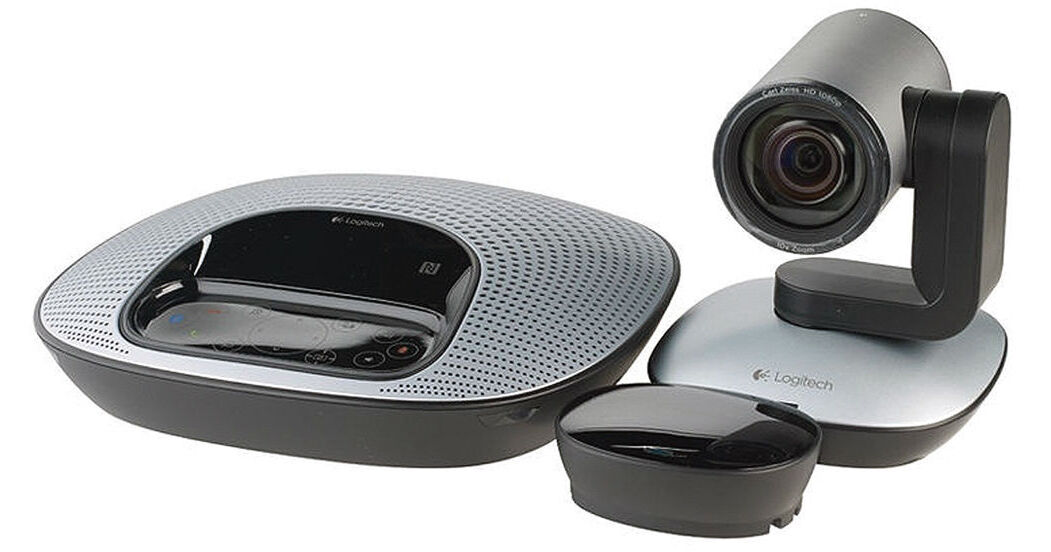
Connect to a Mac, PC, or thin client and set up a collaborative video conference for mid-size groups of 6-10 people. Featuring an advanced camera, speakerphone unit, and all necessary accompanying accessories, Logitech's ConferenceCam CC3000e from ClaryIcon is a professional-quality conferencing solution straight out of the box. It's simple to operate, requiring no special software, training, or maintenance.
Mount the included units as best suits your group setting and conduct the conference in Full HD 1080p resolution. Pan and tilt the camera, zoom in and out, and set up various other adjustments. Work out of most of the popular video conferencing platforms and integrate various additional devices. Enjoy features such as lossless zoom, echo-cancellation, NFC pairing, and more.
Full HD 1080p at 30 fps
Brings life-like video to conference calls, enabling expressions, non-verbal cues, and movements to be seen clearly.
H.264 Compression with SVC and UVC 1.5
Frees up PC bandwidth by putting video processing within the camera, adjusting dynamically to the available bit stream. The result is a smoother video stream in applications like Microsoft Lync 2013.
90° FOV with 260° Pan / 130° Tilt
The wide field of view and smooth mechanical pan and tilt controls enhance collaboration by letting everyone in the room be seen. This configuration is ideal for mid-sized group meetings.
10x Lossless Zoom
Zero in on close-ups of objects and whiteboard content with detail and clarity.
Zeiss Glass Lens with Autofocus
High-precision lens automatically focuses on people and objects to deliver sharp resolution wherever the lens is pointed.
Far-End Camera Control
Operate camera pan, tilt, and zoom functions of another Logitech ConferenceCam in the remote location. (Works with Microsoft Lync and Vidyo deployments; Lync requires plug-in download).
Full Duplex Omni Mics
Conference participants can clearly converse from a 20 ft diameter around the base. The conversations will seem like they're happening in the same room.
Acoustic Echo-Cancellation & Noise-Cancellation
Optimized to hear and be heard even in noisy environments.
Wideband Stereo/Mono Audio
True wideband audio enables people on both sides of the call to enjoy a life-like communication experience.
Touch Controls
Excellent response for call answer/end, volume, mute, and other functions without transmission of audible noise through the audio path. (Works with Microsoft Lync, Skype, Cisco Jabber, and Vidyo deployments).
LCD Caller ID and Other Info
View call-related info (caller ID, call duration, etc.), and speakerphone/camera function indicators (volume control, etc.) on the LCD screen. (Works with Microsoft Lync, Skype, Cisco Jabber, and Vidyo deployments).
Dockable Remote Control
Easily operate camera pan/tilt/zoom, volume up/down, answer/hang-up, mute, and other functions during call. Do this via the base console or with the included remote control (which can be docked on the console when not in use).
Mac / PC Compatible, Including Thin Clients
Employees can simply connect a laptop of their choice to conduct life-like meetings within their own familiar computing environment.
USB and Bluetooth with NFC Pairing
Easily connect to a Mac, PC, or thin client with no additional software required. You can also connect the ConferenceCam speakerphone to any Bluetooth device for professional audio calls. Touch an NFC-enabled mobile device over the base console to instantly pair the two and enjoy professional speakerphone audio quality.
Broad Application Compatibility
Take advantage of integrated experience with most business-grade UC platforms. The CC3000e is Cisco compatible (with Jabber and Webex), Skype certified, optimized for Microsoft Lync, and works with Vidyo.
Camera "Home" Preset
User-defined preset returns camera to preferred viewing position upon wake-up.
LED Indicators
Onboard LEDs flash to confirm video streaming and call status, and provide visual alerts.
Kensington Security Slot
The camera and speakerphone are each provisioned with Kensington Security Slots to help secure the equipment with anti-theft locks.
Multiple Mounting Options
Set up the conference room the way you want with up to a 32 ft range between the camera and speaker. Use the camera on the table or mount it on the wall with included hardware. There's a standard tripod thread on the bottom of the camera for additional mounting options.