Video Chat with a Pro Audio Expert - Live

Blue Cat Audio FreqAnalyst Pack Spectrum Analyzer Plug-In Pack

BH #BLSSMTSA • MFR #11-31227
Print
Blue Cat Audio FreqAnalyst Pack Spectrum Analyzer Plug-In Pack
Key Features
  • FreqAnalyst Multi
  • FreqAnalyst Pro
  • VST, AU, RTAS, AAX, DirectX
  • Mac & Windows
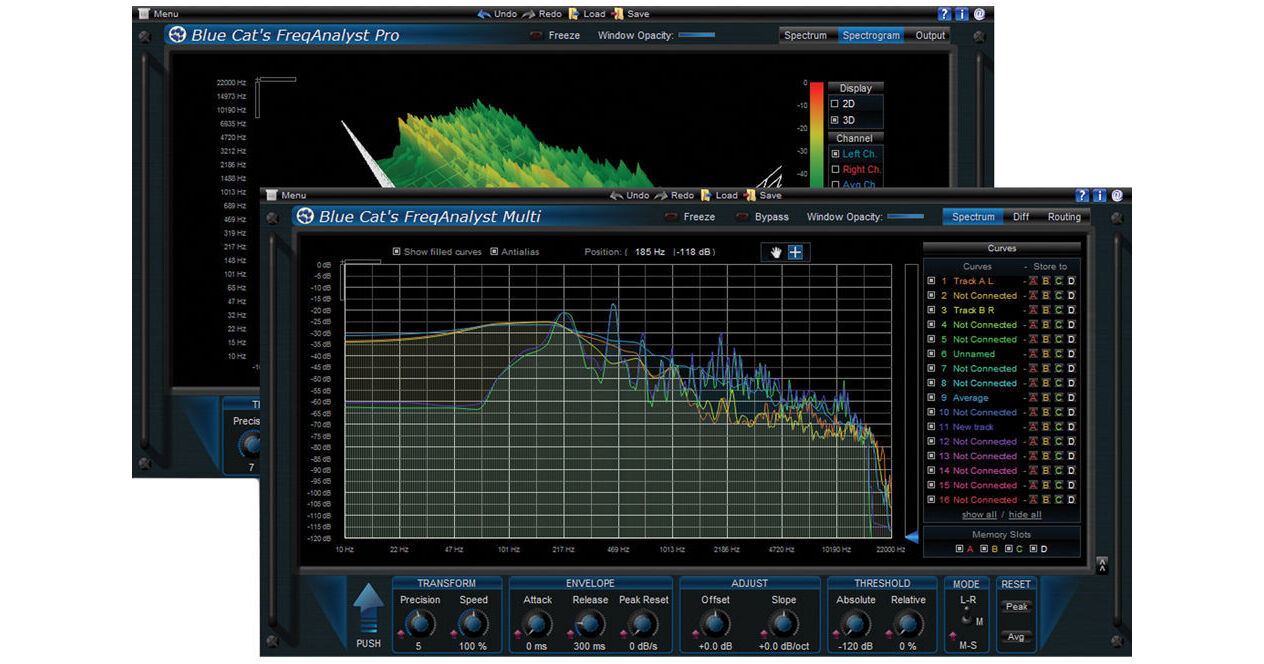
Including plug-ins for spectrum analysis of either single or multiple tracks of audio simultaneously, the FreqAnalyst Pack Spectrum Analyzer Plug-In Pack from Blue Cat Audio consists of their FreqAnalyst Multi and Pro plug-ins. They support VST, AU, RTAS, AAX, and DirectX formats on Mac and Windows.
More Details
No Longer Available
No Store Display
Ask an Expert
800-606-6969
Kit Contains:

Including plug-ins for spectrum analysis of either single or multiple tracks of audio simultaneously, the FreqAnalyst Pack Spectrum Analyzer Plug-In Pack from Blue Cat Audio consists of their FreqAnalyst Multi and Pro plug-ins. They support VST, AU, RTAS, AAX, and DirectX formats on Mac and Windows.

Blue Cat Audio FreqAnalyst Pro Spectral Analysis Tool and Automation Generator Plug-In

With performance that can be switched between multiple detail views and display modes, the FreqAnalyst Pro Spectral Analysis Tool and Automation Generator Plug-In from Blue Cat Audio provides real-time analysis with adjustable attack and release parameters. Additionally, it features output parameters that can generate MIDI CC messages for control of other effects in real time.

The plug-in 's precision and rate can be managed by applying an offset or slope to the measured spectrum, while 3 performance modes give you the choice between instant, peak, or average response, depending on your needs. The spectrogram itself can be set to 2D or 3D operation, with the later providing a waterfall mode in display. The display for all modes support zooming, allowing you to hone in on exact areas for critical analysis. The inclusion of 4 memory slots allows you to compare multiple tracks. The plug-in is available in VST, AU, RTAS, AAX, and DirectX formats on Mac and Windows.

Mono, stereo or mid/side real-time spectrum analyzer
Total control over the analysis parameters, with slope and offset correction
Smart interpolation algorithm for extreme display smoothness
Spectrum and spectrogram views
Animated zoom for all displays
Precise measurement capabilities, with note info display
3D waterfall view with full 3D control
Solid or wireframe 3D surface display
Instant, peak and average curves display for each channel
Save the curves for easy A/B comparison
Opacity control for the user interface
Custom absolute and relative threshold control
Native DSP code
Full MIDI control and automation support with silent, zipper-free parameters update, advanced response control and MIDI Learn
No CPU load on idle: when the plug-in is fed with silence, the processing smoothly shuts down, to optimize the CPU usage of your Digital Audio Workstation
Skinnable and customizable user interface with transparency management
Automation and MIDI output: record output parameters as automation curves or send MIDI CC messages to other plug-ins for powerful side chain effects
Smooth Bypass: activate/deactivate the plug-in with absolutely no noise
Undo/Redo
Import/Export presets in a host independent format
Any sample rate supported
Blue Cat Audio FreqAnalyst Multi Multiple Track Spectral Analysis Tool Plug-In

Allowing you to compare the spectral analysis of several tracks at once, the FreqAnalyst Multi Spectral Analysis Tool Plug-In from Blue Cat Audio gives you the ability to see which parts of the spectrum individual instruments in your mix use. Its Diff view allows you to compare the spectrum of several instances, which can be used for EQ matching or curve response management.

The plug-in's precision and rate can be managed by applying an offset or slope to the measured spectrum, while 3 performance modes give you the choice between instant, peak, or average response, depending on your needs. The spectrogram itself can be set to 2D or 3D operation, with the later providing a waterfall mode in display. The display for all modes support zooming, allowing you to hone in on exact areas for critical analysis. The inclusion of 4 memory slots allows you to compare multiple tracks. The plug-in is available in VST, AU, RTAS, AAX, and DirectX formats on Mac and Windows.

Mono, stereo or mid/side multiple tracks real time spectrum analyzer: visualize and compare the spectrum of several audio tracks on the same screen
Unique data sharing technology with multi-core processors support
Compute and display the difference between spectra for easy EQ matching and response curve measurement
Total control over the analysis parameters, with slope and offset correction
Smart interpolation algorithm for extreme display smoothness
Spectrum view with zooming and precise measurement capabilities as well as note info display
Multiple display sizes
Instant, peak and average curves display for each track
Choose a name for each curve for easier sharing
Save the curves for easy A/B comparison
Opacity control for the user interface
Custom absolute and relative threshold control
Native DSP code for optimal performance
Full MIDI control and automation support with silent, zipper-free parameters update, advanced response control and MIDI Learn
No CPU load on idle: when the plug-in is fed with silence, the processing smoothly shuts down, to optimize the CPU usage of your Digital Audio Workstation
Skinnable and customizable user interface with transparency management
Smooth Bypass: activate/deactivate the plug-in with absolutely no noise
Undo/Redo.
Integrated presets manager
Copy/paste the plug-in's state between instances using the system clipboard
Any sample rate supported
Kit Contains:

Blue Cat Audio FreqAnalyst Pro Spectral Analysis Tool and Automation Generator Plug-In

Delivery Format
Download
License Type
Standard: Perpetual License
User Support
1 User
Standalone Operation
No
System Compatibility/Requirements
Operating System: Windows/macOS
Plug In Formats: AAX (Native) / AU / RTAS / VST

Blue Cat Audio 11-31227 Reviews

See any errors on this page?
Whatever You Need, We've Got It