Video Chat with a Pro Video Expert - Live

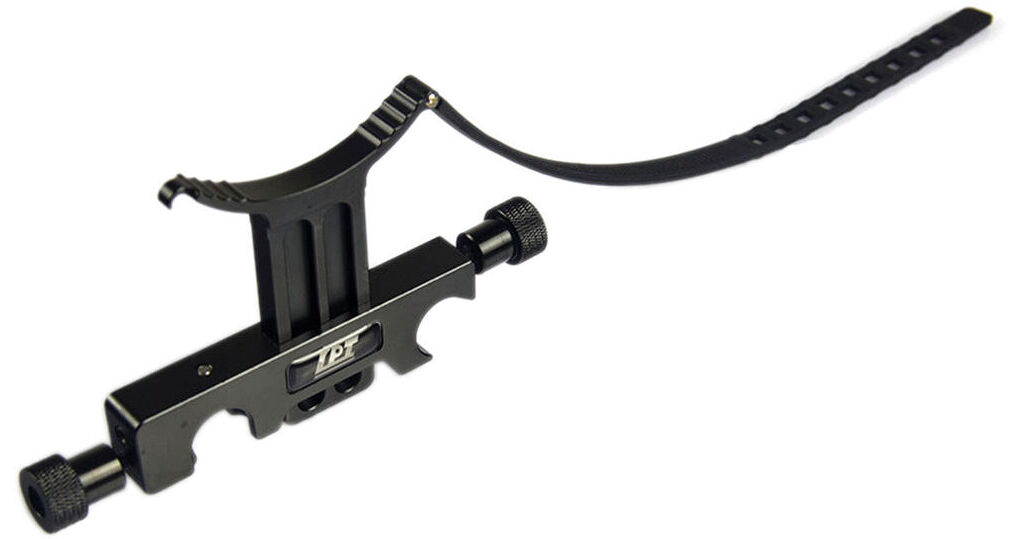
LanParte Tele-Lens Support V2

BH #LATS02 • MFR #TS-02
Print
LanParte Tele-Lens Support V2
Key Features
  • Secures to 15mm LWS Rigs
  • Height Adjustable
  • Integrated Rubber Ring Adds Stability
When using long or heavy lenses on your mirrorless camera or DSLR, extra support can be provided by the Lanparte Tele-Lens Support V2 when mounted on a 15mm LWS rig. The lens support distributes the weight of the lens along the length of the rig, reducing stress on the camera's lens mount. The support arm can be adjusted in height to conform to the supported lens's diameter while the flexible rubber ring can be adjusted to compensate for torsional force during focus pulls.
More Details
Special Order
Expected availability: 7-14 Business Days
No Store Display
This item cannot be canceled or returned.
Free Standard Shipping
Protect Your Gear
Add a protection plan from $9.99
Ask an Expert
800-606-6969

LanParte TS-02 Overview

When using long or heavy lenses on your mirrorless camera or DSLR, extra support can be provided by the Lanparte Tele-Lens Support V2 when mounted on a 15mm LWS rig. The lens support distributes the weight of the lens along the length of the rig, reducing stress on the camera's lens mount. The support arm can be adjusted in height to conform to the supported lens's diameter while the flexible rubber ring can be adjusted to compensate for torsional force during focus pulls.

15mm Quick-release clamp
Adjustable height
Fits multiple lens sizes
Flexible ring
Easy Zoom
UPC: 840534104122

LanParte TS-02 Specs

Height
Highest Position: 2.4" (6.1 cm)
Lowest Position: 0.8" (2.1 cm)
Width
2.4" (6 cm) measured from center to center of clamp sockets
Depth
0.5" (1.3 cm)
Weight
3.4 oz (95.0 g)
Packaging Info
Package Weight
0.22 lb
Box Dimensions (LxWxH)
5.8 x 3.5 x 1.15"

LanParte TS-02 Reviews

Engineered Okay.

By Hugh
Rated 4 out of 5
Date: 2023-09-16

Here's the deal: lens contact on Y bracket is slightly crooked on all three purchased. When you place the Y bracket against the lens barrel then tighten the vertical slider, the slider shifts a bit causing your lens to torque slightly left, right or straight up against the lens mount. I fixed this issue by attaching a sliver of rubber pad in the center portion of the Y bracket then only using the very lightest of pressure to make the Y bracket come into contact with the lens barrel. Then I tighten the vertical slider slowly while watching the lens barrel carefully to make sure it doesn't torque. If you don't mind going through these steps each and every time you change lenses, this product is a good solution. Way overpriced for what you get but I still purchased three.

Better options are plentiful...

By Alexander
Rated 2 out of 5
Date: 2016-12-05

Junk. Rubber strap isn't big enough for large lenses (had to really stretch it over Sony FE 28-135 F4 PZ) and there is no lateral adjustment. The whole kit feels flimsy and just not a precise piece of equipment. Back it went.

See any errors on this page?

How is the vertical support piece secured after ...

How is the vertical support piece secured after it is adjusted to the correct height for the lens?
Asked by: John
The LanParte Tele-Lens Support V2 has a side knob to adjust, and lock the height of the support bracket.
Answered by: Chris H
Date published: 2023-09-19

question

whats the biggest diameter lens this can hold?
Asked by: Julian V.
This can hold up to 95mm diameter. But it is all about which part of the lens you mount it to.
Answered by: Cheng Huei L. Lanparte Expert
Date published: 2018-08-25

question

Does this clump fit Tilta Sony a7s Rig B&H # TIEST17A MFR # ES-T17-A or Movcam Cage Kit for a7s B&H # MO3032400 MFR # MOV-303-2400?
Asked by: G M.
Yes, any 15mm LWS system will work!
Answered by: Cheng Huei L. Lanparte Expert
Date published: 2018-08-25
  • y_2026, m_7, d_10, h_8CST
  • bvseo_bulk, prod_bvqa, vn_bulk_3.0.47
  • cp_1, bvpage1
  • co_hasquestionsanswers, tq_3
  • loc_en_US, sid_1100189, prod, sort_[SortEntry(order=HAS_STAFF_ANSWERS, direction=DESCENDING)]
  • clientName_bhphotovideo
Whatever You Need, We've Got It