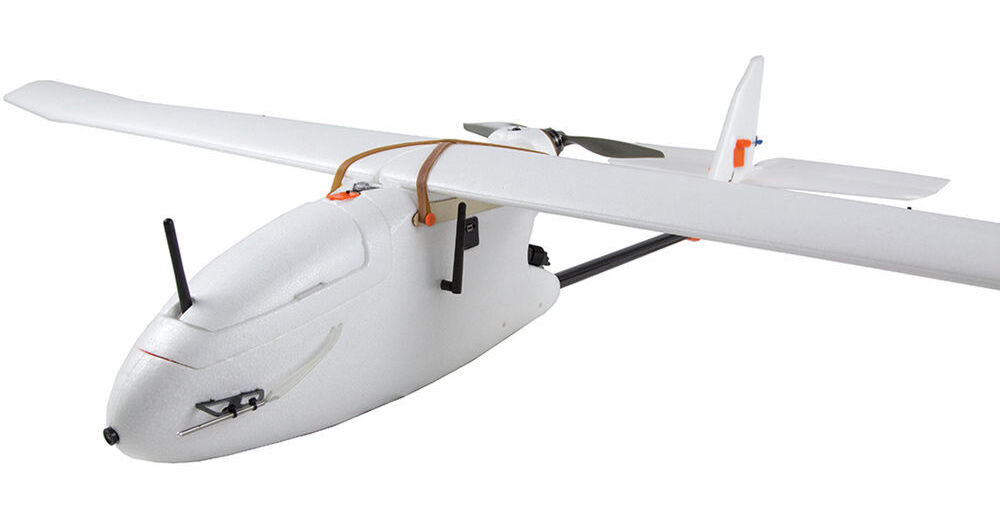
Create high resolution visual-spectrum aerial maps with the Aero-M Drone from 3D Robotics. This semi-autonomous airplane features a Canon PowerShot S100 running customer software that is able to capture ground images with a resolution of 2" per pixel. With a flight time of up to 40 minutes, the Aero-M is able to photograph an area of up to 250 acres per flight. The system comes ready-to-fly, meaning a Spektrum DX7s transmitter (radio controller), two flight batteries(LiPo charger available separately), and a custom-fitted case are all included.
So that you can compile the photos and manage associated data, Pix4Dmapper LT 3DR software for Windows comes included. The software will create georeferenced and orthorectified mosaics from the images, and can export the result - as well and geometric data - in a variety of formats. Industries that can benefit from this system include farming, construction, and conservation, as well as search and rescue and emergency response.
Note: This version of the Aero-M features a 433 MHz telemetry radio for use in Europe. Aircraft used in the U.S. will require the 915 MHz radio instead. Users from other regions should consult local regulations to ensure compliance before purchasing.
- A 32-bit ARM Cortex M4 processor running NuttX RTOS
- 14 PWM/servo outputs; 8 with failsafe and manual override, 6 auxiliary, high-power compatible
- Abundant connectivity options for additional peripherals (UART, I2C, CAN)
- Integrated backup system for in-flight recovery and manual override with dedicated processor and stand-alone power supply
- Backup system integrates mixing, providing consistent autopilot and manual override mixing modes
- Redundant power supply inputs and automatic failover
- External safety button for easy motor activation
- Multicolor LED indicator
- Multi-tone piezo audio indicator
- A 20-model memory - if you will use it to control other aircraft
- Built-in telemetry receiver and 126 x 64 resolution display screen
- 3-position flaps with delay and elevator compensation
- Dual rates and expo
- Differential
- 5-point throttle, pitch, and tail curves
- Control position warnings
- Audio and vibration alarm settings
- Language selection: English, Italian, French, Spanish, or German
- 4.8V, 2000mAh NiMH battery included
- LiPo battery compatibility
- 3DR imagery support: Process images taken by original 3DR Mapping Platforms
- Ground Control Point edit or import (.csv, .txt): Import and edit Ground Control Points to improve the accuracy of your project
- Local, global, and arbitrary coordinate reference system support in meter and feet. Choose from all known coordinate systems or your own local system
- Camera position and exterior orientation (omega, phi, kappa) support: Calculate optimized camera position and exterior orientation from a low grade GPS and without any IMU
- Rapid Check processing mode: Process initial project results in low-resolution in minutes only
- Rapid Check Quality report: Assess quality and completeness of acquired images while still on site
- Camera self-calibration: Optimize internal camera parameters, such as focal length, principal points, and lens distortions, without the need of a camera calibration report
- Automatic Aerial Triangulation (AAT) and Bundle Block Adjustment (BBA): Process automatically with or without known camera position and exterior orientation
- Quality report: Assess quality of projects
- Project merging: Process parts of projects individually and merge them into one project
- Project area definition: Import (.shp) or draw specific orthomosaic and point cloud densification/filtering areas to generate results inside specific boundaries
- Project viewing: Assess flight plan, camera positions, inspect automatic keypoint matching, and add uncalibrated cameras
- Manual tie point editing: Annotate and edit GCPs (2D and 3D), Check Points, and Manual Tie Points with maximum accuracy, using both original images and 3D information at the same time
- Project reoptimization: Reoptimize camera positions and rematch images based on GCPs and manual tie points to improve reconstruction of difficult areas
- Fly-through animation: Create a virtual camera trajectory in the 3D point cloud, play the animation in real-time, export the animation as a video (in mp4 and avi format) and the flightpath waypoints in CSV format
- Geo-referenced orthomosaics in GeoTIFF output format
- Google tiles export in KML and HTML output format
- Mapbox tiles in MB format
Fly-through animations and flightpaths: Point cloud Fly-through animation in MP4 and AVI format