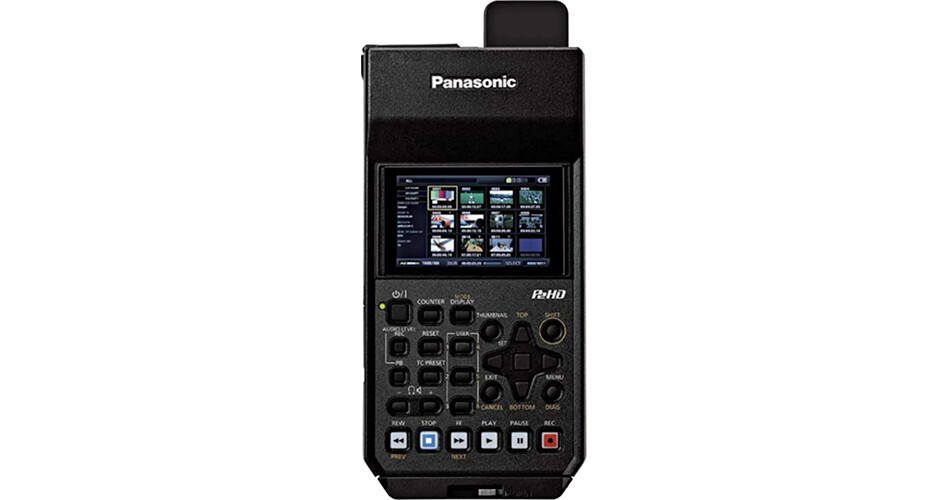
The Panasonic AJ-PG50 Portable P2 Memory Card Recorder is a compact, lightweight field recorder and deck that supports the AVC-ULTRA family of codecs. It records up to 1080p 59.94/50 video to microP2 and P2 memory cards, and features HDMI, 3G-SDI, and analog inputs/outputs for connecting to a wide range of video and audio devices. This makes the AJ-PG50 an ideal solution for backup recording, monitoring, previewing, file copying, and many other critical field uses. Video can be monitored and played back on a built-in 3.5" LCD screen, which is equipped with waveform and vectorscope display functions. For use in the field, the recorder can be powered using an included 5800mAh battery pack, which provides approximately 180 minutes of continuous playback time.
With the AVC-Ultra codec family, you can select the image quality and bit-rate to match the application at hand. Select AVC-Intra for optimum quality, AVC-LongG for high-quality at lower bit-rates, or even DVCPRO codecs for fitting into existing workflows. You can also simultaneously record AVC-Proxy files along with your higher quality files, for low bit-rate proxies and easier web upload, or efficient offline editing.
The AJ-PG50 has a high-speed USB 3.0 (Host) interface for transferring and backing up files to an external storage device and previewing externally stored files. The recorder also provides a standard RJ-45 Ethernet port for wired connection to a LAN for remote control and transferring files to a network. An optional Wi-Fi module is available for wirelessly connecting to a computer, tablet, or smartphone.
AVC-Intra: Intra-frame compression at either 100 or 50 Mbps.
AVC-LongG: Uses inter-frame compression to achieve high-quality HD recording at a low bit rate. Three bit rates are available: 50, 25, and 12 Mbps.
AVC-Proxy: Low bit-rate, high-sound quality proxy video (QuickTime/H.264) can be recorded simultaneously with main video. Ideal for data transfer over a network and efficient offline editing.
In addition to AVC-ULTRA, the AJ-PG50 also supports DVCPRO HD, DVCPRO50, DVCPRO, and DV recording formats.
Dual Codec Rec: Records the main video data with an AVC-Intra or AVC-LongG codec, while simultaneously recording proxy video data at a low bit-rate.
Hot-Swap Rec: The two microP2 card slots enable uninterrupted recording, and also allows switching of the active card slot and changing of card while recording.
Auto Rec: Automatically starts recording according to the SDI/HDMI video signal input.
Loop Rec: Maintains a recording of a certain time period through repeated loop recording; records over older images once memory card becomes full.
Text Memo: Up to 100 memos can be posted onto a clip as bookmarks.
Shot Marker: Used to mark clips as OK, Not Good, etc.
CC Rec:Records the closed caption signal via the SD-SDI input.
Metadata: Data with information such as operator's name, shooting location, and text memos can be added via an SD memory card.
Image Full-Screen Display: Allows use as a recording or preview monitor/
Waveform/Vectorscope: Waveform and vectorscope can be displayed for the playback or input video signal on the LCD monitor. It can also display on HDMI output and SDI output.
4:3 Marker: A 4:3 marker can be displayed on the 16:9 LCD screen.
Repeat Playback: Plays back selected clip or clips repeatedly.
Down-conversion: Down-converts HD to SD and outputs SD signal. There are three aspect ratio conversion modes (FIT-V, FIT-H, FIT-HV) to choose from.
USB 2.0 (Device): Device mode allows you to use the recorder as a P2 card drive for a computer.
Playback: P2 .mxf files on an external storage can be displayed as thumbnails and played back. The audio playback is uninterrupted by slow hard disk performance, or when vibration temporarily delays data reading.
Proxy Preview: Plays back proxy AVC-Proxy files, downloads file/clip information, displays and allows editing of metadata, and enables addition/deletion of shot marks and text memos.
Remote: Allows remote control of recording start/stop, time code setting, and bit-rate setting.
File Transfer: The FTP client function lets you transfer clips from the recorder to a network.
Playlist Editing: Playlists can be created using proxy video with a computer or tablet. The workflow can be streamlined and faster by rough editing location, and then transferring the content files. Editing, saving, playback, and SDI output of a playlist as well as EditCopy can be performed using the web app. (Note: EditCopy does not support AVC-LongG)
- AVC-Intra and AVC-LongG codecs support 24-bit/48 kHz 4-channel digital audio recording
- 6 user-assignable function buttons; user file containing the settings can be saved onto an SD/SDHC/SDXC card
- Compact and lightweight design
- Weighs only 2.4 lb