
Video Chat with a Pro Video Expert - Live

Lilliput 5D-ii/O/P 7" HDMI LCD Field Monitor

BH #LI5DIIOP • MFR #5D-II/O/P
Print
Lilliput 5D-ii/O/P 7" HDMI LCD Field Monitor
Key Features
  • 7" 1024 x 600 HDMI Monitor
  • False Color / Zebra / Histogram
  • 250 cd/m² / 800:1 Contrast Ratio
  • 130° L / R Viewing Angle
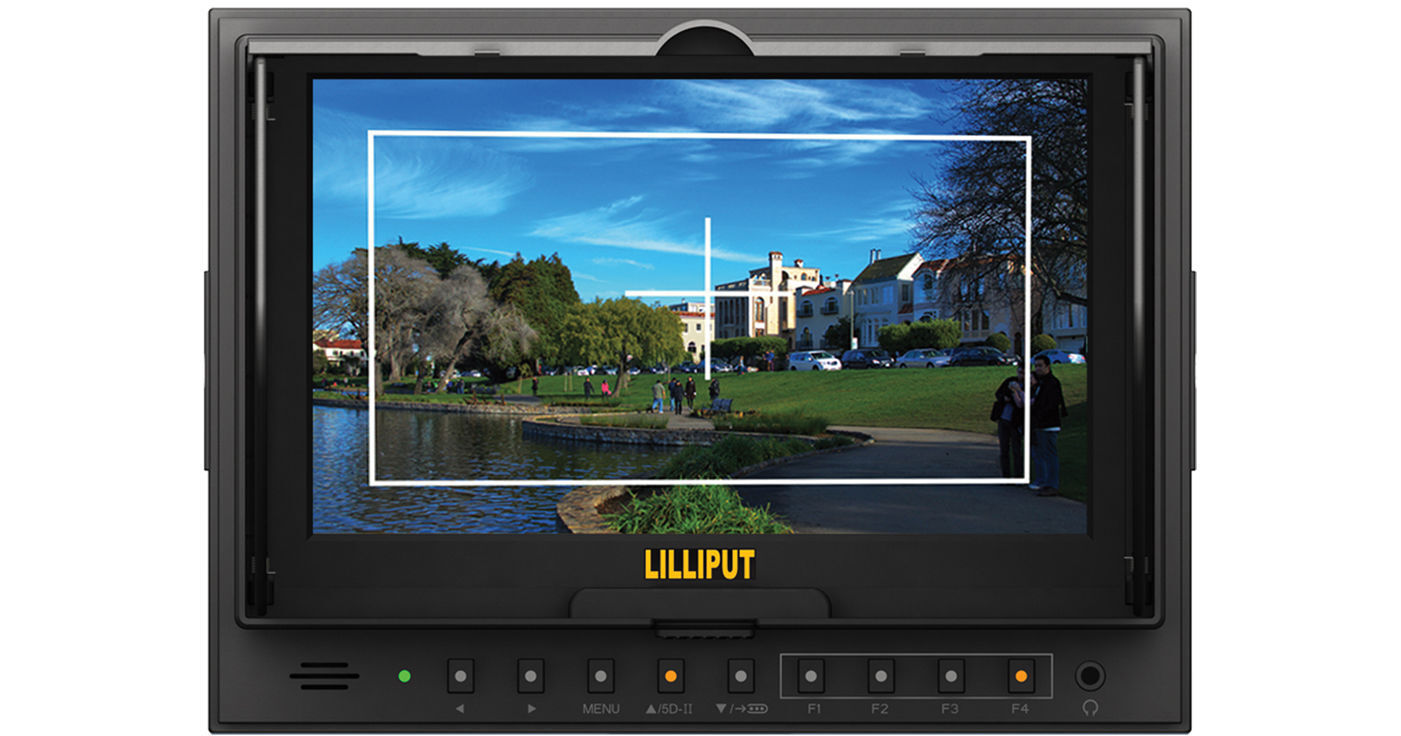
The 5D-ii/O/P 7" HDMI LCD Field Monitor from Lilliput is suitable for use with DSLR cameras and can be easily stored in a camera bag. It supports video with resolution up to 1920 x 1080 and features a native resolution of 1024 x 600, scaling your input video to fit. The 800:1 contrast ratio and 250 cd/m² brightness provide a sharp, clear display.
More Details
Special Order
Expected availability: 7-14 Business Days
No Store Display
This item cannot be canceled or returned.
Free Standard Shipping
Protect Your Gear
Add a protection plan from $36.99
Ask an Expert
800-606-6969

Lilliput 5D-II/O/P Overview

The 5D-ii/O/P 7" HDMI LCD Field Monitor from Lilliput is suitable for use with DSLR cameras and can be easily stored in a camera bag. It supports video with resolution up to 1920 x 1080 and features a native resolution of 1024 x 600, scaling your input video to fit. The 800:1 contrast ratio and 250 cd/m² brightness provide a sharp, clear display.

The monitor is equipped with 1:1 pixel mapping, peaking, and a foldable sun-hood/screen protector. It features an HDMI output, allowing you to feed a second monitor without requiring a splitter, thus reducing the amount of cable clutter on your camera. Four assignable front panel buttons allow you to rapidly recall often used menu functions. The monitor comes with Canon LP-E6 and Sony F970 battery plates.

7" LCD monitor fit for DSLR use
Easily stored in a camera bag
1:1 pixel mapping allows you to maintain the original resolution of your camera's output and avoid any unexpected focus issues in post-production
Focusing is easier with the peaking functionality
Screen protector folds out to become a sun hood, providing protection for the LCD and eliminating the need to buy a separate sun hood
HDMI output feature allows duplication of the video content onto a second monitor without the need of any HDMI splitters
LED-backlit display panels deliver higher levels of detail and image accuracy
800:1 contrast ratio produces colors that are vivid, rich, and accurate
With 150° viewing angle, you can get the same vivid picture from wherever you are standing

Lilliput 5D-II/O/P Specs

Key Specs
Display Size
7.0" / 17.8 cm
Native Resolution
1024 x 600
Touchscreen
No
HDR Support
No
Media/Memory Card Slot
No
Wireless
No
Video Format
HDMI
1080p
Battery
1x L-Series or LP-E6 Mount on Included, Interchangeable Plates
Power Consumption
10 W (Maximum)
Display
Panel Type
LCD
Display Size
7.0" / 17.8 cm
Native Resolution
1024 x 600
Aspect Ratio
16:9
Viewing Angle
Horizontal: 150°
Vertical: 130°
Touchscreen
No
Maximum Brightness
250 nits / cd/m2
Contrast Ratio
800:1
HDR Support
No
LUT Support
No
Image Controls
Focus Peaking, Pixel-to-Pixel Zoom
Inputs/Outputs
Video I/O
1x HDMI Input
1x HDMI Input
Audio I/O
No
Built-In Speaker
No
Power I/O
1x Barrel (12 VDC) Input
Other I/O
1x Mini-USB (Firmware)
Media/Memory Card Slot
No
Wireless
Wireless
No
Wi-Fi
No
Bluetooth
No
Mobile App Compatible
No
Format Support
Video Format
HDMI
1080p
Power
Input Power
12 VDC
Battery
1x L-Series or LP-E6 Mount on Included, Interchangeable Plates
Power Consumption
10 W (Maximum)
Mounting
VESA Mounting-Hole Pattern
75 x 75 mm
Tripod/Accessory Mounting
Bottom
1/4"-20 Female
General
Environmental Resistance
No
Dimensions
7.7 x 5.7 x 1.2" / 196.5 x 145 x 31 mm
Weight
14.1 oz / 400.00 g
Packaging Info
Package Weight
2.945 lb
Box Dimensions (LxWxH)
9.05 x 6.7 x 4.15"

Lilliput 5D-II/O/P Reviews

Great Monitor at a great price

By Darius
Rated 5 out of 5
Date: 2020-08-06

If your looking for a simple monitor to use for your camera, I highly recommend this one. Great for beginners who just want extra screen space to view what is going on in front of the camera without relying on the viewfinder that comes with the camera. Easy to setup and program and makes you look like a pro when using it. I use mine when recording Masses at church so I can see how my shot looks or need to make a concise adjustment such calibrating focus etc. It be nice if came with a battery but no biggie. Those are simple to find.

Great Monitor with Lots of Useful Features

By K.G.
Rated 5 out of 5
Date: 2016-02-17

I have a couple of these monitors on my studio rigs. The focus peaking and false color being on easy to use buttons right on the front make this ideal for scenarios where speed is paramount. The hood is useful and doubles as a screen protector of sorts when stored. The only (slight) downside would be the battery life on LP-E6s. Overall excellent monitor.

See any errors on this page?

question

How can a monitor have a maximum resolution of 1920x1080 when the native is 1024x600?
Asked by: Kim W.
This means is that you can feed it a 1920 x 1080 image and the monitor will scale it to the native 1024 x 600 so you will be able to see a picture.
Answered by: Dennis A L.
Date published: 2018-08-26

question

Is there any degradation in the output signal...in either quality or resolution?
Asked by: Justin
Since this is digital video, the quality and resolution are the same in or out.
Answered by: Dennis A L.
Date published: 2018-08-26

question

I shoot with GH4 what happens when you shoot 4K will this produce an image?
Asked by: Albert M.
You would set the GH4's HDMI output to HD and you would get an HD image, not 4K, on this monitor.
Answered by: Dennis A L.
Date published: 2018-08-26

question

Will the output image show all the camera overlays, (timecode, record, settings etc.) or is it a clean picture that can be sent to a tv for remote viewing?
Asked by: Jerry
We could not find any information saying the OSD could be on one and not the other. Therefore, it is our opinion that with this monitor, what in seen on the first one will be the same on the second screen.
Answered by: Dennis A L.
Date published: 2018-08-26

question

Hi tehre, I am wondering if I can mount this monitor without any additional pieces of equipment to my DJI Ronin M, which has already a DJI Ronin-M Monitor Accessory Mount installed? Or do I need anything additional so I can mount it to my DJI Ronin M?Thanks for letting me know!
Asked by: Timothy R.
The DJI Monitor/Accessory Mount for Ronin-M had no way to attach the LILLIPUT 5D-ii/O/P 7 so you will need some sort of adapter. To keep it compact and simple you probably would like the Vello Multi-Function Ball Head. Please see below.
Answered by: Dennis A L.
Date published: 2018-08-26

question

Sir this product what are items giving with this monitor?
Asked by: Srinivaslu V.
This monitor comes with plates for both Canon LP-E6 and Sony L style batteries. It also comes with a shoe mount so you can attach it directly to your camera. It does not come with batteries though, so we recommend either an LP-E6 or NP-F970 to go along with it.
Answered by: Joseph P.
Date published: 2018-08-26

Does this Lilliput 5D-II have an on/off button to ...

Does this Lilliput 5D-II have an on/off button to conserve battery power?
Asked by: Mark
There is a button on the back to select using battery or 12V
Answered by: Joanna
Date published: 2023-07-31

question

Can this monitor be hung upside down for use?
Asked by: Mark H.
This monitor has screw mountson the bottom, left and right sides of the frame. In the menu, you can flip the image upside down. So, as long as you are cool with the 3 mounts, you can flip the image upside down. So I would say yes. Buy it now from B&H! Do it. Do it.
Answered by: Chris V.
Date published: 2018-08-26
  • y_2026, m_7, d_21, h_8CST
  • bvseo_bulk, prod_bvqa, vn_bulk_3.0.48
  • cp_1, bvpage1
  • co_hasquestionsanswers, tq_10
  • loc_en_US, sid_1124183, prod, sort_[SortEntry(order=HAS_STAFF_ANSWERS, direction=DESCENDING)]
  • clientName_bhphotovideo
Whatever You Need, We've Got It