Video Chat with a Pro Video Expert - Live

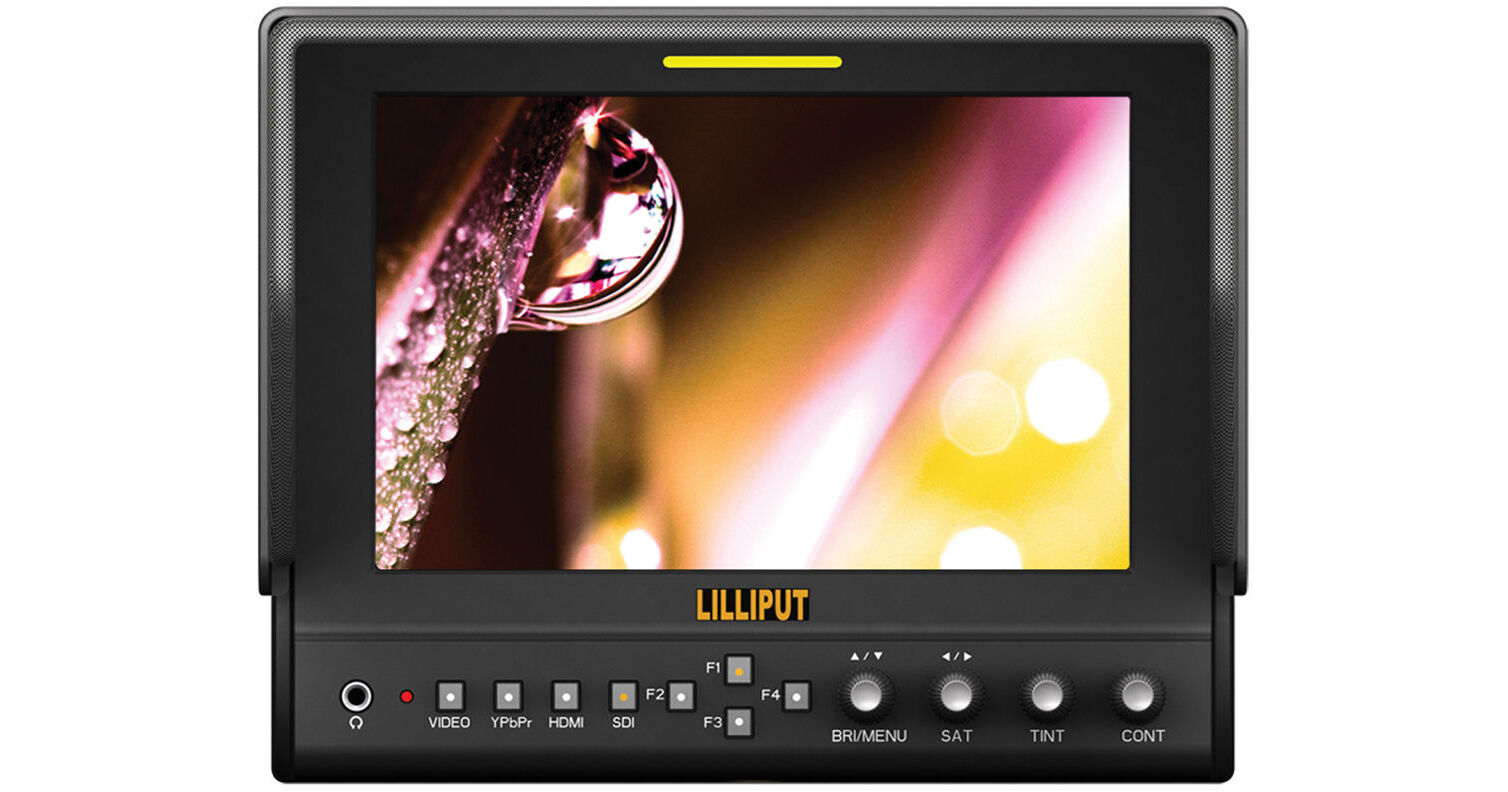
Lilliput 663/S2 7" LCD On-Camera 3G-SDI / HDMI Monitor

BH #LI663S2 • MFR #663/S2
Print
Lilliput 663/S2 7" LCD On-Camera 3G-SDI / HDMI Monitor
Key Features
  • 7" 1280 x 800 IPS LCD Display
  • 800:1 Contrast Ratio
  • HDMI, Component, SDI, Composite Inputs
  • HDMI Loop Output
Lilliput's 663/S2 7" LCD On-Camera 3G-SDI / HDMI Monitor is an on-camera monitor offering 1280 x 800 resolution with 400 nit brightness and an 800:1 contrast ratio. The monitor allows you to analyze focus, exposure, and other characteristics with False Color, Pixel-to-Pixel, and Histogram. It supports both NTSC and PAL compatible signals with HDMI, 3G-SDI, Component, and Composite inputs. This monitor also features an HDMI output, allowing you to feed the monitor and send the video signal along an HDMI infrastructure. It also features both a built-in speaker and headphone jack.
More Details
In Stock
No Store Display
Free Expedited Shipping
Protect Your Gear
Add a protection plan from $59.99
Ask an Expert
800-606-6969

Lilliput 663 Overview

Lilliput's 663/S2 7" LCD On-Camera 3G-SDI / HDMI Monitor is an on-camera monitor offering 1280 x 800 resolution with 400 nit brightness and an 800:1 contrast ratio. The monitor allows you to analyze focus, exposure, and other characteristics with False Color, Pixel-to-Pixel, and Histogram. It supports both NTSC and PAL compatible signals with HDMI, 3G-SDI, Component, and Composite inputs. This monitor also features an HDMI output, allowing you to feed the monitor and send the video signal along an HDMI infrastructure. It also features both a built-in speaker and headphone jack.

The four front panel buttons and four rotating knobs can be assigned to specific functions that allow you to call up often-used menu functions. You can power the monitor by using the included battery plates or the 4-pin XLR connector. The included 4-pin XLR power cable features a barrel connector and three pigtail cables for connecting to a tally system. The monitor features a tally indicator on the front of the monitor. An assortment of supplied accessories includes a Sony L-type and Canon LP-E6-type battery plates. The monitor incorporates a 1/4"-20 threaded mounting hole on the bottom and on each side, and the included sun hood attaches via hook and loop fastener to a removable sun hood attachment frame. A V-mount and Gold mount plate adapter allows you to mount optional V-mount or Gold mount battery plates.

Assignable Function Buttons & Knobs
The front panel buttons and knobs can be customized to call up often-used menu functions.
F1 to F4 Buttons:
  • Center Marker
  • Check Field
  • Color Bar
  • Camera (format selection)
  • PIP
  • Flip
  • Zoom
  • Pixel-to-Pixel
  • Freeze
  • Input
  • Underscan
  • H/V Delay
  • Peaking
  • False Color
  • Exposure
  • Histogram

R1 to R4 Knobs
  • Contrast
  • Brightness
  • Saturation
  • Tint
  • Volume
  • Sharpness
  • Back Light
Monitoring Features
  • Histogram
  • 1:1 Pixel-to-Pixel
  • Picture-in-Picture (for when the HDMI and Composite inputs are used simultaneously)
  • H/V Delay
  • Underscan
  • Center Marker
  • Zoom (up to 8x)
  • False Color
  • Peaking
  • Color Bar
  • Image Flip
  • Freeze Input
  • Adjustable color temperature
Peaking
Peaking highlights the sharpest (most in focus) areas of the image with a color outline. The monitor features two modes, monochrome, and color. The monochrome mode shows the image in black and white with the red peaking outline, and the color peaking mode shows the image in color with a red peaking outline.
False Color
The False Color feature provides under/over luminance warning by presenting the image as a series of color values representing exposure.
Waveform
The waveform provides an objective evaluation of your video signal. It displays the brightness of your image on an IRE scale, allowing you to see if your image will clip, and where your black levels are.
Histogram
The Histogram provides a graphic depiction of how many pixels in your image are at each level between black and white. This provides you exposure information so you can objectively judge how much of your image is clipping, falling into the shadows, or being captured faithfully.
Vectorscope
The vectorscope displays the signal on a graph so you can check the phase of your colors. The vectorscope function also verifies and checks the overall tint and hue of an image.
1:1 Pixel Mode
1:1 pixel-to-pixel mapping allows you to look at parts of your image without any scaling, so you can see the actual detail and not be fooled by scaling artifacts.
H/V Delay
This mode allows you to see the video signal outside the active picture area. Settings include Off, H/V Delay, H Delay, and V Delay.
Underscan/Overscan
Allows you to display an image with lower resolution than the screen with either a black border around the image or fill the screen entirely.

Lilliput 663 Specs

Key Specs
Display Size
7.0" / 17.8 cm
Native Resolution
1280 x 800
Touchscreen
No
HDR Support
No
Media/Memory Card Slot
No
Wireless
No
Video Format
SDI
1080p: 60/59.94/50/30/29.97/25/24/23.98
1080PsF: 24
1080i: 60/59.94/50
720p: 60/59.94/50/30/25
480i
576i
Battery
Interchangeable Mount (No Plate Included)
Power Consumption
11 W (Maximum)
Display
Panel Type
IPS-Type LCD
Display Size
7.0" / 17.8 cm
Native Resolution
1280 x 800
Aspect Ratio
16:10
Viewing Angle
Horizontal: 178° (89/89)
Vertical: 178° (89/89)
Touchscreen
No
Maximum Brightness
400 nits / cd/m2
Contrast Ratio
800:1
HDR Support
No
LUT Support
No
Image Controls
False Color, Focus Peaking, H/V Delay, Histogram, Image Flip, Marker Color, Picture-in-Picture, Pixel-to-Pixel Zoom, Screen Markers, Underscan, Waveform
Inputs/Outputs
Video I/O
1x BNC (3G-SDI) Output
1x HDMI Output
1x 3BNC (Component) Output
1x BNC (3G-SDI) Input
1x 3BNC (Component) Input
1x BNC (Composite) Input
1x HDMI Input
Audio I/O
No
Built-In Speaker
Mono
Power I/O
1x Barrel Input
1x XLR 4-Pin Input
Other I/O
No
Media/Memory Card Slot
No
Wireless
Wireless
No
Wi-Fi
No
Bluetooth
No
Mobile App Compatible
No
Format Support
Video Format
SDI
1080p: 60/59.94/50/30/29.97/25/24/23.98
1080PsF: 24
1080i: 60/59.94/50
720p: 60/59.94/50/30/25
480i
576i
Power
Input Power
7 to 24 VDC
Battery
Interchangeable Mount (No Plate Included)
Power Consumption
11 W (Maximum)
Mounting
Tripod/Accessory Mounting
1/4"-20 Female
General
Environmental Resistance
No
Operating Conditions
-4 to 140°F / -20 to 60°C
Storage Conditions
-22 to 158°F / -30 to 70°C
Material of Construction
Metal
Dimensions
7.5 x 6 x 1.2" / 191.5 x 152 x 31 mm
7.5 x 6 x 5.6" / 191.5 x 152 x 141 mm (Including Sun Hood)
Weight
1.7 lb / 0.8 kg
2.1 lb / 1.0 kg, Including Sun Hood
4.8 lb / 2.2 kg, Including Case
Packaging Info
Package Weight
6.336 lb
Box Dimensions (LxWxH)
12.8 x 11.4 x 4.7"

Lilliput 663 Reviews

Great price -- Great product

By Don
Rated 5 out of 5
Date: 2020-08-10

Our tech person at church needed a waveform monitor. He suggested some in the $700 - 1000 range. When I found this one, I checked with him and he said it might work. He was able to use this monitor to test and recommend setting changes for our 5 cameras. Using this monitor's testing ability allowed us to greatly improve our webcast

Decent but dim

By Richard
Rated 3 out of 5
Date: 2017-09-04

Decent for the price but the screen is lacking in brightness. You'll be struggling to really see comfortably when shooting during the day.

See any errors on this page?

question

I am shooting on a 4k Blackmagic Mini Ursa, and was wondering if this monitor supports 4k 60 frames viewing and 1080p 120fps viewing (not recording)? I don't know much about these field monitors or how to tell whether its compatible, only features I need are peaking for focusing and maybe crosshairs. Is there a way to tell if a monitor supports 4k UHD input and playback of higher framerates?
Asked by: Adrian
Hi Adrian, this monitor isn't going to fulfill your requirements as it's a HD or SD-SDI monitor only. The tech specs in the manual are pretty sparse and make no mention at all of frame-rates or resolution. Your best bet is to search for a field-monitor specifically made for 4K work. The film industry must use them all the time so they are out there, but they may be larger than 7-inch. There are monitors with built-in recorders for 4K, such as the Video Devices PIX-E7 of PIX-E5 which might be what you need, but they are considerably more expensive (and they're in the B&H catalogue) at about $US1400-1500. A 7-inch LED monitor with native 4K resolution is probably not made as it is just too many LEDs to cram into the surface-area available, so any 7-inch LED monitor will downscale to about 1920x1080 anyway, even if it can accept a 4k input signal.
Answered by: Ned M.
Date published: 2018-08-26

Is it possible to charge the battery from the ...

Is it possible to charge the battery from the monitor?
Asked by: Steve
It is not. You will not be able to charge any battery you use with this monitor through the monitor itself.
Answered by: Joe P
Date published: 2018-12-26

Where's the input for the tally signal?

Where's the input for the tally signal?
Asked by: Dale
The tally is integrated with the power cable.
Answered by: Bruno
Date published: 2020-11-08

question

I have a Sony PXW Z150 Camcorder & would like a HD Monitor with a hood which makes it easy to see & focus when outdoors. I would like Zebra function also. Limited budget - any suggestions?
Asked by: Jan
Lilliput also offers B&H # LI5DIIOP which has Zebra patterns.https://bhpho.to/2zwrDfa
Answered by: Joseph P.
Date published: 2018-08-26

It is possible to manually add the SDI ...

It is possible to manually add the SDI connectors?
Asked by: Francisco
No, the mainboards are different between the 663/O/PS and 663/S2, the 663/S2 has SDI and HDMI input.
Answered by: Joanna
Date published: 2023-10-25

question

Hi, I want to know if this monitor works with a Panasonic AG-HPX370P camera (ENG type)?
Asked by: Juan Carlos M.
This monitor accepts HD or SD-SDI, HDMI or composite video input. You select which input from the front-panel with pushbuttons. I use it with SDI and HDMI a lot. Great monitor!
Answered by: Ned M.
Date published: 2018-08-26

question

Can I input from an HDMI source and Output to HD/SDI? Basically using this as an HDMI to SDI converter?
Asked by: Terry F.
Unfortunately no. It is a passive loop through only. We use a Blackmagic Design Micro Converter HDMI to SDI (CONVCMIC/SH). B&H sells it for $85.00.
Answered by: Sherry N.
Date published: 2018-08-26

question

Would this work for the sony a5100 camera?
Asked by: Maryam A.
Not 100% but as long as your camera has an HDMI connection or the other kind of connection this display connects via then you should be good. I would just chat with a pro video representative online here and they could tell you more accurately.
Answered by: Norbert V.
Date published: 2018-08-26
  • y_2026, m_6, d_4, h_10CST
  • bvseo_bulk, prod_bvqa, vn_bulk_3.0.46
  • cp_1, bvpage1
  • co_hasquestionsanswers, tq_18
  • loc_en_US, sid_1124188, prod, sort_[SortEntry(order=HAS_STAFF_ANSWERS, direction=DESCENDING)]
  • clientName_bhphotovideo
Whatever You Need, We've Got It