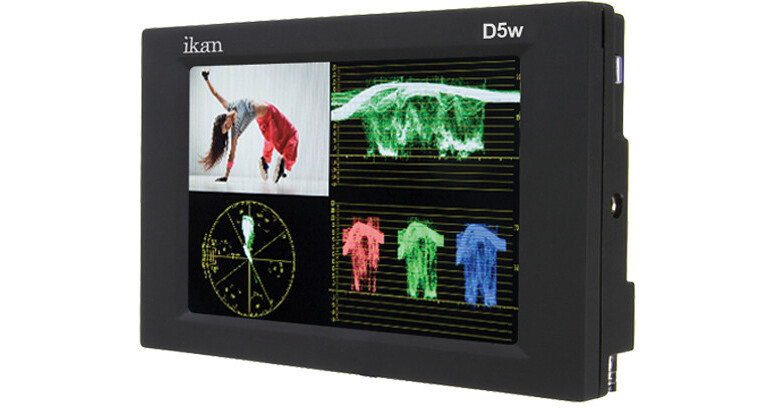
Including three different battery plates, this ikan D5W-1 5.6" On-Camera Monitor includes the D5 5.6" monitor, a Canon 900, Sony L, Panasonic D54 type battery plate, sun visor, shoe mount, and power supply.
The D5W-1 features a 1280 x 800 HD resolution and 3G-SDI and HDMI inputs. It offers an essential set of monitoring tools, including Waveform, Parade, Vectorscope, Peaking, False Color, and Pixel-to-Pixel, for setting up and fine-tuning your shots. A headphone output is available on the bottom for monitoring audio while you shoot.
The monitor's controls are located along the edges and rear and include a rotary navigation wheel, an input button for switching between live inputs, and three function-assignable buttons.
Monitoring Tools
- Waveform provides an objective evaluation of your video signal. It displays the brightness of your image on an IRE scale, allowing you to see if your image will clip, and where your black levels are.
- The RGB parade displays the video signal as three separate colors channels; red, blue and green. This feature lets you objectively see how much of each color you have in your image.
- The vectorscope displays the signal on a graph so you can check the phase of your colors. The vectorscope function also verifies and checks the overall tint and hue of an image.
- Peaking highlights the sharpest (most in focus) areas of the image with a color outline. The D5W-1 features two modes, monochrome, and color. The monochrome mode shows the image in black and white with the red peaking outline and the color peaking mode shows the image in color with a red peaking outline. Both the peaking color and sensitivity can be adjusted in the monitor's menu system.
- The False Color feature provides under/over luminance warning by presenting the image as a series of color values representing exposure.
- ikan's exclusive Adjustable Under Exposure and Over Exposed Warning feature is an extension of false color. It allows the operator to set the preferred IRE exposure limits and the operator is warned when the image exposure exceeds or falling under the preset IRE limit.
- Clip Guides allows you to set the upper IRE limit on the monitor and any part of the frame that is brighter than the set limit will flash a vivid purple.
- The DSLR Scaling function enables users to expand their DSLR camera's HDMI video signal to fill the monitor's screen if they wish. Users may choose from one of four scaling options: Normal, 3:2, 16:9 or Full Screen - convenience made simple.
- The D5W-1's 1:1 pixel-to-pixel mapping allows you to look at parts of your image without any scaling, so you can see the actual detail and not be fooled by scaling artifacts.