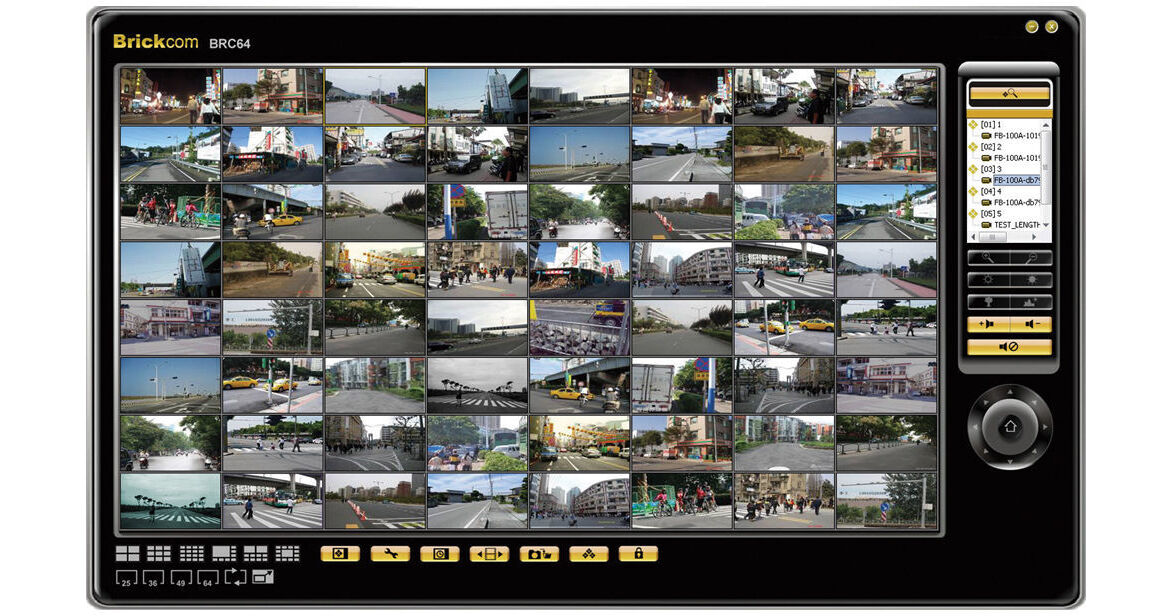
Brickcom BRC64-Pro PC-Based NVR (64-Channel)

BH #BRBRC64PRO • MFR #BRC64-PRO
Print
Brickcom BRC64-Pro PC-Based NVR (64-Channel)
No Longer Available
No Store Display
Ask an Expert
866-842-7675

Brickcom BRC64-PRO Overview

The 64-channel BRC64-Pro PC-Based NVR from Brickcom allows users to manage up to 64 Brickcom IP cameras for live viewing and video recording. With the support for mega-pixel resolution and H.264 compression, it uses less bandwidth while offering the optimal image viewing and recording quality. The e-map functionality gives users a full outline of the monitored areas and the smart camera search feature makes it possible to gain instant access to any Brickcom IP camera on the specific site. For efficient use of disk space, viewing and recording can be done at different frame rates. Recording options include manual, event-triggered, scheduled, or continuous recording. This software can be downloaded for free from Brickcom's website.

Can manage up to 64 channels
Supports dual streaming
Supports remote live viewing for up to 64 channels and remote playback for up to 16 channels
Supports video wall
Recording only to save CPU loading
Audio broadcast
Supports joystick, patrol and preset control
Supports Brickcom and ImmerVision de-wrapping
Supports edge recording
Different frame rate for live view and recording
Digital zoom on live view and playback
Continuous, schedule, motion, alarm recording
Search by date, time or event
Smart motion detection
E-map monitor and event alert
Smart camera search
Supports system information (HDD, CPU, network status)

Brickcom BRC64-PRO Specs

General
Cameras Supported
Add Camera: Manual/smart camera search
Maximum Channels : 64
E-Map
E-Map configuration and management
Video & Audio
Video Compression: MJPEG / MPEG-4 part 2 / H.264
Resolution: QCIF / CIF / FD1 / Megapixel / Up to 5 MP
Maximum Frame Rate: 360 fps
Audio Compression: G.711, G.726, ADPCM, AAC
Maximum Bandwidth: 80 Mbps
Audio Broadcast
Live View
Matrix Screen: 1/4/8/9/10/13/16/25/36/49/64
Video Wall: Live matrix, event display, playback, e-map
Digital Zoom: Supported
Drag and Drop Operation: Supported
Sequence Mode: Sequence all, manually select
Remote Live View: For IE browser, up to 64 channels
PTZ control: Supports joystick, preset and patrol features
Panorama: Supports Brickcom / ImmerVision De-wrapping
Dual Stream Support
Alarm Events
Event Actions: Sound alarm, email, blinking, send the snapshot to FTP site
Event Recording: Post event settings
Auto Reboot System: Per cycle
Logs
Log Types: Event/alarm access
User Management
Management: Group privilege control (maximum groups: 5)
Multilingual Input Languages
English (United States), Deutsch (German), Dutch, Japanese, Portuguese, Russian, Chinese (Simplified), Spanish, Chinese (Traditional), and Thai
Playback
Playback Controls: Play / pause / stop / forward / reverse / speed adjust / frame by frame
Playback: Up to 16 channels
Digital Zoom: Supported
Video Clip Search: Search video clips by date, time, or channel
Snapshot Format: BMP, JPG
Remote Playback: For IE browser, up to 16 channels
Export Video: Export playback videos to local computer in AVI format
Recording
Recording Mode: Manual / continuous / scheduling / event
Schedule Recording : Manual select / weekly mode / holiday mode
Event Recording: By motion detection / digital input
Edge Recording: Supported
Post-Event Recording: 10 to 600 sec
Retain Recorded Video (Days): depend on the size of HDD
Networks
Protocols: HTTP / DHCP / ARP / NTP / DNS / UPnP
Streaming Protocols : RTSP over UDP, RTSP over TCP
System Requirements
Operating System
Microsoft Windows XP / VISTA / 7
Computer
IBM PC/AT compatible
CPU
Pentium 3 GHz or faster
Memory
1024 MB or more
HDD
500 GB
Graphics Card
ATI Radeon 1950, nVidia GeForce 9500GT (1024 MB) with DirectX9.0 or higher
Monitor
1024 x 768 pixels or more, 24-bit true color or better
Network Interface
Gigabit network interface card must be installed
Web Browser
Microsoft IE 6.0 SP2 or higher
Adobe
Adobe Reader: Adobe Reader 8.0 or higher

Brickcom BRC64-PRO Reviews

See any errors on this page?
Whatever You Need, We've Got It