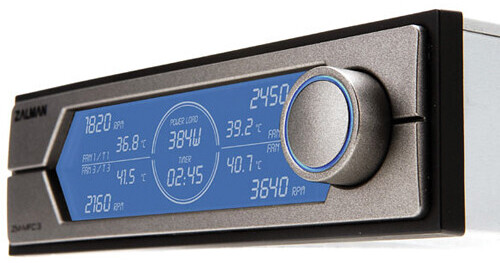
The ZM-MFC3 Fan Controller from Zalman USA can be used to check the real-time power consumption and temperature of the main components of the connected computer. The front panel features the power load display, RPM display, temperature display, and fan channel. A timer is also displayed to indicate the computer usage time, and it resets when the computer is turned off. A jog wheel is located next to the display screen for adjusting the fan RPM and can be used to select a fan channel. The controller's back panel features three 3-pin ports for each of the three fans and supports the RPM output function. A 4-pin port is also included for connecting to the PWM fan function. Four temperature sensors can be connected as well as a DC power connector for connection to the PSU's 4-pin connector. The CVS terminal can be used to receive the measured value of the CVS using the CVS ampere/voltage sensor and extension bracket. The controller comes with the necessary cables and hardware for installation and use.
Ask Our Experts866-264-7509
Hello, Log InAccount & Orders
ZALMAN USA ZM-MFC3 Fan Controller
No Longer Available
ZALMAN USA MFC3 Overview
Real-time power load display
FSTN display for wide viewing angles
Temperature monitoring for up to 4 components
Fan RPM monitoring and control (3 x voltage, 1 x PWM)
Timer display
Built-in protection circuit and alarm
ZALMAN USA MFC3 Specs
| Input Voltage | |
| Output Voltage | |
| Maximum Output Current | |
| Fan Compatibility | |
| Fan Control | |
| Display Range | |
| Power | |
| Operating Temperature & Humidity | |
| Dimensions |
Packaging Info
| Package Weight | |
| Box Dimensions (LxWxH) |
ZALMAN USA MFC3 Reviews
See any errors on this page?