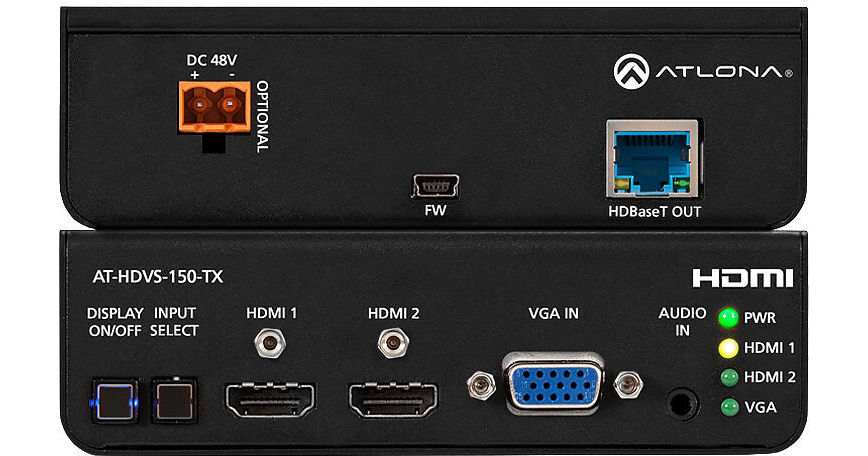
Transmit 1080p HDMI and VGA signals over category cable up to 230' with this Three-Input HDMI/VGA Switcher & HDBaseT Transmitter from Atlona, featuring two HDMI inputs and one VGA with audio. Used in combination with an HDVS-150-RX receiver (available separately), this unit provides a compact, automated A/V system with the convenience of automatic input selection and display control. The switcher is remotely powered by the HDVS-150-RX through Power over Ethernet (PoE).
Featuring automatic display control, the HDVS-150-TX can trigger a display to power on automatically whenever a laptop or other device is connected. At the end of the presentation, when the presenter disconnects the laptop, the HDVS-150-TX forces the display to power off. A power button on the front panel can be used for manual on/off control of the display. Surface mounting brackets are provided with the HDVS-150-TX for easy installation under a table or on a wall.
- Two HDMI inputs plus one VGA input with audio
- Allows HDMI display devices to be used with legacy VGA sources
- Extends A/V up to 230' at 1080p or 1920 x 1200
- Compact, automated A/V system with automatic input selection and display control
- Transmits A/V up to 230' at 1080p or 130' at UHD 4K using Cat 6a/7 cable
- Uses easy-to-integrate category cable for low-cost, reliable system installation
- IEEE 802.3af PoE-powered device
- Power for transmitter is supplied by AT-HDVS-150-RX over HDBaseT
- Selects active input when sources are connected or if there is a change in source power status
- Enables simplified, automatic system operation with no user intervention necessary
- Automatically changes display power state based on active or standby mode of the switcher (in conjunction with the HDVS-150-RX)
- Control signals to display are transmitted via RS-232
- Eliminates the need for a complex control system
- Overrides auto-switching when more than one active source is present
- Simple manual operation allows presenter to maintain control of A/V system
- Rear-panel USB port provides an easy means for device updates
- LED indicators provide power and input selection status information
- Easy setup and troubleshooting
- In education environments, the HDVS-150-TX can be placed in a lectern for use with sources such as a laptop and document camera
- In corporate environments, the switcher can be installed below a boardroom conference table to allow presenters to easily connect their laptops to the system