
Control Sony VISCA protocol pan/tilt/zoom cameras directly from a computer with the HuddleCamHD VISCA Camera Control Software, compatible with up to Windows 10. The software works when connected via RS-232, RS-422, or USB ports, and comes with an RS-232 to USB converter. Control cameras locally with virtual controls, any USB joystick, and keyboard hotkeys. You can also use the WebRemote, IP Remote, or PTZVisual Controller features for far-end camera control from any mobile device or computer with a web browser over a LAN, Wi-Fi, or WAN IP network.
Virtual control is designed to be simple – just snap a picture of the room layout using the built-in video monitor, set up the camera position in the room, visually assign presets to desired locations in the room, and align your camera presets to the corresponding locations of the screen.
Up to 16 pan/tilt/zoom position presets.
Room Layout
Choose from included room layout templates, import custom images, or capture your own layout with the built-in video monitor.
Character Generator
Each member of a meeting can be allocated to a seat and represented with a character graphic.
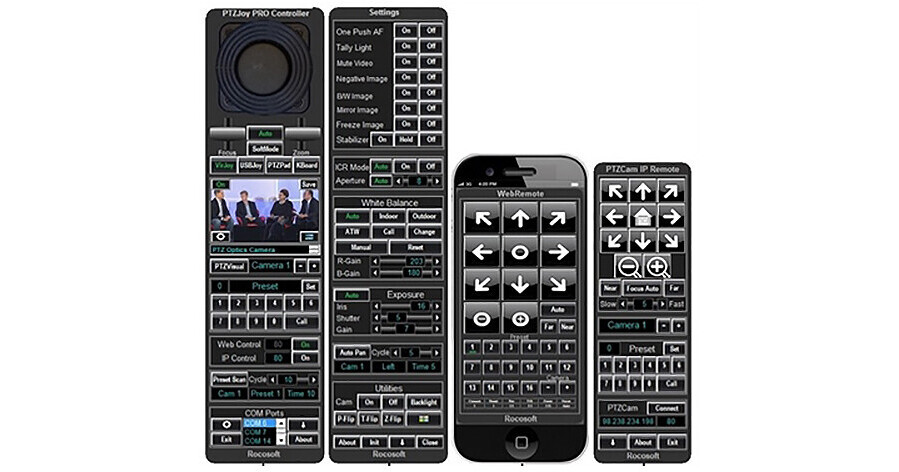
Main Controller
The main remote control interface provides convenient pan, tilt, and zoom controls along with access to more advanced features such as Presets, WebRemote, IP Remote, PTZVisual Pad, and Preset Scan.
Settings
Shows additional video and control settings such as Exposure, White Balance, Auto Pan, Start with Windows, Camera On/Off, and more.
WebRemote
The WebRemote is accessible from the web browser of any PC, Mac, smartphone, or tablet. This allows for quick and convenient far-end control of cameras on the go.
IP Remote
Provides access to the main controller over a secure connection allowing control of the camera connected to the computer with the Main Controller installed. Control the pan, tilt, zoom, focus, and recall presets of far end cameras with the remote interface.
PTZVisualPad
PTZVisualPad is a customizable graphic user interface for controlling a PTZ camera and is designed to simplify the logistics of preset switching during a video conference meeting. Totally customizable, users can set seat positions and camera positions, add pictures to represent people, add custom room layouts, and designate presets to specific locations in the room. Use this feature locally or open it from a remote computer on the IP Remote for far-end camera control using the visual layout.