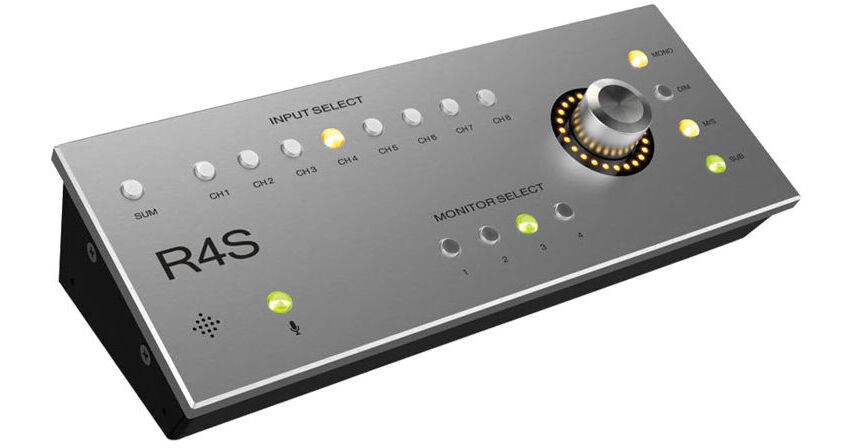
The R4S from Antelope is a dedicated, tabletop remote control designed to completely replicate the front-panel functionality of the Satori analog monitoring system. Centered around an ergonomic and intuitive design, it allows engineers to select their monitoring options, directly from their listening sweet spot.
Connected and powered via USB, the R4S gives you instant visual feedback of all your settings, while the large, stepped volume knob controls the relay attenuator in the main unit.
Controls
Input Select Buttons, Channels 1-8
- Input Select allows you to switch between your desired input sources, which will be fed to your selected monitor output
Monitor Select Buttons 1-4
- These allow you to select between the four monitor outputs — whatever source is selected will be fed to the selected monitor out
Mono, Dim, Mute, M/S, Sub
- Pressing the Mono button sets the currently selected monitor output to mono
- Press the Dim button to activate the -20 dB attenuator
- Press and hold rotary control knob to mute
- When Mono is activated you also have the option to select M/S
- Pressing the M/S button selects either the sum or the difference between the left and the right channel
- Pressing the Sub button activates the low-frequency effects (LFE) channel output
Trim Offset
- To access the Trim Offset feature, press and hold the desired Monitor (1, 2, 3 or 4) and Input (Ch 1, 2, 3, 4, 5, 6, 7 or 8) buttons
- Use the Rotary Control knob to trim (-6 to +6 dB in 1 dB steps) — double-click to set to 0 dB
SUM Select Button
- The Sum Select button allows you to send your stereo sum to your selected monitor output
Talkback Button
- Press the Talkback button to activate the on-board talkback microphone — this can be distributed to your selected headphones using the software control panel
Rotary Control
- Large stepped relay attenuator for main monitor output