Sony Global

Video Chat with a Pro Video Expert - Live

Lilliput 7" Camera-Top Monitor (Black)

BH #LI339 • MFR #339
Print
Lilliput 7" Camera-Top Monitor (Black)
In Stock
No Store Display
$179.00
Free 2-Day Shipping
Protect Your Gear
Add a protection plan from $29.99
Ask an Expert
800-606-6969

Lilliput 339 Overview

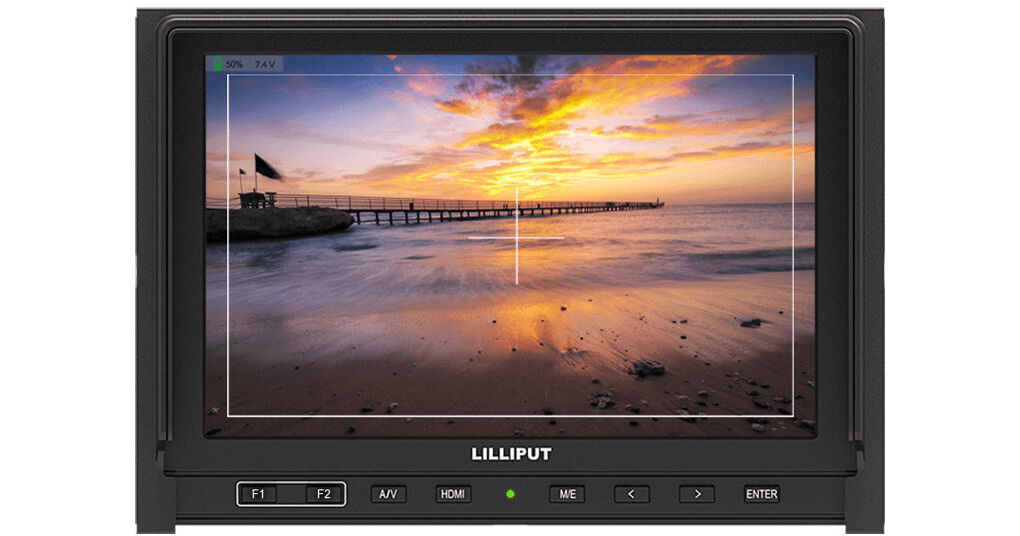
The black 7" Camera-Top Monitor from Lilliput has a display resolution of 1280 x 800 with an aspect ratio of 16:9. The 800:1 high contrast ratio helps produce colors that are vivid, rich, and accurate. The built-in 2600mAh battery with battery level indicator supports up to 3 to 4 hours working time. It can ideally be used by filmmakers, photographers, enthusiasts, and DSLR camera users.

Camera Auxiliary Functions
  • Camera mode
  • Center marker
  • Pixel-to-pixel
  • Safety marker
  • Aspect ratio
  • Check field
  • Color bar
  • Underscan
  • Overscan
  • Freeze input
  • H/V delay
  • 8x zoom
  • Image flip
Excellent Display & Design
  • It features 1280 x 800 high resolution, 400 cd/m² high brightness & 800:1 high contrast which produces colors that are vivid, rich,  and accurate.
Wide Viewing Angles (IPS Panel)
  • 178° horizontal & vertical wide viewing angles allow people viewing from different angles to see the monitor with the same visual effect.
Pro HD display solution for DSLR
  • 7" broadcasting quality field monitor with HDMI & AV inputs. It can ideally be used by filmmakers, photographers, enthusiasts, and DSLR camera users.
Built-in Battery & Battery Level
  • Built-in 2600mAh battery with battery level indicator which supports up to 3 to 4 hours working time

Lilliput 339 Specs

Display
Panel
7.0" (17.8 cm) IPS, LED backlit
Resolution
1280 x 800
Active Area
H x V: 5.89 x 3.68" (149.76 x 93.6 mm)
Dot Pitch
0.117 (H) × 0.117 (V) mm
Aspect Ratio
16:10
Brightness
400 cd/㎡
Contrast
800:1
Surface Treatment
3H
Response Time
T On: Typical 14 msec, maximum 17 msec
T Off: Typical 11 msec, maximum 14 msec
Viewing Angle
89°/89° (Left/Right) and 89°/89° (Up/Down)
Interface
AV input, AV output, HDMI input
Input
HDMI
1
AV
1
Output
AV
1
Audio
Speaker
1
Earphone
1
Control
Basic
Power, AV button, HDMI , menu button, 2 x selection button F1-F2, enter button, Left/right selection key
Advanced
Brightness, contrast, color, language, volume, U/D, L/R, zoom, S auto, C-sys, sleep, Time, OFF-time, ON-time
HDMI Connectivity
Full HD 1080P
1080p (60/59.94/50/30/29.97/25/24/23.98/23.976/24sF)
HD
1080i (60/59.94/50)
1035i (60/59.94)
720p (60/59.94/50/30/29.97/25)
SD
576p (50)
576i (50)
480p (60/59.94)
486i (60/59.94)
Power
Current
12 VDC, 1500 mA
Input Voltage
7 to 24 VDC
Battery
Built-in 2600 mAh battery
Power Consumption
< 12 W
Environmental Specifications
Operating Temperature
-4 to 140°F (-20 to 60°C)
At high temperature and high humidity Ta= 140°F (60°C), 90% RH, 240 hours
Storage Temperature
-22 to 158°F (-30 to 70°C)
Dimensions
Dimensions
7.5 x 5 x 1.2" (19 x 13 x 3 cm)
Weight
12.7 oz (360.0 g)
Packaging Info
Package Weight
2.465 lb
Box Dimensions (LxWxH)
9.05 x 6.7 x 4.1"

Lilliput 339 Reviews

Nice, small, easy to use

By Christine
Rated 5 out of 5
Date: 2024-05-04

I never used one of these before and thought I needed a more expensive model. I've been using it for two weeks now and really like that I'm not limited to using batteries. Everything I needed was in the box. I only had to get a tripod, but that is optional of course.

Good monitor

By Gagnon
Rated 4 out of 5
Date: 2019-01-06

Very good for my DSLR

See any errors on this page?

question

hi i have recently bought this product and most is well. the problem im facing is that im unable to charge the include battery. i have imstalled every as said in the manual but still unable to charge it. i would like to seek advise on what to do to fix the problem or even what to do to replace the product as it come with the 1 year warranty. thank you, dear customer
Asked by: Bisharie A.
The monitor battery will charge with the included AC adapter. Plug the AC adapter into the monitor and the plug into your AC power outlet.
Answered by: Dennis A L.
Date published: 2018-08-26

question

How do you charge the battery that is included with the monitor?
Asked by: Kevin
This Lilliput Monitor has a built in battery that lasts 3-4 hours. You will be able to charge it with the included AC Adapter.
Answered by: Joseph P.
Date published: 2018-08-26

question

Is the internal battery on the monitor replaceable?
Asked by: Anonymous
YES
Answered by: JoannaChen LILLIPUT Expert
Date published: 2018-08-26

question

Is the HDMI connection on the monitor a Mini, or, regular size HDMI port?
Asked by: Anonymous
Regular size HDMI port on the screen.
Answered by: JoannaChen LILLIPUT Expert
Date published: 2018-08-26
  • y_2026, m_5, d_18, h_13CST
  • bvseo_bulk, prod_bvqa, vn_bulk_3.0.43
  • cp_1, bvpage1
  • co_hasquestionsanswers, tq_4
  • loc_en_US, sid_1194081, prod, sort_[SortEntry(order=HAS_STAFF_ANSWERS, direction=DESCENDING)]
  • clientName_bhphotovideo
Whatever You Need, We've Got It