Video Chat with a Pro Video Expert - Live

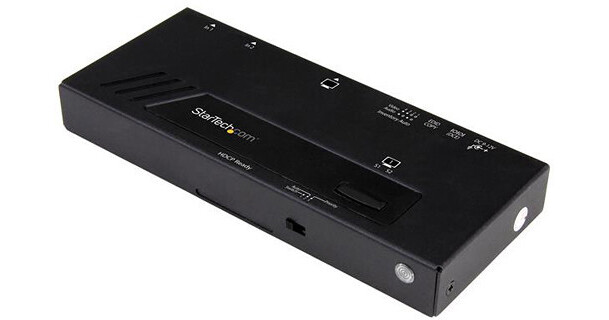
StarTech VS221HD4KA 2-Port HDMI 4K Automatic Video Switch with Fast Switching

BH #STVS221HD4KA • MFR #VS221HD4KA
Print
StarTech VS221HD4KA 2-Port HDMI 4K Automatic Video Switch with Fast Switching
In Stock
No Store Display
Free 2-Day Shipping
Protect Your Gear
Add a protection plan from $11.99
Ask an Expert
800-606-6969

StarTech VS221 Overview

The VS221HD4KA 2-Port HDMI 4K Automatic Video Switch with Fast Switching from StarTech allows you to switch between two HDMI sources on a single HDMI display. Fast auto-switching ensures minimal time for switching between HDMI sources. The switch provides effortless operation with advanced auto-sensing. it detects the latest connected HDMI source and automatically switches to it. The video switch maintains Ultra HD 4K picture quality while switching between content from HDMI source devices including Blu-ray players and DVD players, computer systems, video game consoles, digital cable, satellite boxes, and A/V receivers.

Impressive Image Quality with 4K Support
  • The video switch maintains Ultra HD 4K picture quality while switching between content from two different HDMI source devices including Blu-ray and DVD players, computer systems, video game consoles, digital cable, satellite boxes, and A/V receivers. 
  • UHD 4K support ensures a higher level of image clarity and visibility (8.29 million pixels). It provides a more engaging visual experience for audiences in a wide range of venues including conference centers, boardrooms, educational facilities, and commercial settings.
Fast and Easy Operation
  • Fast auto-switching ensures minimal time for switching between HDMI sources. The switch provides effortless operation with advanced auto-sensing, detecting the latest connected HDMI source and automatically switching to it. Auto-switching makes it easy to share a projector or display, and ensures no downtime in a digital signage application if a source signal is accidentally powered off or fails.
  • Priority switching identifies one port to take priority for HDMI sources when multiple sources are connected. It is ideal for applications such as digital signage.
  • Manual switching enables you to manually select your HDMI source with front panel buttons that are easy to use.
  • An IR remote control is included in the box, enabling you to select your desired input source remotely. The RS-232 serial control interface ensures easy remote operation with serial control-enabled devices.
Hassle-Free Setup with Plug-and-Play Installation
  • The switch saves time during setup with EDID emulation which ensures that all your display settings, such as native resolution and refresh rate, are communicated between your display and video source devices. EDID emulation maximizes compatibility with your 4K display, ensuring a convenient plug-and-play installation and sharp image quality.
General Features
  • Versatile audio configuration with support for 5.1 or 7.1 surround sound
  • Backward compatible with high-definition 1080p
UPC: 065030862356

StarTech VS221 Specs

Hardware
Audio
Supported
Industry Standards
HDMI 1.4
Chipset ID: Microchip PIC24
Output Signal
HDMI
Ports
2
Performance
Audio Specifications
7.1 surround sound
Maximum Digital Resolutions
4K @ 30 Hz
Supported Resolutions
3840 x 2160 (UHD 4K)
2560 x 1600
1920 x 1200
1920 x 1080p
1280 x 720p
Wide Screen Supported
Yes
Connectors
Connector A
1 x HDMI (19-pin), female
Connector B
2 x HDMI (19-pin), female
1 x RJ11, female
Indicators
LED Indicators
2 x Active ports
1 x Power
Power
Input Voltage
110 to 240 VAC
Output Current
1.5 A
Output Voltage
12 VDC
Power Source
AC adapter (included)
Environmental
Humidity
0 to 90%
Operating Temperature
32 to 122°F / 0 to 50°C
Storage Temperature
-4 to 158°F / -20 to 70°C
Physical Characteristics
Dimensions
0.6 x 3.9 x 2.4" / 1.5 x 9.9 x 6.1 cm
Weight
6.3 oz / 178.6 g
Packaging Info
Package Weight
1.9 lb
Box Dimensions (LxWxH)
9.3 x 6.1 x 2.6"

StarTech VS221 Reviews

Very Useful

By David
Rated 5 out of 5
Date: 2020-09-06

Worked for , serves the purpose as intended.

No auto switching

By Aladin
Rated 3 out of 5
Date: 2019-01-22

I have been advised that the VS221HD4KA has friendly built in auto switching tool , which is not correct

See any errors on this page?

Is there a video port switch with hdmi input and ...

Is there a video port switch with hdmi input and display port or usb-c output? that converts the hdmi signal to display / usb-c?
Asked by: Richard
The StarTech VS221HD4KA 2-Port HDMI 4K Automatic Video Switch with Fast Switching only has HDMI input and output.
Answered by: Tim Z
Date published: 2024-10-06

question

Will this allow the 3.5mm audio input to be used when the HDMI input is selected?
Asked by: Fixer
The 3.5mm connection is for VGA audio only. The HDMI is embedded audio only.
Answered by: Dennis A L.
Date published: 2018-08-26

question

Will this switch allow my desktop to connect to a video projector (HDMI) and a VGA monitor to see the same images on both at the same time? I also have a VGA monitor, so these other two are for the extended screen, not my main screen.
Asked by: John N.
I have been using this switch in one of our conference rooms for almost a year. It has worked flawlessly. Our laptops have both VGA and Displayport outputs. We use a passive cable to convert Displayport to HDMI, the HDMI then goes into the switch. If we need to use the VGA output of the laptop, we connect it to the switch. The switch does the conversion to HDMI. That way we only have to feed our monitor with HDMI. We run a single HDMI to the monitor. If you want to share the HDMI output of a laptop with an HDMI projector and an HDMI monitor, you would need to use an HDMI splitter. To use an HDMI projector, and a VGA monitor, you can use an HDMI to VGA adapter. I hope this answers your question.
Answered by: Vernon K.
Date published: 2018-08-26
  • y_2026, m_7, d_30, h_9CST
  • bvseo_bulk, prod_bvqa, vn_bulk_3.0.48
  • cp_1, bvpage1
  • co_hasquestionsanswers, tq_3
  • loc_en_US, sid_1200948, prod, sort_[SortEntry(order=HAS_STAFF_ANSWERS, direction=DESCENDING)]
  • clientName_bhphotovideo
Whatever You Need, We've Got It