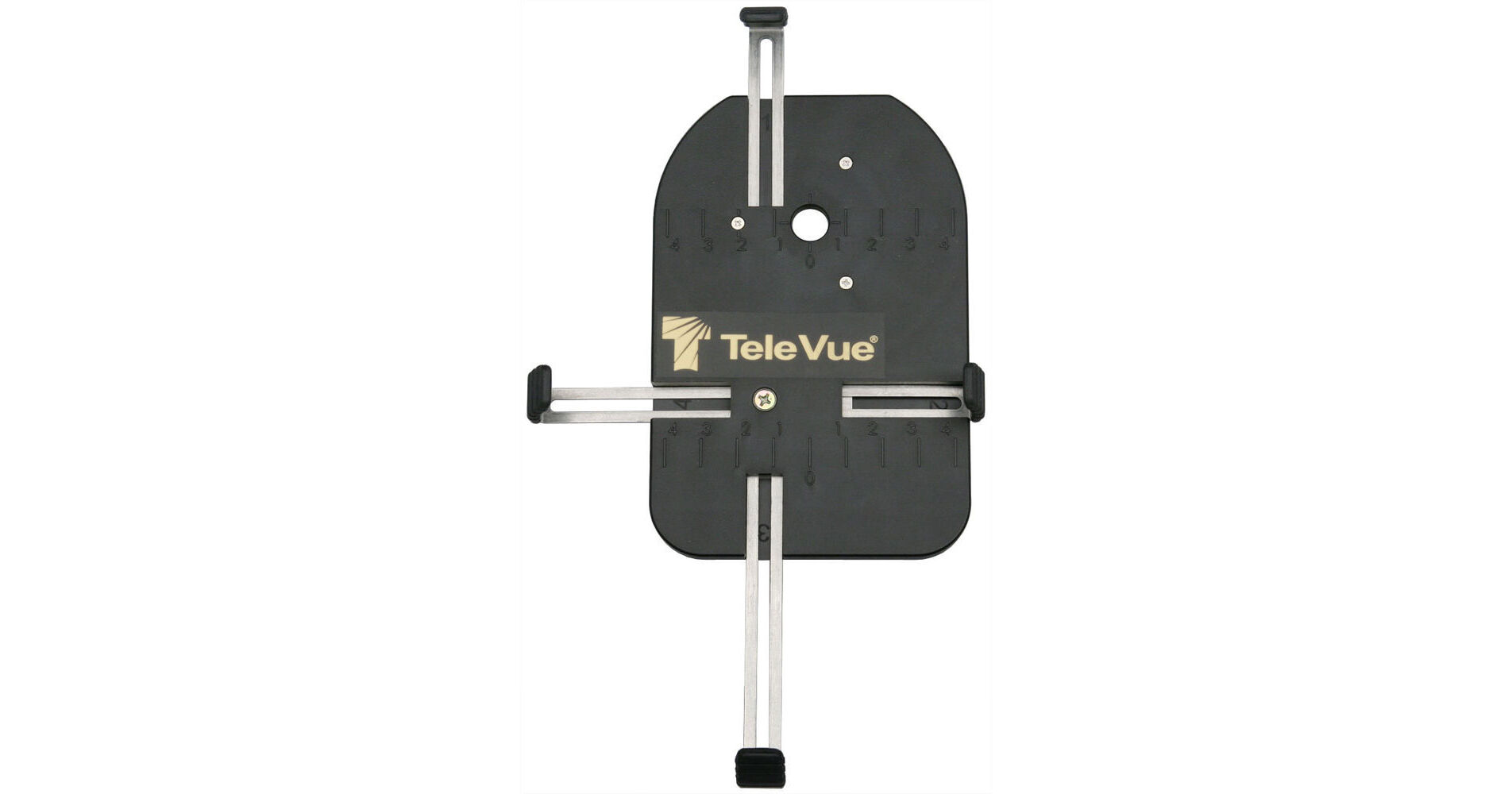
Don't let memorable moments slip away without capturing them with your smartphone. Use the FoneMate Universal Digiscoping Adapter from Tele Vue to connect your smartphone to a spotting scope or a telescope to use it as a powerful telephoto lens. The adapter is compatible with Dioptrx Eyepieces and will accept smartphones with minimum dimensions of 2.4 x 4.7" and maximum dimensions of 4.7 x 8.3". It is easy to mount and use and leaves most of the front and the sides of your smartphone exposed to allow easy access to its buttons, controls, and functions.
Ask Our Experts800-606-6969
Hello, Log InAccount & Orders
Key Features
- For Digiscoping
- Compatible with Dioptrx Eyepieces
- For Smartphones up to 4.7 x 8.3"
Don't let memorable moments slip away without capturing them with your smartphone. Use the FoneMate Universal Digiscoping Adapter from Tele Vue to connect your smartphone to a spotting scope or a telescope to use it as a powerful telephoto lens. The adapter is compatible with Dioptrx Eyepieces and will accept smartphones with minimum dimensions of 2.4 x 4.7" and maximum dimensions of 4.7 x 8.3". It is easy to mount and use and leaves most of the front and the sides of your smartphone exposed to allow easy access to its buttons, controls, and functions.
More DetailsIn Stock
Protect Your Gear
Add a protection plan from $19.99
See Options
Shipping Restrictions: Sales and export of this item to South Korea are prohibited.
Tele Vue FoneMate Overview
Tele Vue FoneMate Specs
| Compatibility |
Packaging Info
| Package Weight | |
| Box Dimensions (LxWxH) |
Tele Vue FoneMate Reviews
Perfect for large televue lens
By David
Rated 5 out of 5
Date: 2025-06-04
Works great. My celestron camera adapter was too small for the televue lenses. This works great..the adapter lamp/locks onto the eyepiece
Solid
By chris
Rated 5 out of 5
Date: 2021-10-19
The best one of these things that I've tried, but note that it only works with certain Tele Vue eyepieces.
See any errors on this page?
Will t b is fit a vortex diamond back spotting ...
Will t b is fit a vortex diamond back spotting scope 20 x 60 x 80
No, the Tele Vue FoneMate Universal Digiscoping Adapter is designed to work with TeleVue eyepieces.
Date published: 2023-08-09
Will this work from a Leica Rangemaster CRF ...
Will this work from a Leica Rangemaster CRF 2800.com to a Google Pixel 2?
The Tele Vue FoneMate Universal Digiscoping Adapter will fit your Google Pixel 2 phone but it has not been tested on a range finder.
Date published: 2019-08-12
What size and pitch thread is on the phonemate ?
What size and pitch thread is on the phonemate ?
They do not publish the thread pitch but it is only compatible with Tele Vue brand eyepieces:
Eyepiece Compatibility:
All DeLite
All Delos
Plössl: 55mm, 40mm, 32mm
Panoptic: 41mm, 35mm, 27mm, 24mm*, 22mm, 19mm
All Nagler Type 4
Nagler Type 5: 31mm, 26mm, 20mm*
All* Nagler Type 6
All Ethos
Date published: 2024-09-21
Will Tele Vue's FoneMate work with the iPhone 13 ...
Will Tele Vue's FoneMate work with the iPhone 13 Pro Max?
Any phone could be used up to 8.3x4.7 inches. Your phone is 6.3x3.1 inches (right?). There is an additional complexity in using phones with multiple cameras. If you try zooming in while mounted and aligned, the phone will change the camera and you will no longer be in the line of light. Another aspect to keep in mind is that Fonemate requires the right eyepiece (Televue dioptrix) to mount the unit to a telescope.
Date published: 2022-01-31