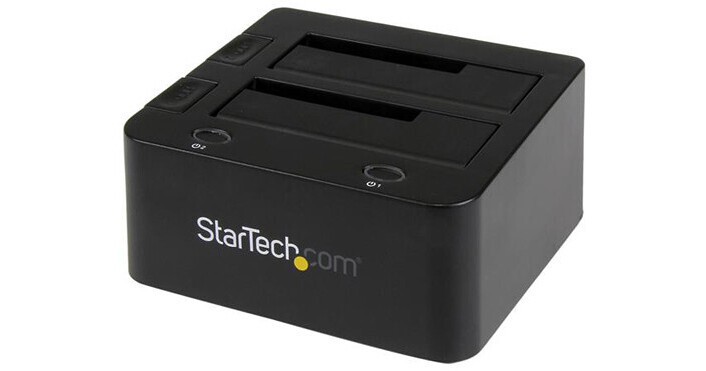
Connect one external SATA and one external PATA (IDE) hard drives or SSDs to your Windows, Mac, or Linux system using the Universal Docking Station for Bare Hard Drives from StarTech. While the slot loading design holds the SATA or PATA drives upright inside the dock, SATA and PATA drives can be connected directly through the designated dock slot, the PATA drive connector is positioned near the rear panel 40-pin data and LP4 power connections, allowing users to connect to the dock using the included IDE data and power cables.
This docking station is compatible with SATA III 6 Gb/s, SATA II 3 Gb/s, and SATA 1.5 Gb/s hard drives, as well as PATA (IDE) 66/100/133 MB/s hard drives. It interfaces with your host system using its integrated USB 3.0 port, which operates at speeds up to 5 Gb/s and is also backwards compatible with USB 2.0 (480 Mb/s) and USB 1.1 (1.5 Mb/s). Also featured is UASP support, an MTBF of 30,000 hours, power and drive status LED indicators, plug and play & hot swap compatibility, an ejection mechanism for SATA drives, and more. Each power and drive status LED indicator also doubles as a power switch for each drive.
The Universal USB 3.0 Docking Station for Bare Hard Drives operates using 110-240 VAC. It includes a USB 3.0 cable, an IDE 40-pin to 40-pin cable, an LP4 power cable, a 40-pin + LP4 to 44-pin IDE cable, and a universal power adapter that will work in North America, the UK, the EU, and Australia. It is protected by a limited 2-year warranty.
Ask Our Experts800-606-6969
Hello, Log InAccount & Orders

Key Features
- 1 x SATA & 1 x PATA (IDE) Drive Bays
- Supports 3.5 & 2.5" HDDs & SSDs
- 1 x USB 3.0 Port
- Power & Drive Activity LED Indicators
Connect one external SATA and one external PATA (IDE) hard drives or SSDs to your Windows, Mac, or Linux system using the Universal Docking Station for Bare Hard Drives from StarTech. While the slot loading design holds the SATA or PATA drives upright inside the dock, SATA and PATA drives can be connected directly through the designated dock slot, the PATA drive connector is positioned near the rear panel 40-pin data and LP4 power connections, allowing users to connect to the dock using the included IDE data and power cables.
More DetailsIn Stock
Protect Your Gear
Add a protection plan from $8.99
See Options
StarTech UNIDOCKU33 Overview
UASP Support
UASP, or USB Attached SCSI, is supports on Windows 8, Max OS X 10.8 or above, and Linux. UASP can perform with faster read and write speeds than traditional USB 3.0 at peak performance. UASP also helps to provide improved performance with lower required processor resources
Applications
Transfer files directly between a SATA and an IDE hard drive, without having to transfer to the host computer first or use multiple devices
Access 2.5 & 3.5" IDE or SATA drives, for data retrieval
Recover data from drives on failed computers
Backup data quickly to an external drive for archiving
Test or benchmark multiple hard drives
UPC: 065030859813
StarTech UNIDOCKU33 Specs
General
| Number of Bays | |
| Inputs/Outputs |
Physical
| Operating Conditions | |
| Storage Conditions | |
| Certifications | |
| Material of Construction | |
| Dimensions | |
| Weight |
Packaging Info
| Package Weight | |
| Box Dimensions (LxWxH) |
StarTech UNIDOCKU33 Reviews
See any errors on this page?