
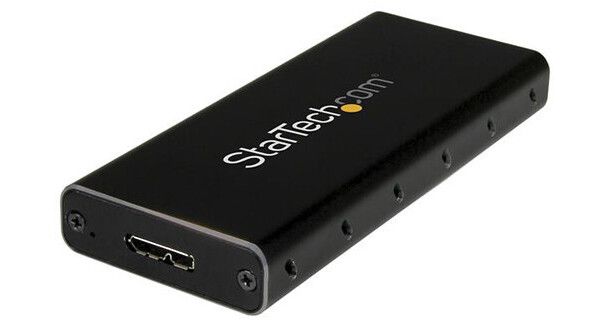
StarTech M.2 SATA SSD Enclosure

BH #STSM21BMU31C • MFR #SM21BMU31C3
Print
StarTech M.2 SATA SSD Enclosure
Key Features
  • Use Your M.2 SATA SSD Externally
  • Supports 30, 42, 60, and 80mm M.2 Drives
  • Micro-USB 3.1 Gen 2 Interface
  • 1,000,0000 Hours MTBF
Repurpose a 2230 (30mm), 2242 (42mm), 2260 (60mm), or 2280 (80mm) M.2 SATA SSD as an external USB 3.1 Gen 2 SSD using the M.2 SATA SSD Enclosure from StarTech to take advantage of enhanced data transfer rates of up to 10 Gb/s and streamline your workflow. With a sturdy aluminum housing, this enclosure protects the drive, while the built-in ventilation holes help ensure the drive doesn't overheat. On the outside of this, enclosure you will find a single micro-USB 3.1 Gen 2 port, and the included micro-USB to USB Type-C cable, which is compatible with Thunderbolt 3, will let you begin transferring data right out of the box. This enclosure is powered by the USB bus, has an MTBF rating of 1 million hours, supports TRIM, and has a power/activity LED indicator to alert you as to when the enclosure is powered on and the drive is operating. Also included are a M.2 screw kit and screwdriver to ensure you have all of the necessary tools to install your drive.
More Details
In Stock
No Store Display
Free Shipping for this Item
Protect Your Gear
Add a protection plan from $5.99
Ask an Expert
800-606-6969

StarTech SM21BMU31C3 Overview

Repurpose a 2230 (30mm), 2242 (42mm), 2260 (60mm), or 2280 (80mm) M.2 SATA SSD as an external USB 3.1 Gen 2 SSD using the M.2 SATA SSD Enclosure from StarTech to take advantage of enhanced data transfer rates of up to 10 Gb/s and streamline your workflow. With a sturdy aluminum housing, this enclosure protects the drive, while the built-in ventilation holes help ensure the drive doesn't overheat. On the outside of this, enclosure you will find a single micro-USB 3.1 Gen 2 port, and the included micro-USB to USB Type-C cable, which is compatible with Thunderbolt 3, will let you begin transferring data right out of the box. This enclosure is powered by the USB bus, has an MTBF rating of 1 million hours, supports TRIM, and has a power/activity LED indicator to alert you as to when the enclosure is powered on and the drive is operating. Also included are a M.2 screw kit and screwdriver to ensure you have all of the necessary tools to install your drive.

Please be aware that StarTech's M.2 SATA SSD Enclosure is only compatible with M.2 SATA SSDs with a SATA III 6 Gb/s, SATA II 3 Gb/s, or SATA I 1.5 Gb/s interface. It does not support M.2 NVMe or AHCI PCIe SSDs.

General Features
A Portable Solution
This slim, pocket-sized M.2 NGFF SSD enclosure has been specially designed for mobility, with a small form factor design that fits easily into your laptop bag. Its lightweight yet durable aluminum housing helps to ensure your drive won't be damaged while you're on the move.

Ventilation holes help to dissipate heat and help ensure an optimum operating temperature.
Maximize the Performance of Your M.2 SSD
Leverage the speed of your M.2 NGFF SATA drive with this external enclosure. It delivers USB 3.1 Gen 2 data transfer speeds up to 10 Gb/s, as well as UASP support, so you can achieve higher transfer speeds when you connect it to a UASP-enabled host computer.

The enclosure works with tablets, laptops and desktop computers and is compatible with hosts equipped with Thunderbolt 3 USB Type-C ports.
Broad Compatibility
The enclosure is compatible with various M.2 SSDs, and enables you to mount multiple drive lengths, including: 30mm (2230), 42mm (2242), 60mm (2260), and 80mm (2280).
UPC: 065030864435

StarTech SM21BMU31C3 Specs

General
Number of Bays
1x M.2 (Length Unspecified)
Inputs/Outputs
1x Micro-USB 3.1/3.2 Gen 2
Physical
Operating Conditions
32 to 104°F / 0 to 40°C at 10 to 90% Humidity
Storage Conditions
14 to 149°F / -10 to 65°C at 5 to 95% Humidity
Material of Construction
Aluminum
Cable Length
18.5" / 46.99 cm
Dimensions
3.9 x 1.7 x 0.5" / 99.06 x 43.18 x 12.7 mm
Weight
1.9 oz / 55.0 g
Packaging Info
Package Weight
0.3 lb
Box Dimensions (LxWxH)
6.35 x 5.15 x 1.25"

StarTech SM21BMU31C3 Reviews

Worked immediately

By Rob
Rated 5 out of 5
Date: 2024-02-10

I tried another M.2 enclosure from another retailer before this one, and couldn't get a working connection. I learned there are a couple of different types (sizes) of M.2 and not all enclosures are compatible with all devices. The description on this one listed it as being compatible and it worked immediately. It also seems to be well constructed, with a mostly metallic construction and two small screws for assembly, and overall is a better quality than the first device I tried.

Easy to assemble and to use!

By Dale
Rated 5 out of 5
Date: 2020-03-25

If you have an M.2 SATA drive, don't just toss it in a drawer and forget about it! It's easy to put it in this enclosure and use it. Just make sure it's an M.2 SATA drive and not an NVME drive!

See any errors on this page?

question

If I have this USB 3.1 enclosure holding an M.2 SSD (capable of 10Gbps speeds) and plug this adapter into my 2015 MacBook Pro's Thunderbolt 2 port, will I get the full 10Gbps speeds? The Samsung M.2 I have is capable of 1.5Gbps write and 2.5Gbps read.
Asked by: Eric
Please note that the StarTech M.2 NGFF USB 3.1 SATA Enclosure does not support Thunderbolt. Using your computers USB 3.0 port you will see speeds near your drives maximum, however due to many factors you will not reached the advertised numbers. This is not a limitation with this specific enclosure.
Answered by: James B.
Date published: 2018-08-26

Would this work on a MacBook air after 2013

Would this work on a MacBook air after 2013
Asked by: Shawn
The StarTech M.2 SATA SSD Enclosure will not work with the SSD from a MacBook Air after 2013. The MacBook uses PCIe 3.1 x 4 interface. The enclosure only supports SATA interface.
Answered by: Nachmen
Date published: 2021-02-01

question

Is this enclosure compatible with the Samsung 960 PRO m.2 NVMe SSD?I heard some comments about b key, m key, so wasn't sure
Asked by: Anonymous
No, not NVMe cards.
Answered by: Adam
Date published: 2020-10-22

Would this work on a MacBook air after 2013 hard ...

Would this work on a MacBook air after 2013 hard drive?
Asked by: Shawn
This device supports any M.2 drives with a SATA interface in the following sizes: Supports 30, 42, 60, and 80mm M.2 Drives . If your specific model of MacBook has a drive that falls under these categories, and is an operational drive, it will work.
Answered by: Michael M
Date published: 2019-05-26

question

Will this work with SSD from Mac Pro 2013?
Asked by: Mike S.
Depends on what form your SSD card is.
Answered by: Adam
Date published: 2020-10-22
  • y_2026, m_7, d_21, h_8CST
  • bvseo_bulk, prod_bvqa, vn_bulk_3.0.48
  • cp_1, bvpage1
  • co_hasquestionsanswers, tq_5
  • loc_en_US, sid_1242621, prod, sort_[SortEntry(order=HAS_STAFF_ANSWERS, direction=DESCENDING)]
  • clientName_bhphotovideo
Whatever You Need, We've Got It