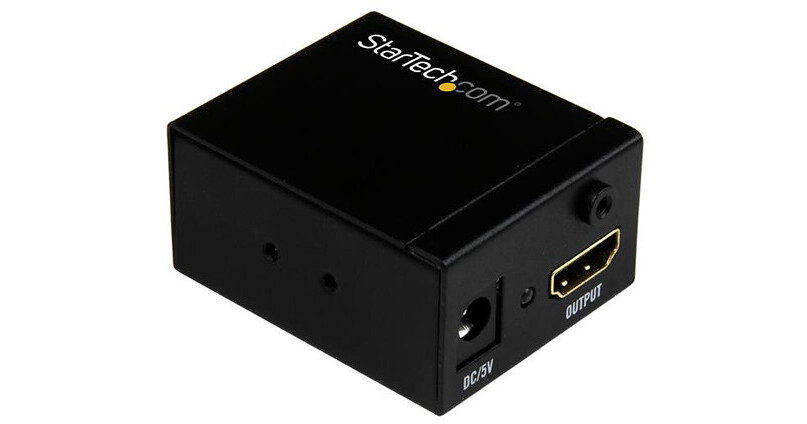
StarTech HDMI Signal Booster

BH #STHDBOOST • MFR #HDBOOST
Print
StarTech HDMI Signal Booster
Key Features
  • Extend HDMI Signals Up to 115'
  • Supports 1080p Video Signals
  • Supports 7.1 Surround Sound
  • Power LED Indicator
This HDMI Signal Booster from StarTech lets you increase the signal strength of your HDMI video source so you can connect an HDMI display up to 115' away, using standard HDMI cables. You can place the booster inline between two HDMI cables, up to 82' in length at the video input, and up to 33' in length at the video output. This booster supports resolutions up to 1080p at 60 Hz. It installs discreetly thanks to its small form factor. All mounting hardware is included.
More Details
In Stock
No Store Display
$31.65
Calculate Shipping
Protect Your Gear
Add a protection plan from $5.99
Ask an Expert
212-444-6615

StarTech HDBOOST Overview

This HDMI Signal Booster from StarTech lets you increase the signal strength of your HDMI video source so you can connect an HDMI display up to 115' away, using standard HDMI cables. You can place the booster inline between two HDMI cables, up to 82' in length at the video input, and up to 33' in length at the video output. This booster supports resolutions up to 1080p at 60 Hz. It installs discreetly thanks to its small form factor. All mounting hardware is included.

Maintains High-Definition Video Signals
When extending HDMI over long distances using standard video cabling, higher resolutions can become unavailable. Using the HDMI signal booster ensures that you'll still be able to depend on high-definition resolutions up to 1080p at 60 Hz.
Compatible with Varying Distances
The HDMI booster features an equalization switch with ten different levels. The equalization switch lets you adjust the amplification of your HDMI signal based on the distance of your cables, so that you can ensure your HDMI signal will work even at distances up to 115'.
Discreet Installation
With its small form factor, the HDMI booster is easy to hide, for a discreet installation. You don't need an external power adapter to operate the signal booster, and it includes mounting hardware, so installing it is hassle-free.
UPC: 065030863209

StarTech HDBOOST Specs

Key Specs
Video Format
Full HD: 60p
HD
Audio Format
7.1-Channel Audio
Inputs
1x HDMI
Outputs
1x HDMI
Format Support
Video Format

Full HD: 60p
HD
Audio Format
7.1-Channel Audio
Interfaces
Inputs
1x HDMI
Receiver Interfaces
Outputs
1x HDMI
Standards
HDCP Support
No
EDID Support
No
Power
Power I/O
1x Barrel (5 VDC) Input
Power Consumption
Power Supply: 100 to 240 VAC
Device: 5 VDC at 1 A
Operating Conditions
32 to 158°F / 0 to 70°C
Storage Conditions
14 to 176°F / -10 to 80°C
General
Certifications
RoHS, WEEE
Dimensions
2.1 x 1.7 x 1" / 53.3 x 43.2 x 25.4 mm
Weight
2.5 oz / 72 g
Packaging Info
Package Weight
0.35 lb
Box Dimensions (LxWxH)
6.8 x 5.65 x 1.2"

StarTech HDBOOST Reviews

Boosted Raspberry PIs through my KVM

By Sketchy
Rated 5 out of 5
Date: 2023-07-30

A while back I bought a KVM for my various systems and several Raspberry PIs. The HDMI didn't work for the PIs. I thought it was a problem with the KVM. I saw online that someone suggested boosting the HDMI signal, so I bought this. I plugged it in between the monitor and KVM and it did the trick. All my PIs now have HDMI. I didn't need the 5v power supply.

Never used the Dc connector - It Just Works GREAT.

By Joseph
Rated 5 out of 5
Date: 2020-11-09

Been having this for 3 years non stop, and been working GREAT. Never had to even use the DC connector , cause both Hdmi bring in enough power to power on the device and boost connectivity. Video output crystal clear. I think today Bought 4 or 5 units. Will definitely recommend

See any errors on this page?

Does this unit support Audio Return Channel ...

Does this unit support Audio Return Channel (ARC)?
Asked by: Theodore
This unit provides a one-way signal boost from a source, such as an AV receiver or a Blu-ray player to the television, and ARC support is not mentioned by Startech as a feature that is supported by this product.
Answered by: Steven M
Date published: 2021-08-04
  • y_2026, m_7, d_15, h_11CST
  • bvseo_bulk, prod_bvqa, vn_bulk_3.0.47
  • cp_1, bvpage1
  • co_hasquestionsanswers, tq_1
  • loc_en_US, sid_1258464, prod, sort_[SortEntry(order=HAS_STAFF_ANSWERS, direction=DESCENDING)]
  • clientName_bhphotovideo
Whatever You Need, We've Got It