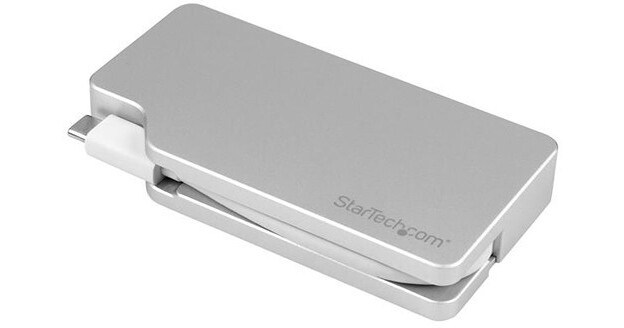
StarTech 4-in-1 USB Type-C A/V Multi-Adapter Hub

BH #STCDPVGDVHDM • MFR #CDPVGDVHDMDP
Print
StarTech 4-in-1 USB Type-C A/V Multi-Adapter Hub
Key Features
  • 1 x Mini DisplayPort 1.2 Output
  • 1 x HDMI Output
  • 1 x Dual Link DVI-D Output
  • 1 x VGA Output
Built with a sturdy aluminum housing and integrated Mini DisplayPort 1.2, HDMI, Dual Link DVI-D, and VGA outputs, as well as an integrated USB Type-C cable, the 4-in-1 USB Type-C A/V Multi-Adapter Hub from StarTech allows users to connect their USB Type-C system, such as the Apple MacBook, to an external Mini DisplayPort, HDMI, Dual Link DVI-D, or VGA display. Please bear in mind that in order to pass a DisplayPort video signal through the USB Type-C port, your system must support DP alt mode.
More Details
In Stock
No Store Display
Free Shipping for this Item
Ask an Expert
800-606-6969

StarTech CDPVGDVHDMDP Overview

Built with a sturdy aluminum housing and integrated Mini DisplayPort 1.2, HDMI, Dual Link DVI-D, and VGA outputs, as well as an integrated USB Type-C cable, the 4-in-1 USB Type-C A/V Multi-Adapter Hub from StarTech allows users to connect their USB Type-C system, such as the Apple MacBook, to an external Mini DisplayPort, HDMI, Dual Link DVI-D, or VGA display. Please bear in mind that in order to pass a DisplayPort video signal through the USB Type-C port, your system must support DP alt mode.

This adapter supports a maximum digital resolution of 3840 x 2160 and a maximum analog resolution of 1920 x 1200. Using the Mini DisplayPort or HDMI outputs, resolutions of 3840 x 2160, 2560 x 1600, 1920 x 1200, 1920 x 1080, and 1280 x 720 are supported, while the Dual Link DVI-D and VGA outputs support resolutions of 1920 x 1200, 1920 x 1080, and 1280 x 720. Additionally, the Mini DisplayPort and HDMI outputs support 7.1-channel surround sound. Please note that only one video output may be used at a time. If multiple outputs are used, only one will function.

The 4-in-1 USB Type-C A/V Multi-Adapter Hub is also compatible with Thunderbolt 3 devices that are capable of outputting a DisplayPort signal. It is VESA certified, utilizes plug-and-play installation, and its small footprint and lightweight design mean it won't take up much room in your workspace, while also making it easily portable for on-the-go use.

General Features
All-In-One Video Connectivity
Instead of filling your laptop bag with different converters for different displays, this 4-in-1 adapter gives you all the video outputs you'll need. With VGA, DVI, HDMI and Mini DisplayPort outputs, this adapter lets you connect from your laptop's USB Type-C port to virtually any boardroom or classroom display, without the inconvenience of carrying a separate adapter for each display type.

With support for multiple video outputs and a small-footprint design, this adapter is a well-suited plug-and-play solution for travel or BYOD (Bring Your Own Device) applications around the office.
Built-In Cable Manager
The adapter features a built-in magnetic fastener for cable management. The magnet helps guide the breakout cable into place for quick and secure storage while traveling, ensuring the adapter is neatly stored in your travel bag.
Picture Quality - Up to UHD 4K
The HDMI and Mini DisplayPort outputs on this travel adapter support Ultra HD 4K resolutions, providing four times the picture quality of Full HD 1080p. The HDMI and Mini DisplayPort outputs are also backward compatible with lower resolutions, such as 1080p and 720p, so the adapter is also a good fit for your legacy video equipment. The VGA and DVI outputs also support HD resolutions up to 1920 x 1200, so you can still enjoy excellent video quality.

This travel adapter is compatible with USB Type-C Intel Thunderbolt 3 devices that are capable of outputting a DisplayPort signal.
DP alt Mode
The travel adapter is VESA certified to ensure compatibility with your DP alt mode computer. DP alt mode means your computer can pass a DisplayPort video signal through the USB Type-C port.
UPC: 065030863094

StarTech CDPVGDVHDMDP Specs

Interface
DP Alt Mode (Video) Only
Connector 1
1x USB-C Male
Connector 2
1x HDMI Female
1x Mini DisplayPort Female
1x VGA Female
1x DVI-D Female
Cable Length
0.4" / 10.2 mm
Active/Passive
Active
Maximum Resolution Support
3840 x 2160 at 60 Hz
Materials
Housing: Aluminum
Color
Silver
Certifications
HDCP 1.4/2.2, RoHS, WEEE
Dimensions
4.1 x 2.2 x 0.6" / 104.1 x 55.9 x 15.2 mm
Packaging Info
Package Weight
0.4 lb
Box Dimensions (LxWxH)
6.7 x 5.7 x 1.3"

StarTech CDPVGDVHDMDP Reviews

The device did not work

By kikeram
Rated 1 out of 5
Date: 2019-06-21

The device did not work with my macbook when connecting the DVI monitor flashes continuously :(

It just plain works!

By JeffVB
Rated 5 out of 5
Date: 2017-05-04

It was as simple as USB is supposed to be. Plug it in, watch it go.

See any errors on this page?

question

Does this dvi work with the 5k imac 2017? ( i want to use it for a projector)
Asked by: melody
Yes, you would have to use a Mini Display port to DVI adapter.
Answered by: Andrea O.
Date published: 2018-08-26

question

Will this work to hook up my hp 30 dual link dvi monitor to my 2014 mac pro?
Asked by: amy
Yes, this hub is dual-link DVI compatible.
Answered by: Michael M
Date published: 2019-09-26

question

Does this adapter support 4K 60Hz through HDMI?
Asked by: Anonymous
This adapter supports a maximum digital resolution of 3840 x 2160 and a maximum analog resolution of 1920 x 1200. Using the Mini DisplayPort or HDMI outputs, resolutions of 3840 x 2160, 2560 x 1600, 1920 x 1200, 1920 x 1080, and 1280 x 720 are supported, while the Dual Link DVI-D and VGA outputs support resolutions of 1920 x 1200, 1920 x 1080, and 1280 x 720. So in short, yes it does.
Answered by: James B.
Date published: 2018-08-26

question

May I connect my MacBook Pro to my 30 Apple Cinema Display (Dual Link DVDI-D)?
Asked by: Miguel R.
The StarTech 4-in-1 USB Type-C A/V Multi-Adapter Hub is compatible with 2016/2017 MacBook Pro's.
Answered by: James B.
Date published: 2018-08-26

question

Does this work with dell xps 13 935? I want to connect my laptop to an optima projector via USB type c to Hdmi port.
Asked by: Anonymous
This will allow USB-C to HDMI to Projector.
Answered by: Dana G.
Date published: 2018-08-26

question

Will this adapter drive more than one monitor at a time?
Asked by: Bruce W.
Yes it will depending on the video card's capacity.
Answered by: Andrea O.
Date published: 2018-08-26

question

Can my MacBook Air use this TB port to carry both HDMI to a monitor and TB to an external drive?
Asked by: Kevyn S.
Just tried this with my new Imac and a WD My Book external drive. Could not get the drive to mount or even show up in Apple Disk Utilities or WD disk Utilities, so I'm thinking no.
Answered by: Tim D.
Date published: 2019-04-10
  • y_2026, m_7, d_16, h_8CST
  • bvseo_bulk, prod_bvqa, vn_bulk_3.0.48
  • cp_1, bvpage1
  • co_hasquestionsanswers, tq_7
  • loc_en_US, sid_1262155, prod, sort_[SortEntry(order=HAS_STAFF_ANSWERS, direction=DESCENDING)]
  • clientName_bhphotovideo
Whatever You Need, We've Got It