
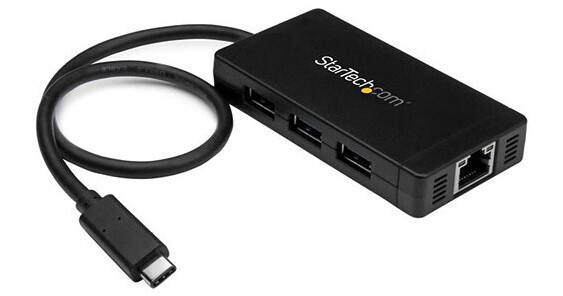
Turn a USB Type-C port on your laptop into three USB Type-A ports (5Gbps) and one Gigabit Ethernet port. If you have a USB-C™ equipped laptop, but lack other important connection ports, then this hub can help. It couples your USB peripheral and RJ45 network connections into a single, convenient combination hub. USB 3.0 is also known as USB 3.1 Gen 1.
Through the USB-C host connector, this hub gives you three traditional USB-A ports, and a Gigabit Ethernet connection, making it a must-have laptop accessory. Plus, the integrated 30 cm (12 in.) cable lets you place the hub, your devices, and your network connection, exactly where you need them.
It's ideal for virtually any USB-C equipped laptop, such as the Chromebook Pixel™, the Dell™ Latitude 11 5000 2-in-1, and Dell XPS 12.
Take advantage of USB-C
This dynamic USB 3.0 hub integrates an easy-to-use USB Type-C™ connector. It's small and reversible, which makes for easier insertions, and you can connect the plug with either side facing up, which means less risk of damaging your ports and less frustration.
While your USB-C equipped laptop, or MacBook is lightweight and portable, it might be missing vital connectivity ports, such as wired Internet. Because this hub offers a Gigabit Ethernet port, you can connect to a network in locations were Wi-Fi® is unreliable or unavailable.
Compact design for portability or permanent placement
With a small footprint and lightweight housing, you can easily tuck the hub and the included power adapter into your laptop bag to expand your connectivity when you're traveling.
Plus, the compact USB 3.0 hub takes up minimal space on a desk, so it fits perfectly in office, hot-desk (short-term guest), and BYOD workstation environments.
Extended-length cable eliminates aggravation
The hub's built-in USB cable is long enough to reach your laptop or tablet's USB 3.0 port, regardless of where the port is located. Now, you can eliminate the worry and frustration when your hub's built-in cable is too short and doesn't reach your laptop's USB port location.
Plus, the extended-length cable provides you with more desk placement options, which makes it easier to create a comfortable, space-efficient work area.
Save money and time
This easy-to-use hub is natively supported in most operating systems, and you can install it quickly, without having to install additional drivers or software. You can also avoid the nuisance and cost of purchasing new devices, by using the USB 3.0 hub with your current USB 2.0 and 1.x devices.
The HB30C3A1GE is backed by a StarTech.com 2-year warranty and free lifetime technical support.