Video Chat with a Pro Video Expert - Live

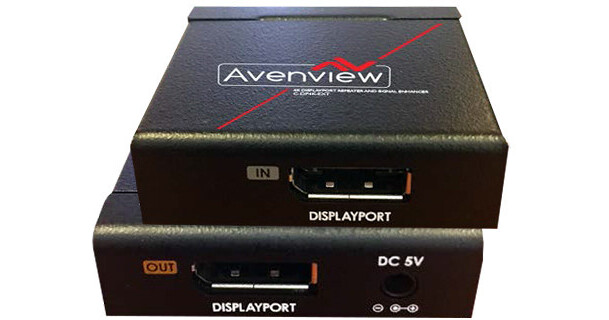
Avenview 4K DisplayPort Repeater and Signal Enhancer

BH #AVCDP4KEXT • MFR #C-DP4K-EXT
Print
Avenview 4K DisplayPort Repeater and Signal Enhancer
Key Features
  • Pair with DisplayPort 1.2a Fiber Cable
  • Carry DP Signal up to 131' to 4K Display
  • Boosts Quad GPU Power Signal
  • Removes Digital Noise
The Avenview 4K DisplayPort Repeater and Signal Enhancer is designed to pair with optional DisplayPort fiber cables to carry a DCI 4K DisplayPort signal at extended distances to a 4K display. It carries the signal up to 131' over fiber, and Avenview recommends their successfully tested DisplayPort 1.2a fiber cable series, which includes the 131' FO-DP4K-40-MM cable.
More Details
Special Order
Expected availability: 2-4 Weeks
No Store Display
Free Standard Shipping
Protect Your Gear
Add a protection plan from $13.99
Ask an Expert
800-606-6969

Avenview C-DP4K Overview

The Avenview 4K DisplayPort Repeater and Signal Enhancer is designed to pair with optional DisplayPort fiber cables to carry a DCI 4K DisplayPort signal at extended distances to a 4K display. It carries the signal up to 131' over fiber, and Avenview recommends their successfully tested DisplayPort 1.2a fiber cable series, which includes the 131' FO-DP4K-40-MM cable.

Connect your DisplayPort source to the repeater using a standard DisplayPort cable, sold separately, and then connect the repeater to your 4K display over fiber. To maintain image quality, the repeater boosts the power signal of your source whenever necessary. If less than 3.3V is provided from the source, the booster will kick in, and this is one of the main features of the repeater. This can happen if your source has a multi-output graphics card, such as a Quad GPU, in which case the voltage of the power signal drops a certain amount when the signal is distributed. The repeater corrects and stabilizes the power signal by regenerating it. Furthermore, the repeater additionally enhances the image being carried by cleaning out the digital noise in it.

The device features a metal construction and compact design so that it's robust and can be installed out of sight.

Note:
1) Requires DisplayPort fiber cable up to 131'. Avenview recommends their successfully tested DisplayPort 1.2a cables, including the 131' FO-DP4K-40-MM cable.
Key Features
  • Pair with optional DisplayPort fiber cables to carry a DisplayPort signal up to 131' to a 4K display
  • Supports up to DCI 4K (4096 x 2160) resolution at 60 Hz
  • Boosts power signal to maintain image quality, useful for DisplayPort sources using multi-output GPUs
  • Enhances image quality by removing digital noise
  • Metal construction and compact design for seamless installation
  • Supports data rates up to to 5.4 Gb/s
  • DPCD signal compliant
  • Plug-and-play operation
UPC: 606825937509

Avenview C-DP4K Specs

Input
1 x DisplayPort 1.2a 20-pin female
Output
1 x DisplayPort 1.2a 20-pin female
Video Bandwidth
4 lanes, 21.6 Gb/s (HBR2)
Supported Resolution
Up to 4096 x 2160 at 60 Hz
Power Supply
5 VDC, 2 A
Chassis Material
Metal
ESD Protection
Human Body Model: ±8 kV (air-gap discharge) and ±4 kV (contact discharge)
Operating Temperature
32 to 104°F / 0 to 40°C
Storage Temperature
-4 to 140°F / -20 to 60°C
Relative Humidity
20 to 90% RH (no condensation)
Dimensions
2 x 0.6 x 2" / 5.1 x 1.5 x 5.1 cm
Weight
0.17 lb / 77 g
Packaging Info
Package Weight
0.755 lb
Box Dimensions (LxWxH)
6.45 x 5.75 x 2.65"

Avenview C-DP4K Reviews

Excellent

By Matt
Rated 5 out of 5
Date: 2018-03-19

This does exactly what it’s supposed to do. I have a 4K Ben Q monitor and a 2015 MacBook Pro that I have running in another room because of fan noise in my studio. I have an optical thunderbolt cable but couldn’t get 4K 60hz at the tail end of my Thunderbolt Daisy chain. No cable would allow me to get 4K at 60hz at the distance I needed. The longest cable run I could do was 6ft or so and that was unreliable. I got a very short DP cable run directly into the repeater and then I ran a 25ft display port cable outside the room and tacked it to the wall. Works perfectly. Make sure you have the shortest possible cable running directly to this box from the source. This is a great solution and doesn’t require you to spend $350+ on optical cabling that dies after a couple years because the lasers and sensors overheat.

See any errors on this page?
Whatever You Need, We've Got It