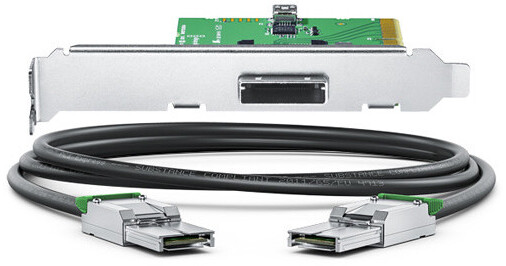
Connect your UltraStudio 4K Extreme to your computer via PCIe using the PCIe Cable Kit from Blackmagic Design. The kit includes a high-speed Gen 3 PCI express plug-in card and cable, and delivers higher data transfer speeds than Thunderbolt. The PCIe adapter card needs to be installed in your computer's PCIe slot and the cable connects your UltraStudio 4K Extreme's PCIe port to the PCIe port at the back of your computer.
Ask Our Experts800-606-6969
Hello, Log InAccount & Orders
Video Chat with a Pro Video Expert - Live
Key Features
- For UltraStudio 4K Extreme
- PCIe Adapter Card & Cable
- Faster than Thunderbolt
Connect your UltraStudio 4K Extreme to your computer via PCIe using the PCIe Cable Kit from Blackmagic Design. The kit includes a high-speed Gen 3 PCI express plug-in card and cable, and delivers higher data transfer speeds than Thunderbolt. The PCIe adapter card needs to be installed in your computer's PCIe slot and the cable connects your UltraStudio 4K Extreme's PCIe port to the PCIe port at the back of your computer.
More DetailsBlackmagic Design BDLKULSR4KEXTSPK Overview
Blackmagic Design BDLKULSR4KEXTSPK Specs
| Compatibility |
Packaging Info
| Package Weight | |
| Box Dimensions (LxWxH) |
Blackmagic Design BDLKULSR4KEXTSPK Reviews
See any errors on this page?
Hi there, what is the cable length? Thanks!
Good question. It is two meters.
Date published: 2024-06-02
Will this PCI cable kit help connect Cintel ...
Will this PCI cable kit help connect Cintel scanner to a Windows workstation?
The Blackmagic Design PCIe Cable Kit for UltraStudio 4K Extreme (BH #BLKULSR4TSPK) is compatible with the Cintel scanner with a Windows workstation.
Date published: 2024-06-02
