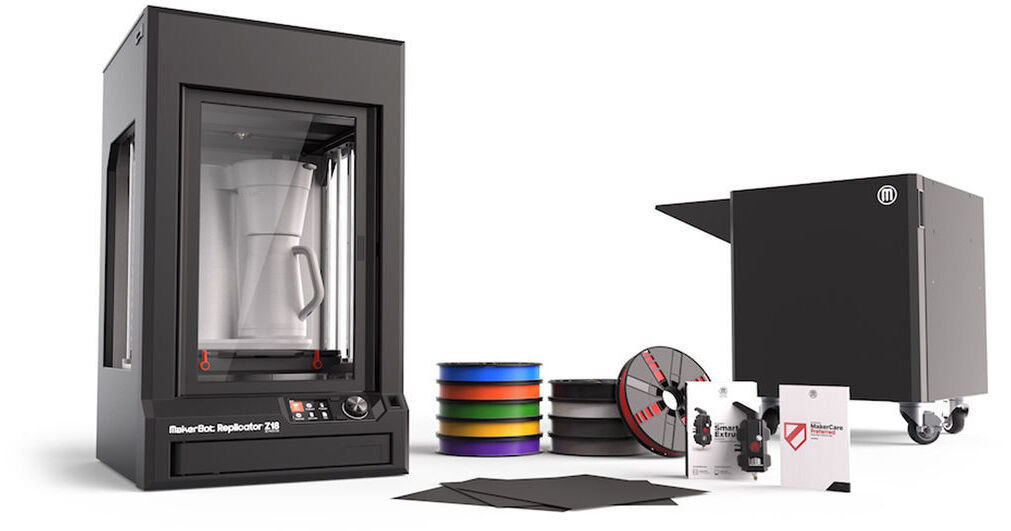
MakerBot Z18 Essentials Pack with 3-Year MakerCare Preferred Protection Plan

BH #MAZ18PACK3 • MFR #Z18PACK3
Print
MakerBot Z18 Essentials Pack with 3-Year MakerCare Preferred Protection Plan
Key Features
  • Includes the Replicator Z18
  • Includes a Smart Extruder+
  • Includes a 10-Pack of PLA Filament
  • Includes MakerBot Cart for the Z18
The Z18 Essentials Pack from MakerBot combines several basic items that users will need in order to get started with 3D printing. Included with this manufacturer's bundle are the MakerBot Replicator Z18 3D Printer, a Smart Extruder+, a large 10-pack of PLA filament, a MakerBot Cart for the MakerBot Replicator Z18, a pack of Z18 Build Plate Tape, and a MakerCare Preferred Card, which provides three years of coverage under the MakerCare Preferred Protection Plan.
More Details
No Longer Available
No Store Display
Ask an Expert
800-606-6969
Kit Contains:

The Z18 Essentials Pack from MakerBot combines several basic items that users will need in order to get started with 3D printing. Included with this manufacturer's bundle are the MakerBot Replicator Z18 3D Printer, a Smart Extruder+, a large 10-pack of PLA filament, a MakerBot Cart for the MakerBot Replicator Z18, a pack of Z18 Build Plate Tape, and a MakerCare Preferred Card, which provides three years of coverage under the MakerCare Preferred Protection Plan.

MakerBot Replicator Z18 3D Printer

The Replicator Z18 3D Printer from MakerBot allows you to print large, detailed objects up to 12" in width and depth, and up to 18" in height. To ensure accurate printing and to minimize warping even throughout lengthy print jobs, the Z18 features a heated build chamber to maintain a consistent temperature, and a polycarbonate ABS build plate that is factory and resistant to temperature extremes.

For on-board control of your printer, the Z18 features a 3.5" full-color LCD display and intuitive dial. Access your object library, see previews of your 3D model files, and employ utilities to set up and maintain your 3D printer.

The Z18 incorporates an on-board 320 x 240 camera for print monitoring and sharing to MakerBot Thingiverse and social networks. Accessible from the MakerBot Print software and MakerBot Mobile App, the Replicator Z18 also automatically takes reference pictures of final prints and stores them in your cloud storage library.

Free downloadable software, MakerBot Print, helps you find, organize, and prepare your 3D files for printing. Send files to your Replicator Z18 over a USB or Ethernet cable, or insert a USB flash drive with your file directly into the printer. The Z18 is compatible with Mac, Windows, and Linux computers.

Ultra-Tall Build Volume
The chief feature of the Z18 is its significant build volume. Print an object an entire foot in length and width, and up to a foot and half in height.
Supports XL and XXL Filament Spools
MakerBot designed extra-large capacity filament spools expressly for the Z18, to ensure that your large, lengthy project can print without interruptions for adding more filament. XL spools supply 5 lb of PLA filament, while XXL spools supply 10 lb. The Z18 has a push-to-open drawer at the base to hold a large spool of filament, but XL and XXL spools must be fitted into a filament case or other spool system.
MakerBot Replicator Smart Extruder+
The MakerBot Replicator Smart Extruder+ detects filament absence and automatically pauses your print. It can also send notifications to the MakerBot Mobile app. The Smart Extruder+ is easily removable and replaceable if necessary.
Heated Build Chamber
The Z18 features a heated chamber that maintains an even temperature during lengthy print jobs that can last for days. Keeping your print at an even temperature helps prevent curling and warping.
Flexible Build Plate
The Z18's build plate is made of flexible polycarbonate plastic which makes it easier to remove your prints. Instead of scraping and peeling your finished object from the build plate, which is especially difficult with the large print sizes made possible by the Z18, simply flex and bend the polycarbonate build plate until your print is completely detached.
On-Board Camera
The Replicator Z18 has an on-board camera for print monitoring and easy sharing to MakerBot Thingiverse and social networks. It is accessible through the MakerBot Print software and automatically takes reference pictures of final prints and saves them to your cloud storage library.
3.5" Full Color LCD Display
With a 3.5" full-color LCD display, you'll be able to access your object library and see previews of your 3D model files right on the Replicator Z18. The on-board interface and intuitive dial are designed to provide a user-friendly experience; while the on-board utilities help you set up and maintain your printer.
Four Ways to Print
Connect to your Replicator Z18 in any of four ways - via USB stick, USB cable, Ethernet cable, or wirelessly via Wi-Fi.
Full-Featured Software
The MakerBot Desktop software is a free download from MakerBot. It allows you to store, organize, and access 3D design files in your personal cloud-enabled library. You can also find, buy, and prepare your files from one central location.
Software Supported 3D File Types
MakerBot (.makerbot), STL (.stl), SolidWorks (.sldprt, .sldasm), InventorOBJ (.ipt, .iam), IGES (.iges, .igs), STEP AP203/214 (.step, .stp), CATIA (.CATPart, .CATProduct), Wavefront Object (.obj), Unigraphics/NX (.prt), Solid Edge (.par, .asm), ProE/Creo (.prt, .prt., .asm, .asm.), VRML (.wrl), Parasolid (.x_t, .x_b)
Filament Compatability
PLA and MakerBot Tough PLA
Customer Support
MakerBot Support offers comprehensive MakerCare coverage plans and responsive expertise from those who know MakerBot products best. Their support site also offers both intelligent troubleshooting and in-depth product information.
MakerBot Smart Extruder+ for the Replicator Z18

Compatible with 5th generation or newer models of the Replicator Z18, the Smart Extruder+ from MakerBot is a user-swappable spare or replacement extruder that has been tested for over 160,000 cumulative hours to help ensure greater print success over time and to deliver dependable and consistent 3D printing performance. A spare extruder also helps to ensure minimal downtime.

General Features
Meet the Smart Extruder+
Enjoy ease of use and reliability when using MakerBot PLA filament with the Smart Extruder+
Keep Reliability Close at Hand
The Smart Extruder+ was rigorously tested for over 160,000 hours to help ensure greater print success over time. It comes backed by a limited 6-month warranty.
Keep a Backup and Keep on Printing
Keeping a spare extruder on hand helps to ensure minimal downtime and uninterrupted results.
MakerBot 1.75mm PLA Filament (Large Spool, 10-Pack)

This 10-pack of 1.75mm PLA Filament from MakerBot contains one large, 2 lb spool of each MakerBot True Color filament - True Red, True Orange, True Yellow, True Green, True Blue, True Purple, True Black, True White, Cool Gray, and Warm Gray.

This filament is used with MakerBot PLA Printers to print 3D objects.  Since PLA, or polylactic acid, is a bioplastic derived from corn, it doesn't emit toxic fumes when melted in the course of 3D printing.

Use this filament with 3D printers intended to work specifically with PLA, since they are engineered to cool the object rapidly after extrusion so that the PLA will retain its shape.

MakerBot Cart for the MakerBot Replicator Z18 (Black)

The black MakerBot Cart for the MakerBot Replicator Z18 provides convenient access for your MakerBot Replicator Z18 3D printer (sold separately). It provides ergonomic height and is made of powder-coated steel. It has an interior shelf and additional storage space for filaments and 3D printing accessories. There is also an exterior shelf to hold the MakerBot Filament Case (sold separately). With four wheels on the bottom, the MakerBot Cart allows you to move the Replicator Z18 from one place to another.

Compatible with the MakerBot Replicator Z18 3D printer
Casters enable easy movement
Ergonomic height
Interior storage space and shelf for filament and 3D printing accessories
Exterior shelf to hold the MakerBot Filament Case
Made of powder-coated steel
MakerBot 3-Year MakerCare Preferred Protection Plan for the Replicator Z18 3D Printer

The 3-Year MakerCare Preferred Protection Plan from MakerBot provides three years of coverage for your Replicator Z18 3D Printer, with a 1-business day response time and coverage for unlimited qualifying incidents. If this warranty is not purchased, then your Replicator Z18 will be covered by MakerBot's limited six-month warranty. However, if you do opt to add these three years of protection, it will need to be bought within 60 days of the purchase date of your Replicator Z18 and is valid for three years from the purchase date of your Replicator Z18. Please be aware that the maximum amount of coverage that can be purchased is three years. This warranty cannot be extended any further.

Kit Contains:

MakerBot Replicator Z18 3D Printer

Printer
Print Technology
Fused Filament Fabrication (FFF), Marketed as Fused Deposition Modeling (FDM)
Build Volume
11.8 x 12 x 18" / 30.0 x 30.48 x 45.7 cm
Number of Extruders
1
Layer Resolution
XY Axis: 100 to 300 micron / 0.1 to 0.3 mm (3 Settings)
Supported Extruder Nozzle Diameter
0.4 mm
Positioning Precision
XY Axis: 11 micron / 0.011 mm
Z Axis: 2.5 micron / 0.0025 mm
Filament Compatibility
1.75 mm Diameter:
PLA
Build Area
Build Area Type
Enclosed
Build Plate Features
Auto Leveling
Build Plate Composition
PC-ABS
Filament Spool Storage
External
3D Scanner
No
Monitoring Camera
Yes
Connectivity
System Connection
1x RJ45
1x USB-B 2.0
1x USB-A 2.0
Wi-Fi
Yes
Software
Supported Operating Systems
Windows 7
Windows 8
Windows 10
macOS X 10.9 or Later
Supported 3D File Types
.makerbot, .obj, .stl, .thing
General
AC Input Power
100 to 240 VAC, 50 / 60 Hz
Operating Temperature
60 to 75°F / 15 to 23°C
Storage Temperature
32 to 100°F / 0 to 37°C
Dimensions (W x H x D)
22.2 x 19.4 x 33.6" / 56.39 x 49.28 x 85.34 cm
Weight
90 lb / 40.8 kg
Packaging Info
Package Weight
123.5 lb
Box Dimensions (LxWxH)
38.5 x 28 x 25"

MakerBot Z18 E ential Reviews

See any errors on this page?
Whatever You Need, We've Got It