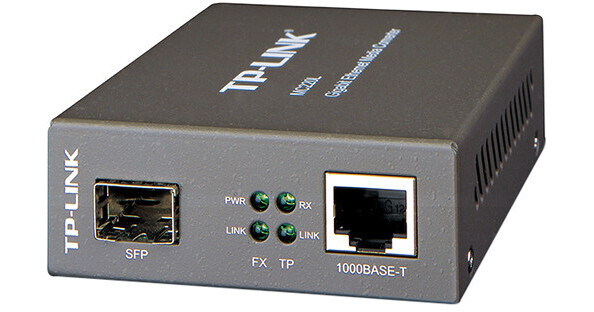
TP-Link MC220L Gigabit SFP Media Converter

BH #TPMC220L • MFR #MC220L
Print
TP-Link MC220L Gigabit SFP Media Converter
Key Features
  • 802.3ab/z/x Network Standards
  • 1 x Gigabit SFP Port
  • 1 x Gigabit RJ45 Ethernet Port
  • Power / Link / Transmit LED Indicators
Convert 1000BASE-SX/LX/LH fiber to 1000Base-T copper media or vice versa with the MC220L Gigabit SFP Media Converter from TP-Link. This media converter supports the 802.3ab, 802.3z, and 802.3x network standards and extends fiber distance up to 0.31 miles for multi-mode fiber and 6.21 miles for single-mode fiber. In addition to extending the transmission distances, the MC220L Media Converter also supports data transfer rates of up to 1000 Mbps in Full-Duplex mode for both TX and FX ports. Installation is simple as this device comes equipped with a single Gigabit SFP port, a single Gigabit Ethernet port, and an external power adapter.
More Details
Top Seller
In Stock
No Store Display
Protect Your Gear
Add a protection plan from $3.99
Ask an Expert
800-606-6969

TP-Link MC220L Overview

Convert 1000BASE-SX/LX/LH fiber to 1000Base-T copper media or vice versa with the MC220L Gigabit SFP Media Converter from TP-Link. This media converter supports the 802.3ab, 802.3z, and 802.3x network standards and extends fiber distance up to 0.31 miles for multi-mode fiber and 6.21 miles for single-mode fiber. In addition to extending the transmission distances, the MC220L Media Converter also supports data transfer rates of up to 1000 Mbps in Full-Duplex mode for both TX and FX ports. Installation is simple as this device comes equipped with a single Gigabit SFP port, a single Gigabit Ethernet port, and an external power adapter.

  • Works at 1000 Mbps in Full-Duplex mode for both TX and FX ports
  • Supports auto MDI/MDIX for TX port
  • Provides switch configuration of force/auto transfer mode for FX port
  • FX port supports hot-swappable
  • Extends fiber distance up to 0.31 miles for multi-mode fiber and 6.21 miles for single-mode fiber
  • Easy-to-view LED indicators provide status to monitor network activity easily
  • External power supply
UPC: 840460604567

TP-Link MC220L Specs

Standards and Protocols
IEEE 802.3ab
IEEE 802.3z
IEEE 802.3x
Basic Functions
Full Duplex Flow Control (IEEE 802.3x)
Extends Fiber Distance up to 0.5km Using 50/125um Fiber
Ports
1 x Gigabit SFP Port
1 x 1000 M RJ45 Port (Auto MDI/MDIX)
Wavelength
Depends On the Used SFP Module
Network Media
1000BASE-FX
Multi-Mode/Single-Mode SFP Module
1000BASE-X
Multi-Mode/Single-Mode SFP Module
1000BASE-T
UTP Category 5, 5e, 6 Cable (Maxium 328' / 100 m)
EIA/TIA-568 100Ω STP (Maximum 328' / 100 m)
LED Indicators
PWR, LINK, RX
Power Supply
External Power Adapter
Max Power Consumption
1.7 W
Certifications
FCC, CE, RoHS
Temperature & Humidity
Operating Temperature: 32 to 104°F / 0 to 40°C Storage Temperature: -40 to 158°F / -40 to 70°C Operating Humidity: 10 to 90% Non-Condensing Storage Humidity: 5 to 90% Non-Condensing
Dimensions
3.7 x 2.9 x 1.1" / 94 x 73 x 27 mm
Weight
Not Specified byManufacturer
Packaging Info
Package Weight
0.95 lb
Box Dimensions (LxWxH)
8.031 x 6.535 x 2.284"

TP-Link MC220L Reviews

Does what it's supposed to

By Howard
Rated 5 out of 5
Date: 2026-06-08

We purchased two of these for quick fiber connectivity tests. They work with a variety of fiber SFPs, both multi-and single-mode.

Works as expected when paired with Ubiquiti UACC-OM-SM-1G-S

By John
Rated 4 out of 5
Date: 2024-07-27

You're probably better off getting a switch with a faster SFP+ port... but for just adding a 1.25Gbit SFP full duplex module throttled to 1000BaseT speeds this better than generic media converter is OK. Don't expect detailed status on what your SFP module is doing. The main reason for choosing this model is to use SFP modules that you can migrate to new equipment in the future, getting rid of this 9VDC & separate adapter points of failure. I would prefer a module rated 5-12VDC, which this may support, but for now I am sticking with the TP-LINK 9VDC adapter.

See any errors on this page?

Are these hardware version 2 or newer? They need ...

Are these hardware version 2 or newer? They need to be to be compatible with the TL-MC1400 and TL-FC1420 rack mount chassis.
Asked by: Amy
The TP-Link MC220L Gigabit SFP Media Converter BH #TPMC220L version we are offering are V4.6 or later.
Answered by: Mark S
Date published: 2022-03-04

Can I use a bidirectional SFP on this? If so, ...

Can I use a bidirectional SFP on this? If so, what brand would be compatible (CISCO, Netgear, etc.)?
Asked by: Guy
The TP-Link MC220L Gigabit SFP Media Converter BH #TPMC220L is compatible with: For MC200CM: 850nm For MC210CS: 1310nm For MC220L: depends on the used SFP module For MC200CM: 62.5/125μm multi-mode fiber (≤220m); 50/125μm multi-mode fiber (≤550m) For MC210CS: 9/125μm single-mode fiber (≤15km) For MC220L: depends on the used SFP module It should work with other brands as well.
Answered by: Mark S
Date published: 2022-05-12
  • y_2026, m_7, d_14, h_11CST
  • bvseo_bulk, prod_bvqa, vn_bulk_3.0.47
  • cp_1, bvpage1
  • co_hasquestionsanswers, tq_2
  • loc_en_US, sid_1309772, prod, sort_[SortEntry(order=HAS_STAFF_ANSWERS, direction=DESCENDING)]
  • clientName_bhphotovideo
Whatever You Need, We've Got It