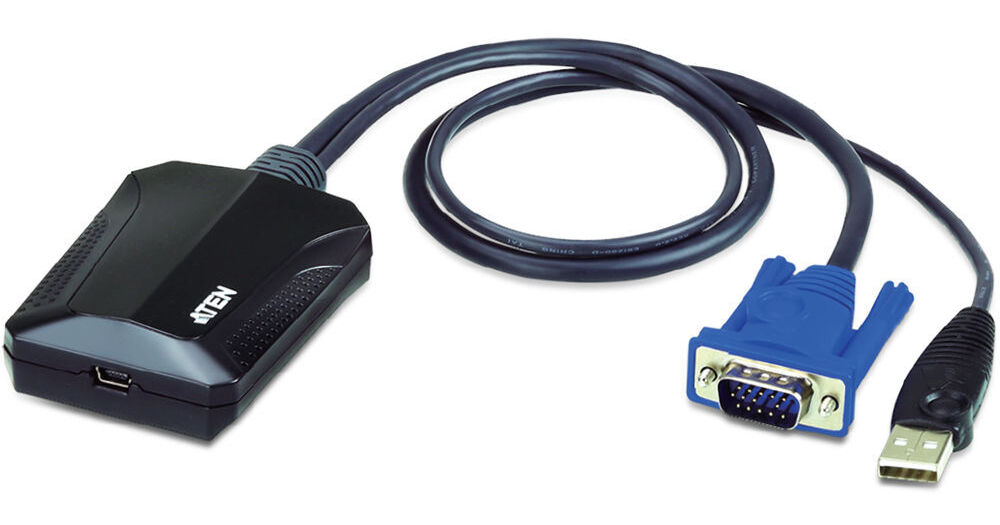
ATEN Portable Laptop USB Console Crash Cart Adapter

BH #ATCV211 • MFR #CV211
Print
ATEN Portable Laptop USB Console Crash Cart Adapter
Key Features
  • Direct Laptop-to-Computer Connection
  • USB 2.0 and VGA Interfaces
  • BIOS-Level Access
  • GUI Console
The ATEN CV211 Portable Laptop USB Console Crash Cart Adapter lets you directly connect your laptop to servers, desktops, kiosks, ATMs, and other systems, so you can perform system upgrades or repairs. The adapter connects to a laptop via an included USB cable and has integrated VGA and USB 2.0 Type-A cables for the host system. The adapter offers BIOS-level access, bi-directional file transfers, hotkey macros, video recording, and onscreen capturing. In addition, it supports resolutions of up to 1920 x 1200 and draws power from a bus-powered USB port.
More Details
In Stock
No Store Display
Free 2-Day Shipping
Ask an Expert
800-606-6969

ATEN CV211 Overview

The ATEN CV211 Portable Laptop USB Console Crash Cart Adapter lets you directly connect your laptop to servers, desktops, kiosks, ATMs, and other systems, so you can perform system upgrades or repairs. The adapter connects to a laptop via an included USB cable and has integrated VGA and USB 2.0 Type-A cables for the host system. The adapter offers BIOS-level access, bi-directional file transfers, hotkey macros, video recording, and onscreen capturing. In addition, it supports resolutions of up to 1920 x 1200 and draws power from a bus-powered USB port.

For easy operation and quick remote access, the adapter comes with useful functions that provide file applications, OS patching, diagnostic testing, and software installations through an intuitive graphical user interface (GUI). To view the target computer's desktop without using a scroll bar, you can automatically or manually resize the GUI console's window to the resolution of the remote computer. There's also a built-in cable clip for managing cables while in-use or during transport.

Direct Laptop-to-Computer Desktop Access
Transforms a laptop into a mobile console for servers, computers, kiosks, and ATMs
Virtual media enables file applications, OS patching, diagnostic testing, and software installation
Upgradable firmware keeps the unit up to date
Desktop scaling—user can adjust the size/resolution of the Remote desktop window by size or ratio
Server and Computer Troubleshooting
BIOS-level access provides total control of a server during hardware and operating system failures
Bi-directional file transfers between a laptop and target computer
Video recording and image capturing features allow you to save a record of remote operations for future training and troubleshooting
Mouse DynaSync—automatically synchronizes the laptop and target computer's mouse movements
On-screen keyboard with multi-language support
Supports hotkey macros—define keystrokes that execute specific actions on the target computer to complete tasks efficiently and accurately
Ease of Use
Plug-and-Play—no software installation required on either side
Toolbar helps users easily operate all the functions from a single-click control panel within the remote view window
Adjustable video settings for optimal picture and performance
USB bus-powered design with hot-plugging support
Convenience
Integrated VGA and USB keyboard/mouse cables
Cable clip for managing cables
Supports analog video resolutions of up to 1920 x 1200 @ 60 Hz
Palm-size portability
UPC: 672792403736

ATEN CV211 Specs

Peripheral I/O
1x VGA Male
1x USB-A Male
KVM/Link I/O
1x Mini-USB Female
Operating Conditions
32 to 104°F / 0 to 40°C up to 80% Humidity
Storage Conditions
-4 to 140°F / -20 to 60°C
LED Indicators
Yes
Housing Dimensions
2.8 x 2.1 x 1.2" / 7.1 x 5.3 x 3.0 cm
Weight
0.3 lb / 0.1 kg
Packaging Info
Package Weight
0.54 lb
Box Dimensions (LxWxH)
6.25 x 4.7 x 2.35"

ATEN CV211 Reviews

See any errors on this page?

Is this compatible with MacOS Tahoe 26.2 on ...

Is this compatible with MacOS Tahoe 26.2 on macbook pro m2?
Asked by: David
I'm sorry, but this ATEN Portable Laptop USB Console Crash Cart Adapter (CV211) only supports macOS 10.15.17 or earlier. It will not support Tahoe 26.2.
Answered by: Jordan K
Date published: 2026-02-13
  • y_2026, m_7, d_7, h_13CST
  • bvseo_bulk, prod_bvqa, vn_bulk_3.0.46
  • cp_1, bvpage1
  • co_hasquestionsanswers, tq_1
  • loc_en_US, sid_1316715, prod, sort_[SortEntry(order=HAS_STAFF_ANSWERS, direction=DESCENDING)]
  • clientName_bhphotovideo
Whatever You Need, We've Got It