
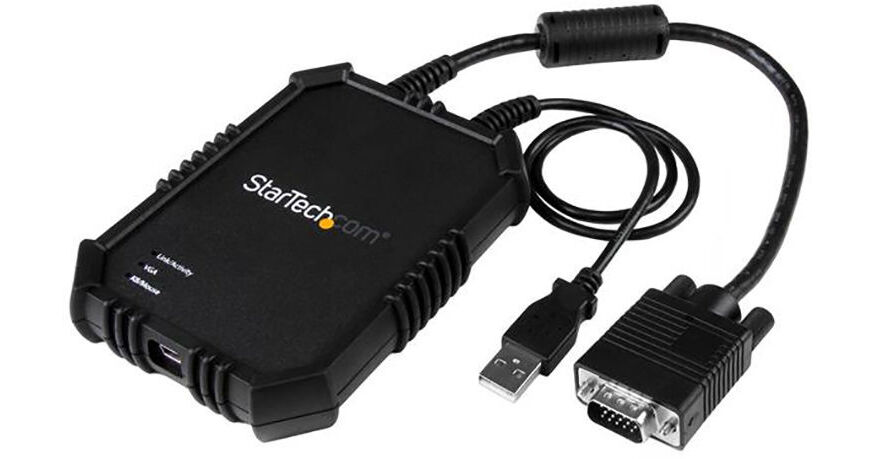
StarTech Laptop-to-Server KVM Console

BH #STNOTECNS02X • MFR #NOTECONS02X
Print
StarTech Laptop-to-Server KVM Console
Key Features
  • Turns Notebooks into Portable Consoles
  • For Accessing Servers, Kiosks, ATMs
  • Integrated VGA and USB Cables
  • Supports Resolutions up to 1920 x 1200
The StarTech Laptop-to-Server KVM Console lets you use a notebook's display, keyboard, and mouse as a set of peripherals for servers, kiosks, ATMs, and other computing systems. The KVM console provides BIOS-level control of a system that has a VGA port and a USB port, using its integrated cables. The VGA interface supports resolutions up to 1920 x 1200. The console connects to your notebook via an included USB cable, which also draws power from a bus-powered port. Software is available for transferring files from your laptop to the server as well as monitoring and capturing activities as videos. You can also take screenshots and scale the onscreen window to full-screen mode or smaller, without scroll bars. Moreover, the KVM console features a rubberized housing design for handling accidental drops.
More Details
In Stock
No Store Display
Free Expedited Shipping
Protect Your Gear
Add a protection plan from $49.99
Ask an Expert
800-606-6969

StarTech NOTECONS02X Overview

From Manufacturer

The StarTech Laptop-to-Server KVM Console lets you use a notebook's display, keyboard, and mouse as a set of peripherals for servers, kiosks, ATMs, and other computing systems. The KVM console provides BIOS-level control of a system that has a VGA port and a USB port, using its integrated cables. The VGA interface supports resolutions up to 1920 x 1200. The console connects to your notebook via an included USB cable, which also draws power from a bus-powered port. Software is available for transferring files from your laptop to the server as well as monitoring and capturing activities as videos. You can also take screenshots and scale the onscreen window to full-screen mode or smaller, without scroll bars. Moreover, the KVM console features a rubberized housing design for handling accidental drops.

Rubberized housing
Portability with a compact footprint as well as integrated KVM and USB cables
Plug-and-Play installation
Strain reliefs prevent wear and fatigue
Supports file-sharing and video-capture between your notebook and connected server
Optimized viewing with automatic video scaling that resizes the viewing panel to avoid scroll bars
Supports resolutions of up to 1920 x 1200
LED indicators for USB, video, and console link
Compatible with legacy and industrial devices
UPC: 065030862240

StarTech NOTECONS02X Specs

Key Specs
# of Systems Supported
1
Console I/O
1x Mini-USB Female
KVM I/O
1x VGA 15-Pin Male
1x USB-A Male
Supported Resolutions
1920 x 1200 @ 60 Hz
# of Systems Supported
1
Console I/O
1x Mini-USB Female
KVM I/O
1x VGA 15-Pin Male
1x USB-A Male
OS Compatibility
Linux / Windows / Windows Server / macOS
Supported Resolutions
1920 x 1200 @ 60 Hz
USB Keyboard/Mouse Emulation
No
Power Source
Bus Powered
Operating Conditions
32 to 104°F / 0 to 40°C up to 80% Humidity
Storage Conditions
-40 to 158°F / -40 to 70°C
Rack Mountable
No
Cable Length
15" / 38.1 cm (Host)
3" / 76.2 mm (Video)
6' / 1.8 m (USB)
Dimensions
4.5 x 3.5 x 0.9" / 111.0 x 88.0 x 22.0 mm
Weight
8.6 oz / 243.8 g
Packaging Info
Package Weight
1 lb
Box Dimensions (LxWxH)
11.8 x 6.4 x 2"

StarTech NOTECONS02X Reviews

Awful

By BlueVaGto
Rated 1 out of 5
Date: 2022-12-24

On Windows 11, this is useless. No video because the keyboard/mouse doesn't work. Can't follow your instructions to change from USB to PS2--greyed out. If you plug in a keyboard, the video will activate with a space bar. I've tried 3 Dell servers and a new Windows 11 Dell laptop and a Windows 10 Lenovo laptop. Same behavior. I think this has to go back to Amazon. Waste of $550.

Needs improvement.

By radmanrugg
Rated 3 out of 5
Date: 2017-10-07

KVM usually works. Mac Software: Right now I upgraded to High Sierra and the software stopped working. Trying to find a solution. Before that I often have to reset the video to get it to take a change in resolution during POST on some servers rather that automatically. The MAC software could use more keys (del) on the optional key window or user selectable keys to keep handy. Also the keys should be mapped to button in the window title and not in a separate window. It is nice that I can get to F keys which on a Mac is a bit of a pain to use the keyboard since they default to other functions. Could also use a Video reset button. Also could scale the video captured to scale to the current window size. It does to some degree but has grey areas around the video if the resolution is smaller than the window. Hardware: It is fairly rugged. It has 2 wire connections on one side (console side) and a USB plug hole on the other. So I have to fiddle with unplugging the USB and trying to coil up the cords on the other side which includes a giant RFI core on the Video cable and the giant video cable end. Its ends up being messier than it should be to be put in a backpack. Also if and pins get bent on the 15 pin VGA cord you are done with no way to repair. It would be a huge improvement if the console side (VGA / USB) had just connectors so you could 1) use any cable length you want 2) allow you to replace the video cable once they inevitably wear out due to a large number of insertion cycles and normal wear and tear. As it is the video cable is short and after a so many insertion cycles won't stay in the connectors under its own weight. If I could just plug a cable of my choice in, I could rest it on the floor with a longer set of cables. I did purchase VGA and USB extension cables that help but the connections are again a disturbance in ability to coil up when done. Over all this needs improvement. 1 Mac Software needs Video reset button to affect sensed resolution on console window or better detection in the first place 2 Video capture should scale up if window is bigger than the capture. 3 Mac Software needs User define-able keys on for extra keys (lots of keys I don't use and 1 I don't have (del key)). 4 Mac on screen hot keys should be allowed in the title bar as compared to another window. 5 Hardware needs video connectors directly on the unit for all 3 cables. 6 Case could use a design that allows cables to be wrapped around it for storage / transportation. But right now this is probably the best portable console you can get right now. So I am not directing you to anything else. Just hope Star Tech upgrades this thing before someone comes along and makes a better one.

See any errors on this page?
Whatever You Need, We've Got It