Video Chat with a Pro Video Expert - Live

StarTech DisplayPort UHD 4K Signal Booster/Extender

BH #STDPBOOST • MFR #DPBOOST
Print
StarTech DisplayPort UHD 4K Signal Booster/Extender
Special Order
Expected availability: 2-4 Weeks
No Store Display
Free Standard Shipping
Protect Your Gear
Add a protection plan from $11.99
Ask an Expert
800-606-6969

StarTech DPBOOST Overview

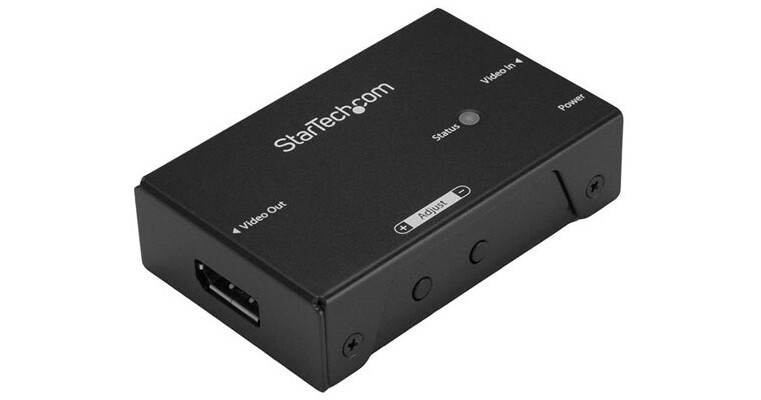
Amplify the strength of your DisplayPort signal to extend your video source up to 65 ft. over standard DP cabling. This DisplayPort signal booster lets you increase the signal strength of your DP video source using standard DisplayPort cables. You can achieve resolutions up to 4K at 60Hz, and depending on your desired resolution, the booster supports varying distances up to 65 ft. (20 m) away at 1080p 60Hz resolution. For inline installations, you can place the booster between two DisplayPort cables, up to 50 ft. in length at the video input, and up to 15 ft. in length at the video output.
Maintains Ultra HD 4K video signals
When extending DisplayPort over long distances using standard video cabling, higher resolutions can become unavailable. Using the DP signal booster ensures that you can depend on UHD resolutions up to 4K at 60Hz at up to 22 ft. (7 m). You can achieve even greater distances with lower resolution support - up to 4K at 30Hz, at up to 42 ft. (13 m), and 1080p at 60Hz at up to 65 ft. (20 m).
Easy and discreet installation
With its small form factor, the DisplayPort booster is easy to hide, for a discreet installation. It includes mounting hardware, so installing it is hassle-free. By extending your video signal using standard DP cables, the DisplayPort booster is a cost-effective alternative to more expensive extension systems that require the installation of a CAT5 or CAT6 cabling infrastructure.
Compatible with varying distances
The booster makes it easy to adjust your DisplayPort signal strength based on the distance of your cables, with equalization adjustment buttons. This means that you can adjust the amplification of your DisplayPort signal, to ensure your DisplayPort signal will be flawless even at distances up to 65 ft. (20 m). Support for varying distances makes the booster perfect for multi-device deployment across large institutions, such as boardrooms in corporate offices, classrooms in schools, or waiting rooms in hospitals, as these applications may require varied distances in different rooms.
The DPBOOST is backed by a 2-year StarTech.com warranty and free lifetime technical support.

Key Features
  • Discreet installation with a small form factor
  • Works at varying distances up to 65 ft. with a built-in equalization switch
  • Astonishing picture quality with support for 4K (30Hz) at up to 42 ft. away from your video source
Maintains Ultra HD 4K video signals
When extending DisplayPort over long distances using standard video cabling, higher resolutions can become unavailable. Using the DP signal booster ensures that you can depend on UHD resolutions up to 4K at 60Hz at up to 22 ft.
Easy and discreet installation
With its small form factor, the DisplayPort booster is easy to hide, for a discreet installation. It includes mounting hardware, so installing it is hassle-free. By extending your video signal using standard DP cables, the DisplayPort booster is a cost-effective alternative to more expensive extension systems that require the installation of a CAT5 or CAT6 cabling infrastructure.
Compatible with varying distances
The booster makes it easy to adjust your DisplayPort signal strength based on the distance of your cables, with equalization adjustment buttons. This means that you can adjust the amplification of your DisplayPort signal, to ensure your DisplayPort signal will be flawless even at distances up to 65 ft. (20 m). Support for varying distances makes the booster perfect for multi-device deployment across large institutions, such as boardrooms in corporate offices, classrooms in schools, or waiting rooms in hospitals, as these applications may require varied distances in different rooms.
UPC: 065030864220

StarTech DPBOOST Specs

General
Device Type
Video/audio extender
Form Factor
External
Networking
Connectivity Technology
Wired
Max Resolution
3840 x 2160
Max Transfer Distance
66 ft
Features
7.1 channel audio support
Expansion / Connectivity
Interfaces
1 x DisplayPort (input) female
1 x DisplayPort (output) female
Miscellaneous
Included Accessories
4 rubber feet
Cables Included
1 x USB power cable
Mounting Kit
Included
Compliant Standards
FCC, RoHS
Power
Power Device
External power adapter
Dimensions & Weight
Width
5.6 in
Depth
6.6 in
Height
2.5 in
Weight
2.29 oz
Manufacturer Warranty
Service & Support
Limited warranty - 2 years
Packaging Info
Package Weight
0.95 lb
Box Dimensions (LxWxH)
6.7 x 5.7 x 2.8"

StarTech DPBOOST Reviews

mostly works; hard to adjust

By fgmr
Rated 4 out of 5
Date: 2018-07-31

My three monitors are about 12' cable length from my computer, and two of them kept blanking out. With the boosters, one works fine and one works with occasional random blankouts. There are "up" and "down" adjustment buttons, but no feedback as to which of the "ten modes" you're in, or indication of if they wrap or what. This makes it hard to adjust.

Excellent!

By Manu
Rated 5 out of 5
Date: 2017-04-20

I needed this booster to use a 27" Eizo display 10 meters from a TouchBar MacBook Pro. I used a 1.80m Startech USB-C to Display Port cable from the MBP to the booster, and a 10m DP to DP cable from the booster to the screen. Turned all on, and everything worked fine. Not all the cables and booster I tried before worked. This one does.

See any errors on this page?

Does this do 4k 60 4:4:4?

Does this do 4k 60 4:4:4?
Asked by: Travis
the manufacturer has not provided the specifics on chroma sub sampling for this device
Answered by: Sean
Date published: 2021-03-04
  • y_2026, m_10, d_26, h_9CST
  • bvseo_bulk, prod_bvqa, vn_bulk_3.0.48
  • cp_1, bvpage1
  • co_hasquestionsanswers, tq_1
  • loc_en_US, sid_1338483, prod, sort_[SortEntry(order=HAS_STAFF_ANSWERS, direction=DESCENDING)]
  • clientName_bhphotovideo
Whatever You Need, We've Got It