Video Chat with a Pro Audio Expert - Live

PreSonus Faderport 16 Mix Production Controller

BH #PRFP16 • MFR #FADERPORT 16
Print
PreSonus Faderport 16 Mix Production Controller
Key Features
  • 16 Touch-Sensitive Motorized Faders
  • 16 High-Definition Scribble Strips
  • General Session and Transport Controls
  • Marker Creation and Navigation
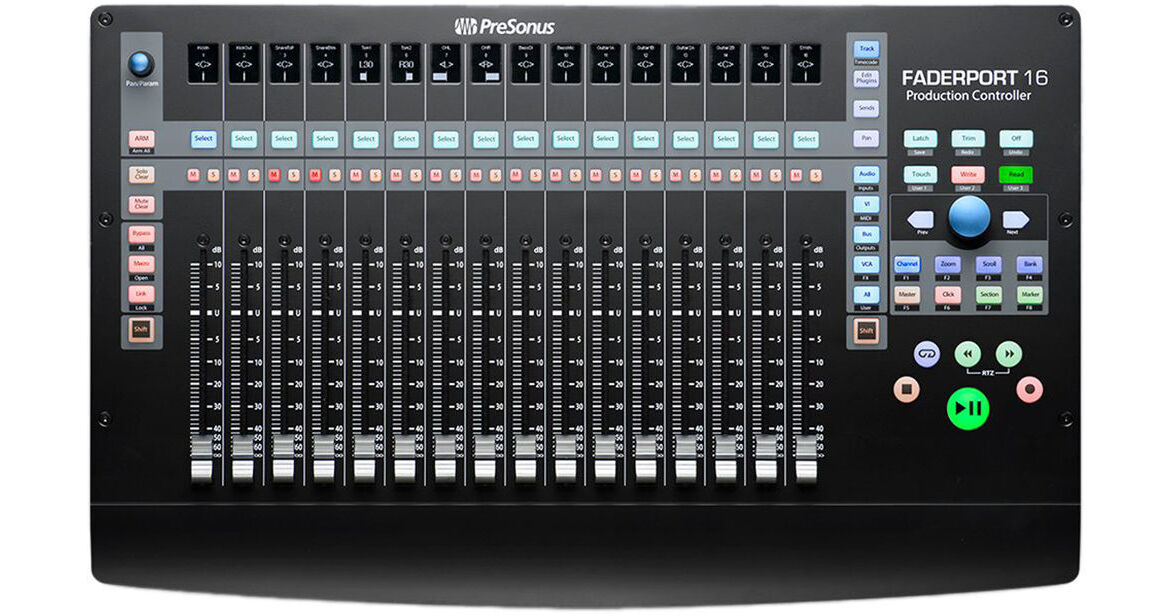
The PreSonus Faderport 16 is a 16-channel mix production controller featuring 16 100mm long-throw touch-sensitive motorized faders and 16 digital scribble-strip displays. Navigation, automation, and channel controls make mixing and getting around your favorite DAW fast and easy with compatibility for virtually any DAW host for Mac OS X or Windows. The controller supports HUI and Mackie Control emulations plus native control of Studio One.
More Details
Temporarily Out of Stock
No Store Display
Free 2-Day Shipping
Ask an Expert
800-606-6969

PreSonus Faderport 16 Overview

The PreSonus Faderport 16 is a 16-channel mix production controller featuring 16 100mm long-throw touch-sensitive motorized faders and 16 digital scribble-strip displays. Navigation, automation, and channel controls make mixing and getting around your favorite DAW fast and easy with compatibility for virtually any DAW host for Mac OS X or Windows. The controller supports HUI and Mackie Control emulations plus native control of Studio One.

Full transport controls are provided along with footswitch functionality for start and stop (footswitch available separately). General session operations such as solo/mute clear and marker creation and locate functions help speed up your workflow. Simply connect the supplied USB cable and external power supply to the Faderport 16, then power it up, and never go back to mixing with a mouse.

  • 16 touch-sensitive 100mm long-throw motorized faders
  • 16 high-definition digital scribble-strip displays
  • Complete Transport Controls: Play, Stop, Fast Forward, Rewind, Record, Loop, and Return to Zero
  • Drop Marker, Next/Prev Marker, Next/Prev Event
  • General Session Controls: Undo/Redo, Arm All, Solo/Mute Clear, Track Management, Click On/Off with tap tempo
  • Session Navigator provides quick control via Track Scroll, Channel Bank, Timeline Scroll, and much more
  • Channel Controls: Level, Pan, Solo, Mute, Rec Arm
  • Automation Controls: Touch, Latch, Trim, Write, Read, Off
  • Optional Fader Functionality: Plug-In Edit, Bus Sends, Pan
  • Compatible with Mac OS X and Windows
  • Native Studio One support and HUI and Mackie Control Universal emulation
  • Footswitch input for hands-free start/stop
  • USB 2.0 connectivity
UPC: 673454006272

PreSonus Faderport 16 Specs

System Requirements
Mac
OS X 10.8.5 or later (64-bit)
Intel Core 2 Duo processor (Intel Core i3 or faster recommended)
4 GB RAM (8 GB or more recommended)
USB 2.0 port
Internet connection for driver and bundled software installation

Windows
Windows 7 SP1, 8.1, or 10 (all 32-bit or 64-bit)
Intel Core 2 Duo processor (Intel Core i3 or faster recommended)
4 GB RAM (8 GB or more recommended)
USB 2.0 port
Internet connection for driver and bundled software installation

Note: 30 GB hard disk space and 1366 x 768 resolution monitor (high-dpi recommended) required for Studio One
Host Application Compatibility
Native Mode: PreSonus Studio One 3.5.3
HUI Emulation: Pro Tools 12
Mackie Control Emulation: Logic 10.4, Cubase 9.4, Ableton 9.7+, Sonar, and more
Faders
Quantity: 16
Throw: 3.9" / 100 mm
Type: Touch-sensitive and motorized
Resolution: 10-bit, 1024 steps
Display
16 x high-definition digital scribble-strip displays
Transport Controls
Play, Stop, Fast Forward, Rewind, Record, Loop, Return to Zero
Controls
Markers: Drop Marker, Next/Prev Marker, Next/Prev Event
General Session Controls: Undo/Redo, Arm All, Solo/Mute Clear, Timecode, Track Management, Click On/Off, four programmable User buttons, eight Function buttons, Macro, Parameter Link, Bypass
Session Navigation: Track Scroll, Channel Bank, Timeline Scroll, Horizontal Zoom, Vertical Zoom, Scrub, Nudge
Channel Controls: Level, Pan, Solo, Mute, Rec Arm
Automation Controls: Touch, Latch, Trim, Write, Read, Off
Optional Fader Functionality: Plug-In Edit, Bus Sends, Pan
Window View: Mix, Project, Transport, Undo
Console Management: Show/Hide: Audio Tracks, Inputs, MIDI Tracks, Buses, Outputs, VCAs, FX, Show All
Footswitch Input
1 x 1/4" jack
USB
USB 2.0 Type-B
Power Requirement
12 VDC, 1.2 A external power supply (included)
Dimensions
2.1 x 11.9 x 19.6" / 53.6 x 302.3 x 497.8 mm
Weight
8 lb / 3.6 kg
Packaging Info
Package Weight
12.35 lb
Box Dimensions (LxWxH)
24.2 x 16 x 4.9"

PreSonus Faderport 16 Reviews

Perfect for my workflow

By Cory
Rated 4 out of 5
Date: 2021-05-05

For years I searched for a decent mixing controller that lets you do volume rides on multiple tracks simultaneously. I've owned or looked at literally everything; from iPad apps to analog mixers, finally settling on the Faderport 16. The "16" part is important, because the 8 channels offered on other controllers will fill up faster than you'd expect. After using this for a while it has completely changed my workflow. Things that were a major headache before, like recording automation on 3 tracks while also balancing some aux groups, are amazingly simple now. I set this up in Reaper via MCU (there is also apparently a CSI script that offers tighter integration), and it works well for all the main functions, with the exception of a few utility keys (which I don't use anyway). The faders are very nice and responsive, the only issue being that they have a small 50ms or so sensor lag, so very fast jumps might not register. For normal mixing/automation work though, this isn't an issue. I do not use this for controlling plugins, so cannot comment on that. But If you are the kind of person who has one hand permanently resting on a fader while you're working, I can't recommend this enough. Just wish the design was a little more minimal and less swooshy.

Excellent with studio one and logic

By Mike
Rated 4 out of 5
Date: 2018-05-04

I am a cubase user. It works limited with cubase. Can’t you get it to work fully like it should since it is universal? I’m going to have to find something else.

See any errors on this page?

What does "native mode" with Studio One mean?

What does "native mode" with Studio One mean?
Asked by: James
This means that when you are using the FaderPort 16 with PreSonus Studio One DAW software, you have the ability to sync the FaderPort 16 to see exactly what you see in the Studio One Arranger window and console. You can also do things like bypass all the plug-ins on any track with the push of a button, and you can open the Channel Editor and enable your faders to control each channel's custom macro. With the Link Parameter, the Pan/Param encoder can follow your mouse to provide instant hands-on control of any parameter or lock the encoder to the current parameter. Additionally, you can also use the Session Navigator to quickly scroll through the different sections in the Arranger track.
Answered by: Lisa S
Date published: 2022-07-30

Can this be used as a control surface for audio ...

Can this be used as a control surface for audio in Blackmagic ATEM software?
Asked by: Bob
Yes, the PreSonus Faderport 16 Mix Production Controller should be capable of controlling basic audio parameters in ATEM software using the Mackie Control Universal emulation protocol.
Answered by: Matt Z
Date published: 2022-05-09

Will this controller work with Premiere Pro 2022?

Will this controller work with Premiere Pro 2022?
Asked by: Paul
Yes you can use the PreSonus Faderport 16 with Adobe Premiere Pro or Adobe Audition.
Answered by: David M
Date published: 2022-08-11

Will this controller work with StudioLive 32R and ...

Will this controller work with StudioLive 32R and how to connect to UC Surface?
Asked by: Joshua
The Presonus Faderport 16 Mix Production Controller is only a DAW controller, and it is not compatible with UC Surface.
Answered by: Alex D
Date published: 2024-05-25
  • y_2026, m_7, d_18, h_7CST
  • bvseo_bulk, prod_bvqa, vn_bulk_3.0.48
  • cp_1, bvpage1
  • co_hasquestionsanswers, tq_4
  • loc_en_US, sid_1360171, prod, sort_[SortEntry(order=HAS_STAFF_ANSWERS, direction=DESCENDING)]
  • clientName_bhphotovideo
Whatever You Need, We've Got It