Video Chat with a Pro Video Expert - Live

Lumantek ez-Pro VS4 4x1 Multiview Switcher for 3G-SDI and HDMI

BH #LUEZPROVS4 • MFR #EZ-PRO VS4
Print
Lumantek ez-Pro VS4 4x1 Multiview Switcher for 3G-SDI and HDMI
Key Features
  • 4-Input, 1-Channel HD Video
  • 3G/HD/SD-SDI Inputs & Outputs
  • Adjustable PiP, 2 x Logos, Luma Keyer
  • Embedded I/O & External RCA Audio Input
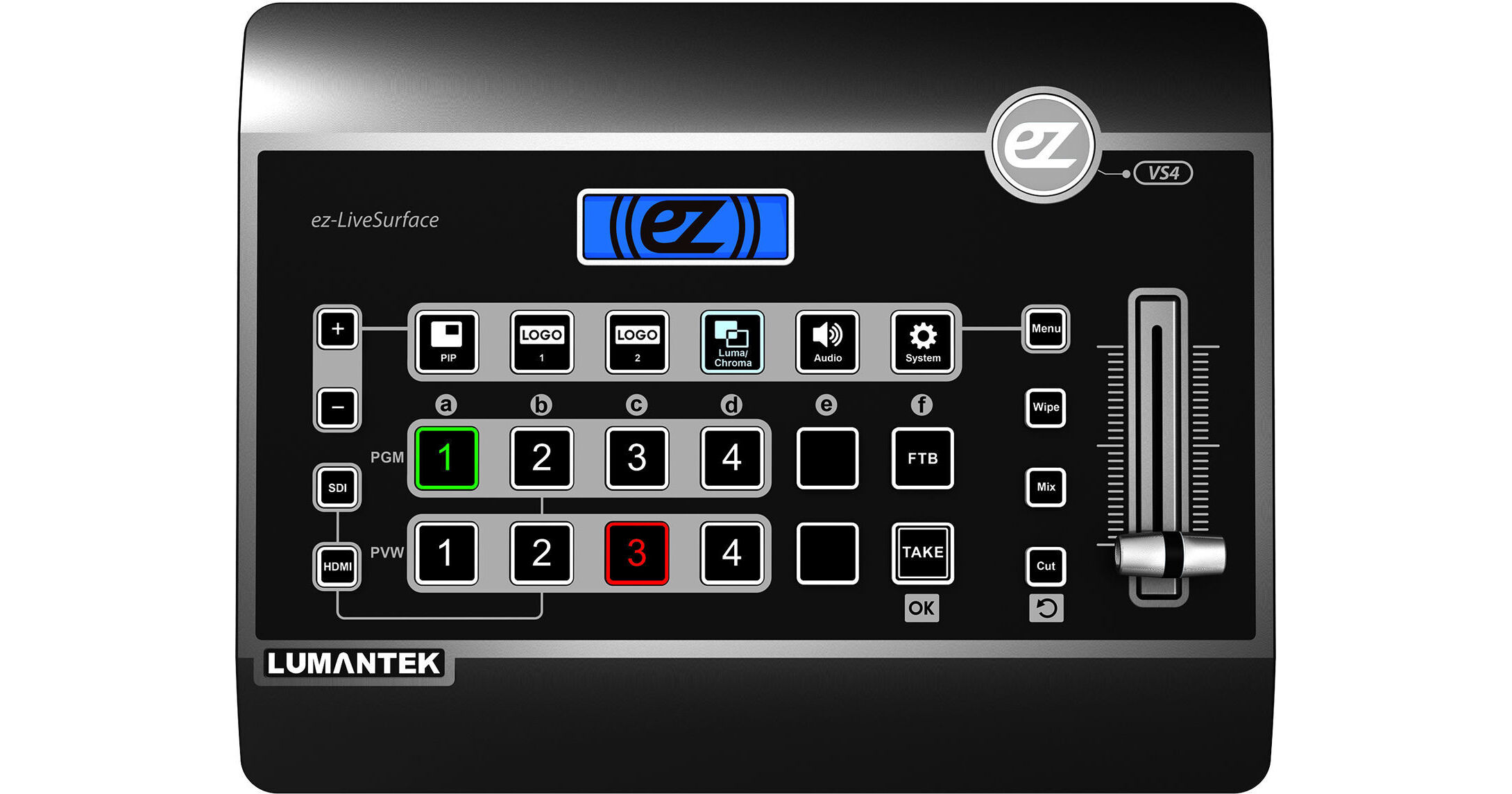
The flexible ez-Pro VS4 4x1 Multiview Switcher from Lumantek is a standalone console switcher designed for corporate, educational, event, and house-of-worship applications. Integrated scaling enables you to mix and match up to four SD, HD, 3G-SDI, and HDMI signals. Program is output via HDMI or SDI, and a multiview display is available via HDMI. Features of the ez-Pro VS4 include an adjustable PiP (picture-in-picture) function, chroma/luma keying, embedded-audio volume control, and dual-logo insertion. Use the console buttons and T-bar to switch, cut, mix, wipe, and otherwise transition between sources.
More Details
Special Order
Expected availability: 2-4 Weeks
No Store Display
Free Standard Shipping
Protect Your Gear
Add a protection plan from $69.99
Ask an Expert
800-606-6969

Lumantek EZ-PRO VS4 Overview

The flexible ez-Pro VS4 4x1 Multiview Switcher from Lumantek is a standalone console switcher designed for corporate, educational, event, and house-of-worship applications. Integrated scaling enables you to mix and match up to four SD, HD, 3G-SDI, and HDMI signals. Program is output via HDMI or SDI, and a multiview display is available via HDMI. Features of the ez-Pro VS4 include an adjustable PiP (picture-in-picture) function, chroma/luma keying, embedded-audio volume control, and dual-logo insertion. Use the console buttons and T-bar to switch, cut, mix, wipe, and otherwise transition between sources.

The compact ez-Pro VS4 switcher supports video resolutions up to Full HD 1080p60 with 8/10-bit 4:2:2 processing, and both Level A and Level B 3G-SDI transmission. Up to four channels of embedded audio are supported, plus external audio via stereo RCA inputs. An integrated USB 2.0 interface is provided for firmware upgrades, logo input, and a GUI application.

Features
  • Mix and match 3G/HD/SD-SDI and HDMI sources
  • Supports up to 1080p60 HD video
  • Multiview output via HDMI
  • Automatic scaling
  • PiP function with adjustable position and size
  • Incorporates up to two logos
  • Chroma and luma key functions
  • Volume control for embedded audio
  • External audio input via stereo RCA jacks
  • Diverse transition effects

Lumantek EZ-PRO VS4 Specs

Video Inputs
1 x SDI/HDMI selective
2 x HDMI
1 x SDI (BNC, 75 Ohms)
Audio Input
2 x 1/4" stereo RCA jacks (balanced, ±10 V max at -10 dB)
Video Output
Program:
1 x HDMI
1 x SDI (BNC, 75 Ohms)

Multiview:
1 x HDMI
Audio Output
1 x 3.5 mm stereo
Supported Input Resolutions
SD:
480i: 50/59

HD:
1080p: 30/29.97/25/24/23.98
1080i: 60/59.94/50
720p: 60/59.94/50

Full HD:
1080p: 60/59.94/50
Supported Output Resolutions
HD:
1080p: 30/29.97/25/24/23.98
1080i: 60/59.94/50
720p: 60/59.94/50

Full HD:
1080p: 60/59.94/50
USB Interface
USB 2.0
Power Input
7-14 VDC
Power Consumption (Maximum)
20 W
Operating Temperature
32 to 104°F / 0 to 40°C
Dimensions
2.8 x 11.7 x 9.1" / 70 x 297 x 230 mm
Weight
3.7 lb / 1.7 kg
Packaging Info
Package Weight
5.67 lb
Box Dimensions (LxWxH)
14.75 x 10.8 x 4.35"

Lumantek EZ-PRO VS4 Reviews

Multi view loses signal

By David
Rated 2 out of 5
Date: 2021-03-03

I’ve been using this switch for about 10 months now and have had a consistent problem. I use this for two 3-hour long shows, music performance. After using it for about a month, I would randomly lose signal from the multi view HDMI port, and the only way to get it back is to turn off/on the switch. I have been in contact with the company. They have replaced this switch 3 times and all three have performed the same way. Now, they are unwilling to work with me anymore and said it is not a problem with their product. This could be true because I use this switch in two different environments with two different monitors and cables. They also said that nobody has ever reported this issue before me, however there is someone on this review that has a similar issue with the program out.

Items are not standard for production.

By PATANASIT
Rated 1 out of 5
Date: 2019-05-21

Products lack quality inspection Even though the product is damaged There are 4 input signals but only 3 channels can be used.

See any errors on this page?

Is there a freeze frame option?

Is there a freeze frame option?
Asked by: Shawn
Unfortunately, this does not have a freeze frame option.
Answered by: David
Date published: 2019-07-04

Are the sdi inputs compatable with ptzoptics sdi ...

Are the sdi inputs compatable with ptzoptics sdi a inputs at 1080p60 without an external converter? Yet to find a compatable switcher for the ptzoptics sdi at 1080p60
Asked by: Bo
This switcher should be compatible with PTZ Optics cameras that output at 1080p60. This switcher accepts both 1080p 60 and 1080p 59.94.
Answered by: Joe P
Date published: 2019-03-17

question

hi i am nanda. i want to knaw vs4 is available in india ?? if it yes sop lease give me contract no.delhi, mumbai pune kolkata
Asked by: Nanda M.
I am sorry. We can ship this product to India but we have no contacts or outlets there.
Answered by: Mark S.
Date published: 2018-08-27

What do the buttons over e do? black color? ...

What do the buttons over e do? black color? Future use?
Asked by: Hal
According to Lumantek the top button under the "E" bank allows you to select “External Audio” when selecting Audio while controlling volume. It is also used when setting options in the “Menu” window. The bottom button under the "E" Bank allows you to mute external audio.
Answered by: Joe P
Date published: 2019-02-07

question

If I bring audio in from my mixer will it embed it in the HDMI output, are there any latency issues and are they correctable?
Asked by: Nathan
The audio will be embedded in to the HDMI output. However this unit does not offer delay if you face any latency issues between the sources. Instead you may want to consider the Roland V-1HD, B&H # ROV1HD. The V-1HD has delay available on the sources if you need to adjust the channels for latency issues.https://bhpho.to/2Q5be5E
Answered by: Anonymous
Date published: 2018-10-24
  • y_2026, m_8, d_6, h_10CST
  • bvseo_bulk, prod_bvqa, vn_bulk_3.0.48
  • cp_1, bvpage1
  • co_hasquestionsanswers, tq_5
  • loc_en_US, sid_1361873, prod, sort_[SortEntry(order=HAS_STAFF_ANSWERS, direction=DESCENDING)]
  • clientName_bhphotovideo
Whatever You Need, We've Got It