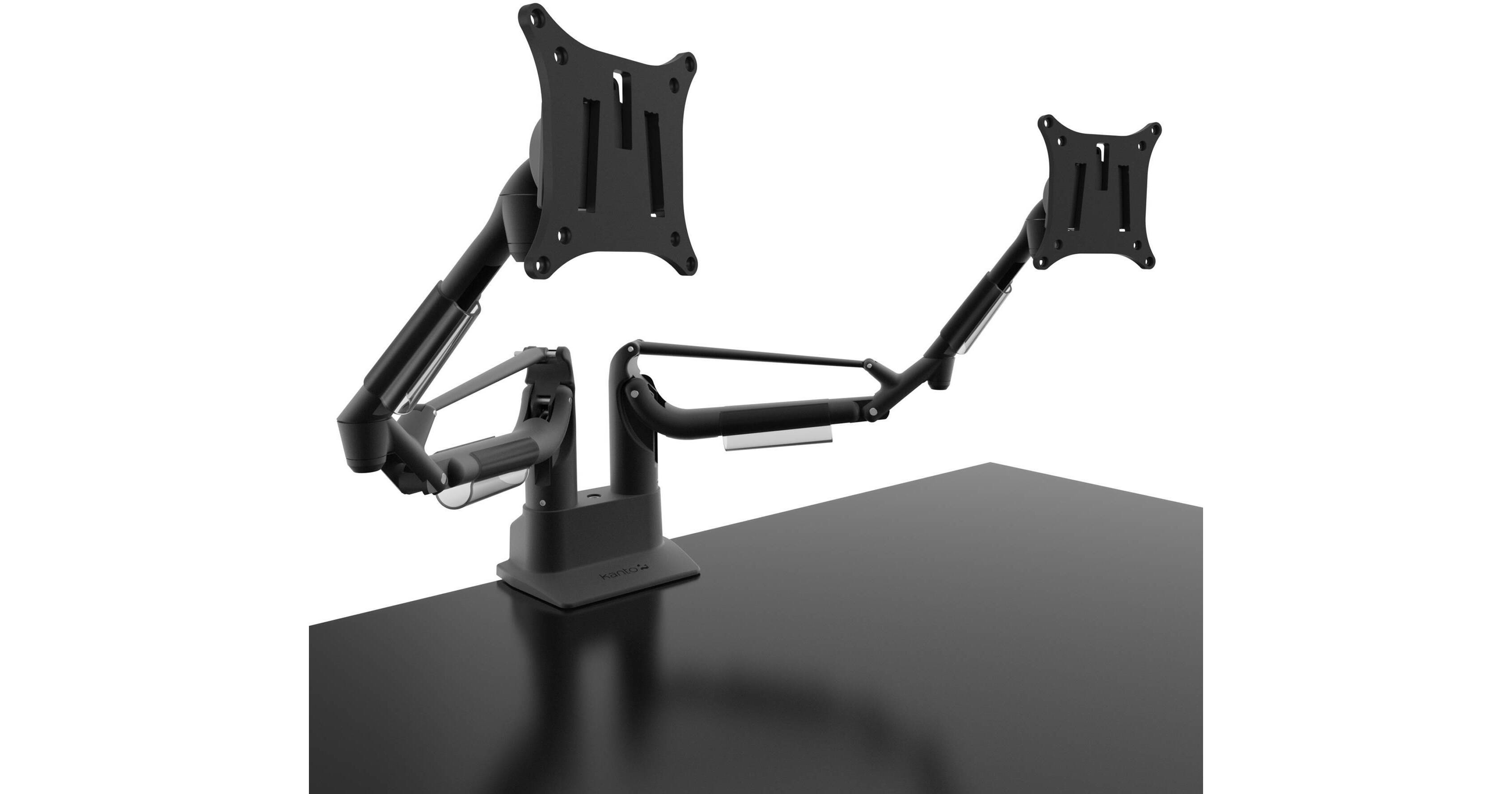
Kanto Living DMS2000 Dual Arm Desktop Monitor Mount (Black)

BH #KADMS2000 • MFR #DMS2000
Print
Kanto Living DMS2000 Dual Arm Desktop Monitor Mount (Black)
Key Features
  • Autonomous Control of 2 Monitors
  • Increased Monitor Viewing Positions
  • Gain Access to More of Your Desk
  • Up to 9.5" of Height Adjustment
Free your dual-monitor setup with the black Kanto Living DMS2000 Dual Arm Desktop Monitor Mount. This durable, aluminum monitor mount can either clamp to the back of your desk or fit into an available grommet hole up to 2" thick. Once installed, it provides you with nearly unlimited viewing positions and autonomous control for two separate monitors. Without two traditional stands on your desk, you also gain back desk real estate under and behind both monitors.

The mount can support monitors with 17" to 32" screen sizes, and weights between 3.3 and 16.5 lbs. Your monitors attach to the mount via standard VESA 75x75 or 100x100 hole patterns. Once assembled, you gain the ability to autonomously adjust your monitors in a variety of ways:
  • Up to 9.5" of Height Adjustment
  • 360-Degree Swivel
  • 25-Degree Tilting Up/Down
  • Portrait and Landscape Rotation
  • Up to 23.3" of Arm Extension
More Details
In Stock
No Store Display
Free Expedited Shipping
Ask an Expert
800-952-1815

Kanto Living DMS2000 Overview

Free your dual-monitor setup with the black Kanto Living DMS2000 Dual Arm Desktop Monitor Mount. This durable, aluminum monitor mount can either clamp to the back of your desk or fit into an available grommet hole up to 2" thick. Once installed, it provides you with nearly unlimited viewing positions and autonomous control for two separate monitors. Without two traditional stands on your desk, you also gain back desk real estate under and behind both monitors.

The mount can support monitors with 17" to 32" screen sizes, and weights between 3.3 and 16.5 lbs. Your monitors attach to the mount via standard VESA 75x75 or 100x100 hole patterns. Once assembled, you gain the ability to autonomously adjust your monitors in a variety of ways:

  • Up to 9.5" of Height Adjustment
  • 360-Degree Swivel
  • 25-Degree Tilting Up/Down
  • Portrait and Landscape Rotation
  • Up to 23.3" of Arm Extension


Gas Shock System
The arm features a gas shock system for very precise control with minimal effort. How minimal? It lets you make height and other adjustments using just your fingertips.
Easy Installation
To make installation more manageable, the base of the DMS2000 can be detached from its support arms and secured entirely from the top of your desk.
Cable Management
To keep your desktop clutter-free, use the provided cable management clips to conveniently route your cables.
UPC: 800152718071

Kanto Living DMS2000 Specs

Supported Screen Sizes
17" to 32"
Weight Allowance
3.3 lb / 1.5 kg to 16.5 lb / 7.5 kg per arm
Hole Spacing (VESA Standard)
75x75
100x100
Height Adjustment
9.5" / 24 cm
Tilt
±25°
Reach
23.3" / 59.3 cm
Monitor Rotation
360°
Weight
12.1 lb / 5.5 kg
Packaging Info
Package Weight
14.7 lb
Box Dimensions (LxWxH)
19.5 x 13.5 x 8.5"

Kanto Living DMS2000 Reviews

Great look smooth function

By Brent
Rated 5 out of 5
Date: 2022-04-27

Purchased this dual monitor mount to share with my wife. We both work from home on occasion and we can easily plug in our laptops and get 2 more screens. We both have different setups that we prefer and it is super easy to readjust the monitors to height and position that each one of us like. The mechanism is smooth and holds the monitor firmly. It is easy to get precise adjustment so the monitors are perfectly in line with each other. We have it mounted to a glass table top and it is both secure and safe for the glass. The monitor arm looks very nice and is nicely constructed. I love this product so much for our remote work setup, that I purchased a 2nd setup for my gaming PC and monitors. This is not an inexpensive product, but it is worth the price.

Excellent Monitor Mount

By James
Rated 5 out of 5
Date: 2019-11-07

This is the best dual monitor mount I have seen. I use it for two 32 in screens without issue. It is easy to reposition in any direction and stays put when needed. Cable management is clean and the table clamp is minimalistic, yet strong which is important in my case because it is in full view and not hidden against a wall. Very satisfied with my purchase and feel that it was worth the extra money. Plus it looks cool.

See any errors on this page?

How much weight will the arms support? I have an ...

How much weight will the arms support? I have an Apple iMac Pro and Apple 27" Thunderbolt Display
Asked by: Richard
The DMS2000 can support between 3.3 – 16.5 lb (1.5 – 7.5 kg) per arm. If you have any other questions or require additional information, if you could please email us directly at [email protected] and we would be happy to help.
Answered by: Kanto Living
Date published: 2020-11-06

Will this mount to the 2019 Apple 32" Pro Display ...

Will this mount to the 2019 Apple 32" Pro Display or do I have to order the Apple VESA adapter as well? ---Thanks
Asked by: James
The only arm I've found that will support the weight is the iMac Pro and Thunderbolt Display is the Ergotron LX single which will support 25#. The iMac is 21.38# and the Monitor is 23.5#. 2 singles and they have a drop-in Vesa adapter where you can easily mount the monitors, both of which require the same Apple Visa mount.
Answered by: Richard
Date published: 2020-11-06

Can i use the dms2000 for only one monitor? would ...

Can i use the dms2000 for only one monitor? would that ruin it's functionality or mess up anything? or does it have to have two monitors on it always?
Asked by: Muhammad
You can use the DMS2000 with only one monitor, however our DMS1000 is the same, expect designed for 1 monitor. If you have any other questions or require additional information, if you could please email us directly at [email protected] and we would be happy to help.
Answered by: Kanto Living
Date published: 2020-05-27

Would this work with laptop tray from ergotron? ...

Would this work with laptop tray from ergotron? I'd like to put a monitor one side and laptop the other side.
Asked by: Jeong Eun
If you could please email us directly at [email protected] and pass along your monitors full model numbers and we would be happy to determine compatibility for you.
Answered by: Kanto Living
Date published: 2021-07-09
  • y_2026, m_6, d_9, h_12CST
  • bvseo_bulk, prod_bvqa, vn_bulk_3.0.46
  • cp_1, bvpage1
  • co_hasquestionsanswers, tq_4
  • loc_en_US, sid_1384850, prod, sort_[SortEntry(order=HAS_STAFF_ANSWERS, direction=DESCENDING)]
  • clientName_bhphotovideo
Whatever You Need, We've Got It