Sony Global

Video Chat with a Pro Audio Expert - Live

Waves Scheps Omni Channel - Channel Strip Plug-In (Download)

BH #WASCHOMCH • MFR #SCHOMCH
Print
Waves Scheps Omni Channel - Channel Strip Plug-In (Download)
Key Features
  • EQ, Compression, Saturation, Gate & More
  • Flexible Routing of All Modules
  • 3 Types of Compression
  • 3 Types of Saturation
Available for download, the Waves Scheps Omni Channel is a plug-in designed to handle all of your channel-strip needs. Channel-strip plug-ins take their inspiration from the individual channels of large-format mixing consoles, on which you’d often find an EQ, a compressor, and a gate/expander module. These processes could frequently be swapped in order, but the effect was always one of efficiency, getting you closer to the sound you want without having to patch in external gear. Many plug-ins have operated with this concept in mind, but the Scheps Omni Channel brings some new features into the mix that help you create more realized sounds with just one plug-in instance.
More Details
Digital
Electronic Download
No Store Display
$39.99
$149.00
Save $109.01
Offer ends at
This item cannot be returned.
Emailed within 1-3 Business Days
Ask an Expert
800-606-6969

Waves Scheps Omni Channel - Overview

Available for download, the Waves Scheps Omni Channel is a plug-in designed to handle all of your channel-strip needs. Channel-strip plug-ins take their inspiration from the individual channels of large-format mixing consoles, on which you’d often find an EQ, a compressor, and a gate/expander module. These processes could frequently be swapped in order, but the effect was always one of efficiency, getting you closer to the sound you want without having to patch in external gear. Many plug-ins have operated with this concept in mind, but the Scheps Omni Channel brings some new features into the mix that help you create more realized sounds with just one plug-in instance.

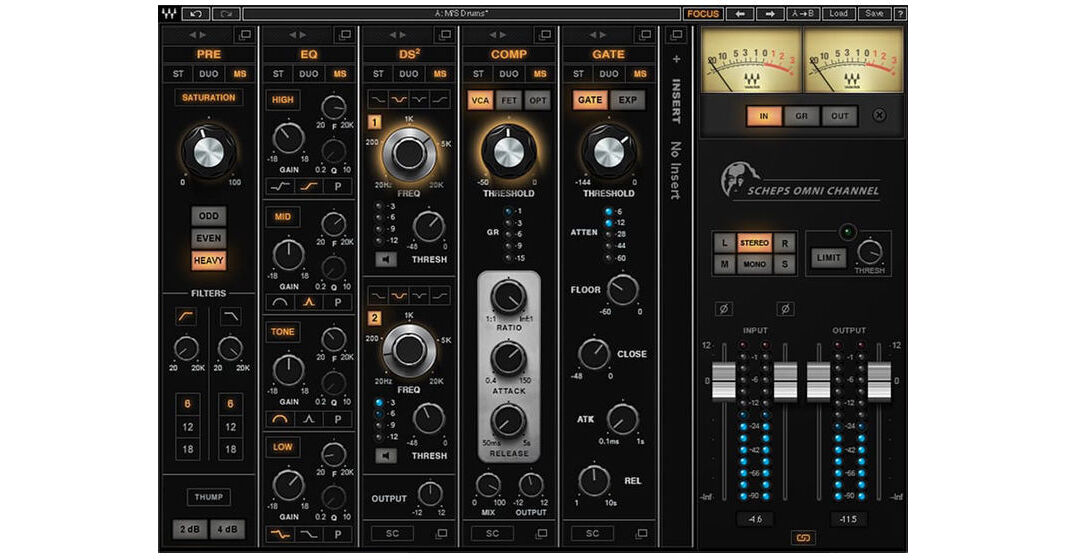
The preamp section, for instance, features a switchable saturation circuit with three types of harmonic distortion. Low- and high-pass filters are on hand to shave off unnecessary frequencies within the preamp. A four-band equalizer section features shelving and parametric bands. Next, you’ll note the DS² section, a processor with its genesis in both traditional split-band de-essing and dynamic equalization. You can use this module to de-ess a vocal, to notch out unpleasant resonances in snare drums, or for any other dynamic/frequency-specific need. A gate/expander is also available, as is a compressor with three different circuit types for eliciting different timbres. Further expanding the Omni Channel’s functionality, an insert slot allows you to patch in any Waves plug-in you desire, be it a delay, a modulator, or even an additional Omni Channel module.

The modules can be moved around in any order you wish, so you can apply preamp saturation after equalization if that’s the vibe of the track. The software can be used in mixing applications, but zero-latency operation and control-mapping for eMotion LV1 Mixing Consoles makes this plug-in a good choice for FOH engineers. The Scheps Omni Channel Strip is compatible with Mac and Windows platforms, and operates in AAX, AU, Audiosuite, VST, and VST3 formats.

Preamp Module
The Pre module provides three types of analog saturation, letting you add diverse colors of harmonic distortion as well as filters and thump (resonance) controls.
Compression Module
The Compression module features 3 completely different compressors ranging from fast to slow and smooth, with a unified control set so you can quickly compare them. A Wet/Dry control allows you to use parallel compression within the module.
EQ Module
The EQ module is a four-band equalizer. Each band provides a distinct musical sound that holds up on its own or can be switched to be fully parametric if surgical EQ is required.
DS² Module
The DS² module is more than a de-esser. With two full-range bands and four filter types, it allows you to remove any offending frequencies, not just sibilances.
Gate/Expansion Module
The Gate/Expansion module gives you all the standard controls (threshold, attack, and release) for gating and expansion, but also lets you adjust the maximum noise reduction to maintain a consistent noise floor.
Insert Slot for Additional Waves Plug-Ins
The Scheps Omni Channel features an insert slot. It can be positioned anywhere in the chain. You can use the slot to insert an additional Waves plugin of your choice, including an extra instance of Omni Channel modules.
Stereo or M/S Operation
All modules can be operated in stereo or M/S mode, so you can EQ the sides differently from the center, compress the center and leave the sides alone, and more.
Other Features at a Glance
  • Designed with Grammy-winning mixer Andrew Scheps (Adele, Jay Z, Metallica, Red Hot Chili Peppers)
  • Drag and drop any module anywhere in the channel strip
  • Internal MS/Duo/Stereo routing per module
  • Stereo component provides full discrete control over each channel
  • Flexible shaping of internal or external sidechain input
  • Zero-latency operation
  • Focus presets designed by Andrew Scheps
  • Artist presets by Tony Visconti, Billy Bush, Ken Pooch Van Druten, and others

Waves Scheps Omni Channel - Specs

Delivery Format
Download
License Type
Standard: Perpetual License
User Support
1 User
Standalone Operation
No
System Compatibility/Requirements
Operating System: Windows/macOS
Plug In Formats: AAX (Native) / AU / AudioSuite / VST / VST3

Waves Scheps Omni Channel - Reviews

See any errors on this page?
Whatever You Need, We've Got It