
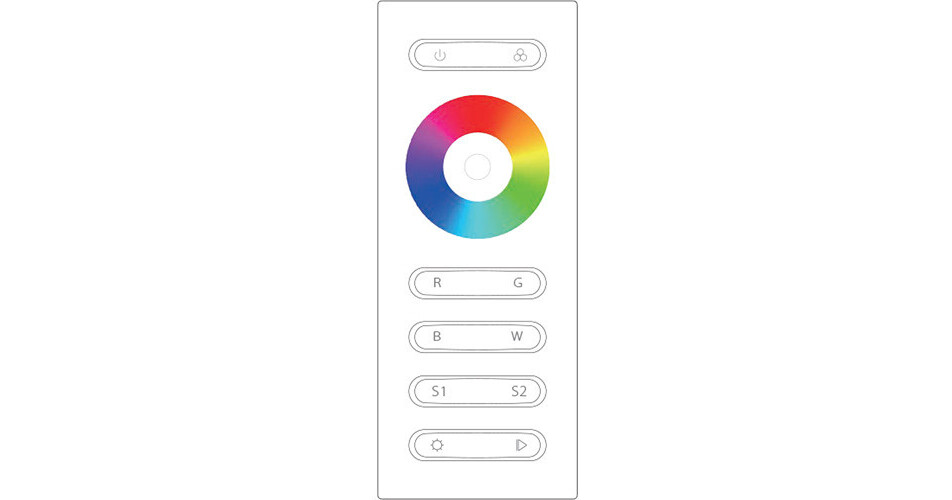
The Rosco 4-Channel RF Remote Controller allows you to control a RoscoLED VariColor RF LED Controller for VariColor RGBW LED Tape, at a range up to 164'. The remote features a color wheel, white spectrum presets, and discrete red-, green-, blue-, and white-channel controls, which enable you to utilize the full capacity of your RoscoLED VariColor Tape with precise color mixing.
Controls
Color Wheel
- Touch to select color
- Drag finger to fine tune your color with RGBW mixing
White Spectrum Presets
- Tap to switch through warm white, neutral white, or cool white (uses RGB color mixing)
RGBW Channels
- Red Channel: Click to turn on/off red output, press and hold down to increase/decrease the light intensity/brightness of the channel
- Green Channel: Click to turn on/off green output, press and hold down to increase/decrease the light intensity/brightness of the channel
- Blue Channel: Click to turn on/off blue output, press and hold down to increase/decrease the light intensity/brightness of the channel
- White Channel: Click to turn on/off white output, press and hold down to increase/decrease the light intensity/brightness of the channel
Brightness/Light Intensity
- Press and hold down to decrease or increase light intensity
- Can be used on a preset color or when dialing in your own selections
Scene 1 and Scene 2
- Press and hold down to save current outputs
- Click to recall the saved color/effect you saved
- Save up to two colors per scene by repeating this process for Scene 1
Play/Pause Presets
- Click once to scroll through the 10 preset colors
- Use the presets in static mode
LED Indicator
- Illuminates orange to indicate a response between your finger and the remote
Power On/Off
- Press to turn the remote on or off