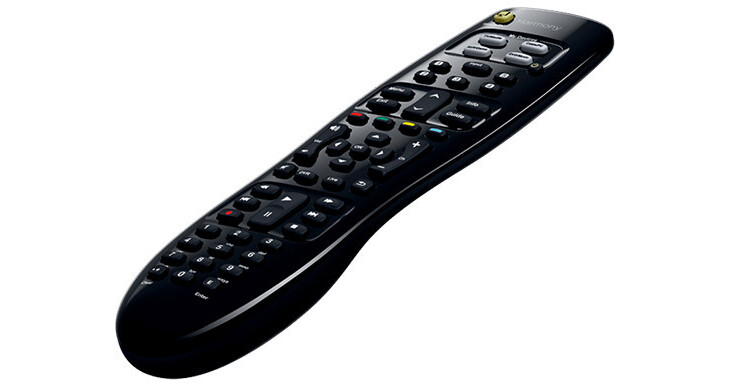
Logitech Harmony 350 Remote Control

BH #LOH350RC • MFR #915-000230
Print
Logitech Harmony 350 Remote Control
Key Features
  • Controls up to Eight Devices
  • Supports Over 270,000 Devices
  • One-Click Activity Buttons
  • Guided Online Setup
Reduce your coffee table clutter with the Logitech Harmony 350 Remote Control. It controls up to eight devices, replacing the remotes for your display, cable/satellite box, Blu-ray player, and more. Harmony software simplifies the programming process. Simply connect the remote to your Internet-connected computer, and the software guides you through the rest. The Harmony database supports over 270,000 devices for virtually universal compatibility.
More Details
No Longer Available
No Store Display
Ask an Expert
800-606-6969

Logitech Harmony 350 Overview

Reduce your coffee table clutter with the Logitech Harmony 350 Remote Control. It controls up to eight devices, replacing the remotes for your display, cable/satellite box, Blu-ray player, and more. Harmony software simplifies the programming process. Simply connect the remote to your Internet-connected computer, and the software guides you through the rest. The Harmony database supports over 270,000 devices for virtually universal compatibility.

With its one-click activity buttons, you can choose what you want to do quickly and easily. The software-programmed macros will turn on all the devices related to your selected activity and navigate to the appropriate inputs and outputs, all with the push of one button. For example, press the "Watch Movie" button to power on your display, Blu-ray player, and receiver, and set the display and receiver to the inputs and outputs designated for the Blu-ray player. The remote includes two AA batteries and a USB cable for instant use.

Replaces up to Eight Remotes
Control your TV, cable or satellite box, DVR, Blu-ray player, sound system, and more.
Guided Online Setup
To program the Harmony 350, just plug it into your compatible Internet-connected computer and enter your device model numbers; the online software walks you through the process.
One-Touch Entertainment
Press the Watch TV button to turn on your display, cable or satellite box, and whatever other device is associated with that function. Each device powers up with the correct settings.
Five Channel Presets
Jump to the channel of your choice with five programmable Favorite buttons.
Set-Top Box and DVR Controls
Access guides, menus, and recorded programs, and control playback, with dedicated buttons.
Growing Compatibility
The ever-growing Harmony database of over 270,000 devices has power-on sequencing, timing, and direct input commands.

Logitech Harmony 350 Specs

Max Controlled Devices
8
Wireless Technology
IR
Macro Capability
Yes
Windows System Requirements
Windows XP, Vista, 7, or 8
USB Type-A port or adapter
Internet access
Mac System Requirements
Mac OS X 10.6 or later
Intel processor
USB Type-A port or adapter
Internet access
Battery Type
2 x AA
Dimensions
Not specified by manufacturer
Weight
Not specified by manufacturer
Packaging Info
Package Weight
0.665 lb
Box Dimensions (LxWxH)
10.5 x 5.5 x 1.6"

Logitech Harmony 350 Reviews

See any errors on this page?
Whatever You Need, We've Got It