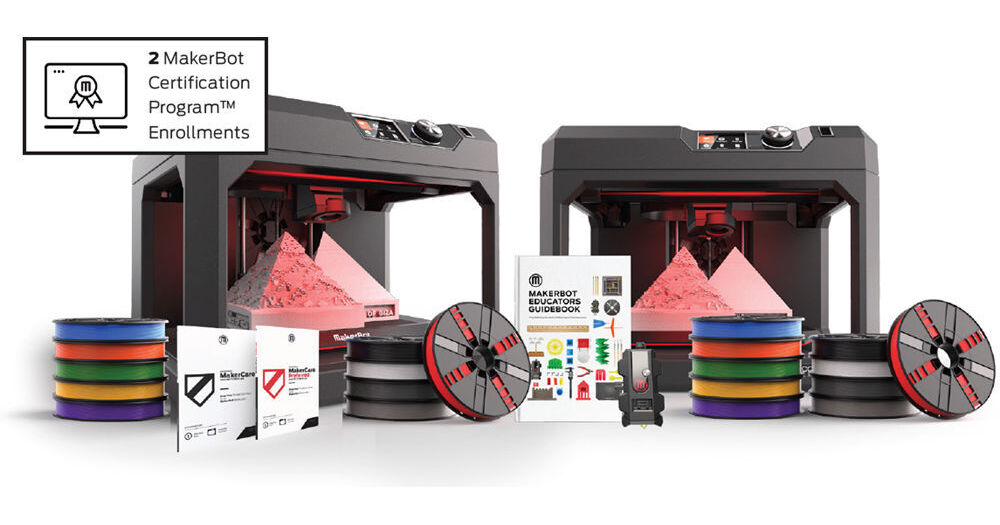


Created for student or group projects with a single round of prints, after school activities, and small groups, the Classroom Bundle from MakerBot is well suited for teachers who want to bring 3D printing into a single classroom environment. It can accommodate printing for 10 students and includes items necessary to run the printers for a full school year.
Included with this bundle are two MakerBot Replicator+ 3D printers, two 1-year MakerCare protection plans, two 10-packs of 1.75mm PLA filament, one SmartExtruder+ unit, two enrollments for MakerBot's online certification program, and one MakerBot Educators Guidebook.
Engineered and tested for reliable and faster 3D printing, the Replicator+ 3D Printer from MakerBot prints up to 30% faster than is predecessor and offers a 25% larger build volume. For improved reliability and precision, it features upgraded hardware, such as a redesigned gantry and z-stage. It has also been tested for over 380,000 hours of use. It is constructed using PC ABS with powder-coated steel reinforcements, as well as aluminum casting and extrusions for the motion components.
The Replicator+ features a build volume of 11.6 x 7.6 x 6.5"; a cubic build volume of 573 in3; a layer resolution of 100-400 microns; Fused Deposition Modeling (FDM) printing technology that is compatible with Smart Extruder+ and Tough PLA Smart Extruder+ units; uses 1.75mm MakerBot PLA small and large spool filaments, as well as MakerBot Tough PLA large spool filaments; has a 1.8° step angle with 1/16 micro-stepping; 11 micron XY positioning precision; 2.5 micron Z positioning precision; and is equipped with a single 0.4mm extruder nozzle. Users may print their compatible CAD (.cad), STL (.stl), MakerBot (.makerbot), SolidWorks (.sldprt, .sldasm), InventorOBJ (.ipt, .iam), IGES (.iges, .igs), STEP AP203/214 (.step, .stp), CATIA (.CATPart, .CATProduct), Wavefront Object (.obj), Unigraphics/NX (.prt), Solid Edge (.par, .asm), ProE/Creo (.prt, .asm), VRML (.wrl), and Parasolid (.x_t, .x_b) files in an open print chamber via 10/100 Ethernet, Wi-Fi 4 (802.11n), or USB 2.0. The print bed itself is factory-leveled and constructed using a grip surface with a bendable Flex Build Plate.
The MakerBot Replicator+ is Cloud-enabled, allowing you to control and manage one or more printers over the cloud using MakerBot Print or MakerBot Mobile software. It can also be controlled using a built-in dial and an integrated LCD display, each of which allow you to maintain your 3D printer, preview print files, and access your object library. There is also a built-in 640 x 480 camera and this 3D printer operates using 100-240 VAC at 50/60 Hz. It is compatible with Windows 7 and 10 and Mac OS X 10.9 and later. Included is a MakerBot Replicator Smart Extruder+, a large MakerBot filament spool, a USB 2.0 Type-B to Type-A cable, a 4mm hex key, and a power cord.
Compatible with 5th generation or newer models of the Replicator, Replicator+, Replicator Mini, and Replicator Mini+, the Smart Extruder+ from MakerBot is a user-swappable spare or replacement extruder that has been tested for over 160,000 cumulative hours to help ensure greater print success over time and to deliver dependable and consistent 3D printing performance. A spare extruder also helps to ensure minimal downtime.
The MakerBot Teacher Certification Online Course helps you learn how to set up and run your 3D printer in your classroom. There are two certification levels. Completing Level 1 makes you a MakerBot Operator. As a MakerBot Operator, you'll learn the basics of 3D printing technology as well as its history. You'll be able to set up and use the 3D printer. You'll also learn how to use MakerBot Print and explore Thingiverse as well as 3D modeling. Level 1 will also teach you basic troubleshooting. Once you're ready, you can go to Level 2. In Level 2, you'll become a MakerBot Curriculum Creator and become a STEM education leader. Level 2 teaches you the 3D printing process and how to troubleshoot student files. You'll even be able to manage multiple printers and print files. Take advantage of Thingiverse Education and even create your own 3D printing project for your students.
- 3D printing technology and history
- Printer setup and usage and essential parts
- MakerBot Print
- Thingiverse and 3D Modeling
- Basic troubleshooting
- Teach the 3D printing process
- Manage multiple printers and print files
- Troubleshoot student files
- Utilize Thingiverse Education
- Create a 3D printing project for students
The MakerBot Educators Guidebook is a comprehensive blueprint for introducing 3D printing to your students. Written by MakerBot in collaboration with the largest community of 3D printing educators, this guidebook provides a crash course in 3D printing, 9 classroom-ready 3D printing projects, and more.
The 1-Year MakerCare Preferred Protection Plan from MakerBot provides one year of coverage for your Replicator+ 3D Printer, with a one-business day response time and coverage for unlimited qualifying incidents. If this warranty is not purchased, then your Replicator+ will be covered by MakerBot's limited six-month warranty. However, if you do opt to add this one year of protection, it will need to be bought within 60 days of the purchase date of your Replicator+ and is valid for one year from the purchase date of your Replicator+.
Please be aware that the maximum amount of coverage that can be purchased is three years. If you initially buy one year of coverage and want to extend it, this can be done, but any additional coverage purchased after 60 days must be in the form of MakerBot's 1-Year Renewal. This one-year plan can be extended up to two times with the renewal, for up to three years of coverage. Also, if you purchase MakerCare coverage and it expires, you'll have up to 60 days after its expiration to renew it, should you desire.