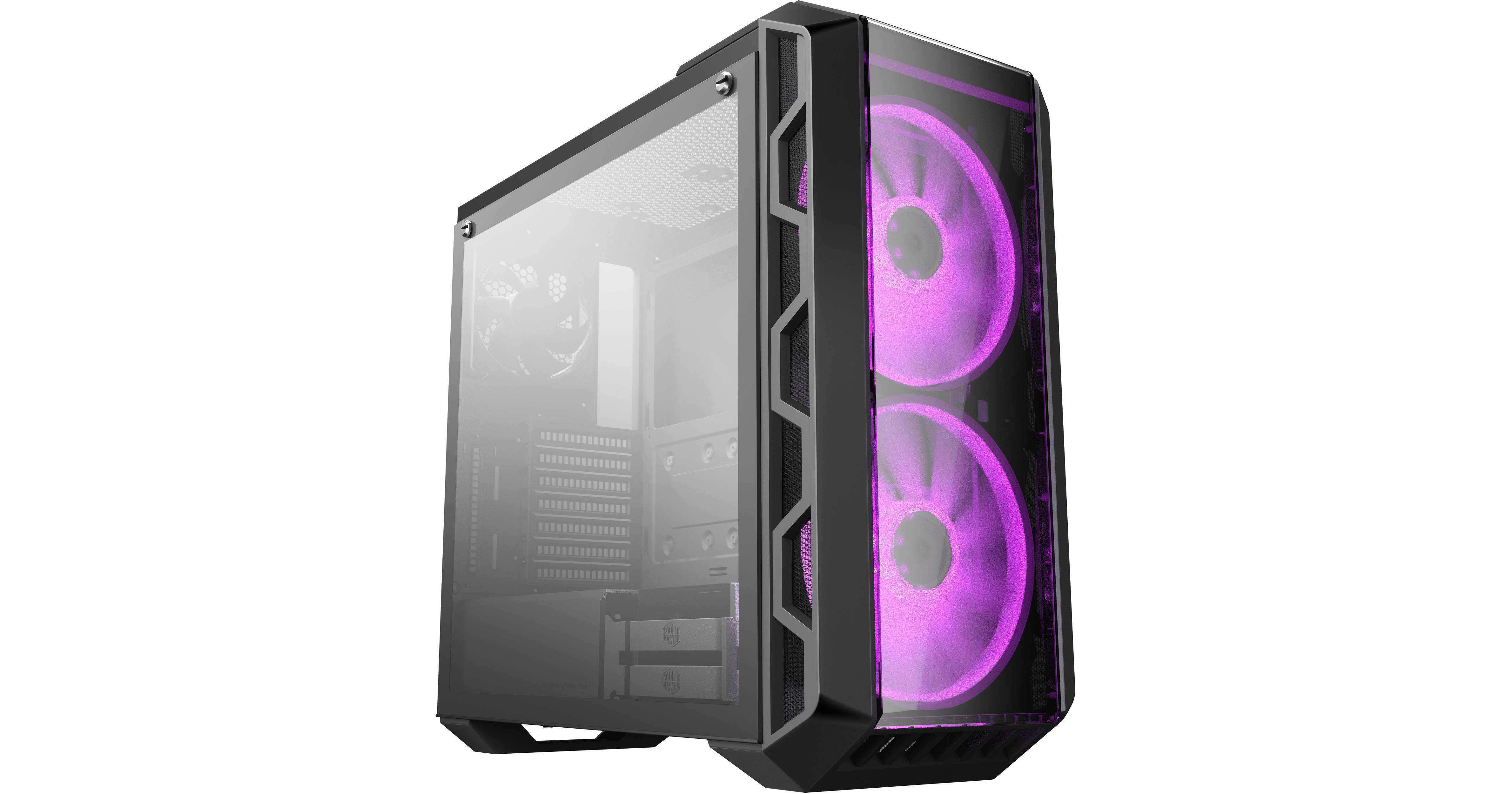
Cooler Master MasterCase H500 Mid Tower Desktop Case

BH #COH500IGNNS0 • MFR #MCM-H500-IGNN-S01
Print
Cooler Master MasterCase H500 Mid Tower Desktop Case
Key Features
  • Steel Frame & Plastic Front Bezel
  • 2 x 2.5"/3.5" Drive Bays
  • 2 x 2.5" Drive Bays
  • 7 x Expansion Slots
The MasterCase H500 Mid Tower Desktop Case from Cooler Master houses all of your system's components and lets you display them with lighting coming from RGB LED fans along with a tempered glass side panel. The MasterCase H500 can accommodate up to four 2.5" drives, and two of the 2.5" bays can support 3.5" storage drives. With a mid-sized design, the case can hold motherboards up to ATX in size and has seven expansion slots. For connectivity, it offers two USB 2.0 and two USB 3.0 ports as well as a set of 3.5mm audio jacks.
More Details
No Longer Available
No Store Display
Ask an Expert
866-264-7509

Cooler Master MasterCase H500 Overview

The MasterCase H500 Mid Tower Desktop Case from Cooler Master houses all of your system's components and lets you display them with lighting coming from RGB LED fans along with a tempered glass side panel. The MasterCase H500 can accommodate up to four 2.5" drives, and two of the 2.5" bays can support 3.5" storage drives. With a mid-sized design, the case can hold motherboards up to ATX in size and has seven expansion slots. For connectivity, it offers two USB 2.0 and two USB 3.0 ports as well as a set of 3.5mm audio jacks.

To help keep the air flowing through system at a constant rate, Cooler Master has equipped the case with two 200mm fans as well as one 120mm fan in the rear. Additional cooling is possible using the included mesh front panel and a user-supplied liquid cooling system. A tempered glass panel is also provided for the front. Furthermore, dust filters are mounted to the top, front, and bottom of the MasterCase H500 desktop case.

Mesh and transparent front panels included for optimized airflow or aesthetics
Managed by an included RGB Controller, two 200mm RGB fans come pre-installed with support for one optional 200mm fan on the top panel
Light-grey tinted tempered glass side panel for showcasing your build with optional (RGB) lighting
Cable and PSU cover for clean system builds
Top magnetic filter allows hot air to flow outside the system for optimal thermal support
Raised front panel covers a portion of the top panel to act as a handle (supporting up to 44 lb / 20 kg) for transport

Cooler Master MasterCase H500 Specs

Key Specs
Motherboard Support
ATX, Micro-ATX, Mini-ITX
Internal Drive Bays
2x 2.5/3.5"
and
2x 2.5"
Expansion Slots
7x Full Height Horizontal
Maximum GPU Length
16.1" / 408.94 mm
CPU Cooler Height
6.5" / 165.10 mm
I/O
2x USB-A (USB 2.0)
2x USB-A (USB 3.0 / 3.1/3.2 Gen 1)
Windowed Panel
Yes
Compatibility
Motherboard Support
ATX, Micro-ATX, Mini-ITX
External Drive Bays
No
Internal Drive Bays
2x 2.5/3.5"
and
2x 2.5"
Expansion Slots
7x Full Height Horizontal
Maximum GPU Length
16.1" / 408.94 mm
CPU Cooler Height
6.5" / 165.10 mm
Supported PSU Size
ATX
Maximum PSU Length
7.1" / 180.34 mm
PSU Mounting Location
Bottom
Cooling
Fan Mounting (Front)
3 x 120 mm
or
2 x 140 mm
or
2 x 200 mm
Fan Mounting (Rear)
1 x 120 mm
Fan Mounting (Side)
No
Fan Mounting (Top)
2 x 120 mm
or
2 x 140 mm
or
1 x 200 mm
Fan Mounting (Bottom)
No
Fans Included (Front)
2 x 200 mm LED
Fans Included (Rear)
1 x 120 mm
Fans Included (Top)
No
Maximum Radiator Size (Front)
360 mm
Maximum Radiator Size (Rear)
120 mm
Maximum Radiator Size (Top)
240 mm
Fan Mounting (Internal)
No
Fan Controller Included
Yes
Filters Included
:
Inputs / Outputs
I/O
2x USB-A (USB 2.0)
2x USB-A (USB 3.0 / 3.1/3.2 Gen 1)
Audio I/O
1x 3.5 mm Input
1x 3.5 mm Output
Display Outputs
No
Physical
Windowed Panel
Yes
Material
Acrylic, Plastic, Steel, Tempered Glass
Certifications
CE, FCC
*as per Manufacturer
Built-In Lighting
No
Security
No
Cable Management Space
: " /  mm
Dimensions (W x H x D)
8.98 x 20.67 x 19.76" / 228 x 525 x 502 mm
Packaging Info
Package Weight
23.4 lb
Box Dimensions (LxWxH)
24 x 22.25 x 11.5"

Cooler Master MasterCase H500 Reviews

See any errors on this page?
Whatever You Need, We've Got It