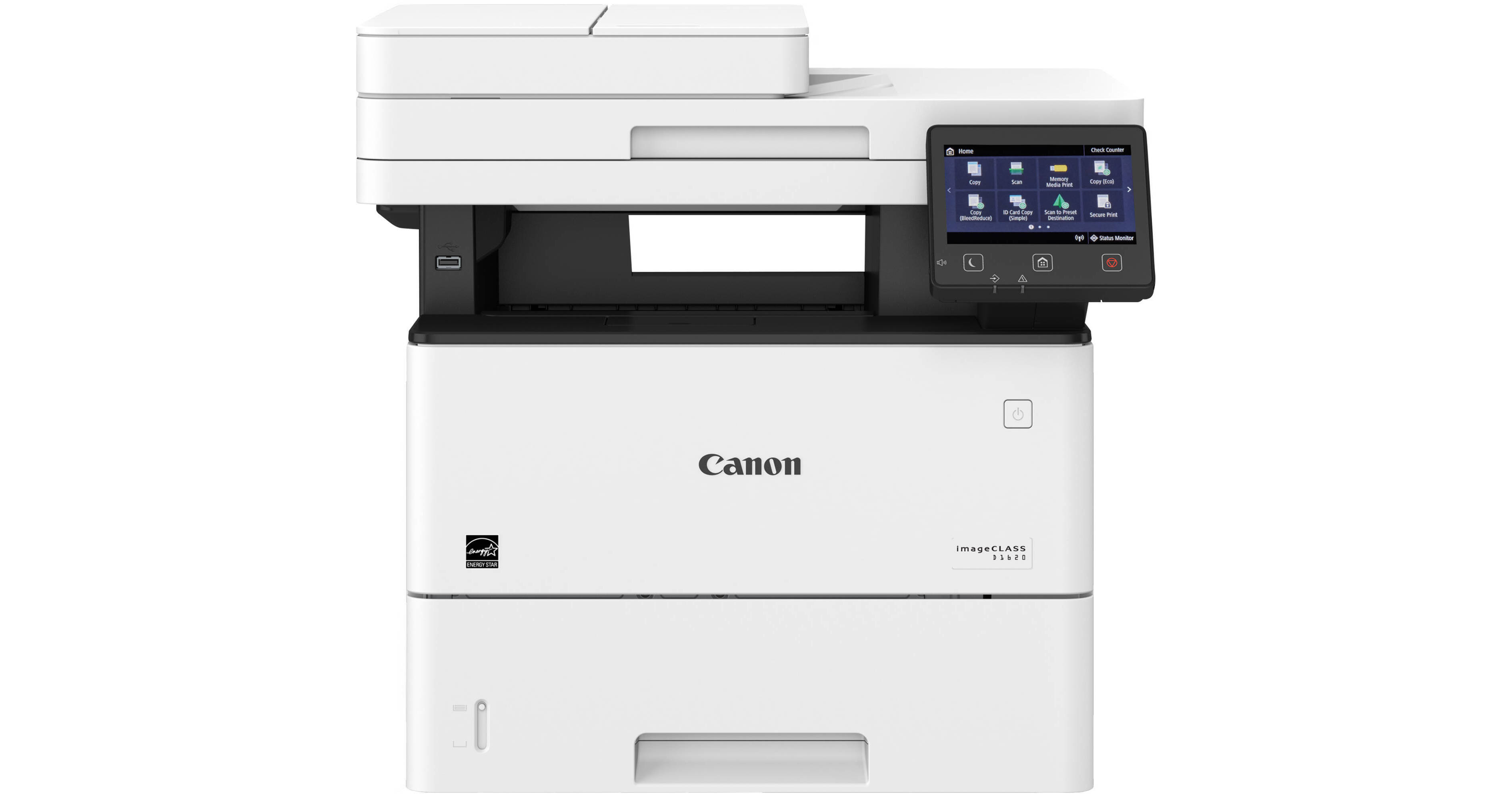
Canon imageCLASS D1620 Monochrome Laser Printer

BH #CAD1620 • MFR #2223C024
Print
Canon imageCLASS D1620 Monochrome Laser Printer
Key Features
  • Print, Scan, Copy
  • Print Resolution: 600 x 600 dpi
  • Print Speed: 45 ppm
  • Optical Scan Resolution: 600 x 600 dpi
Designed for small to mid-size workgroups, the imageCLASS D1620 Monochrome Laser Printer from Canon offers fast performance with minimal maintenance for printing, scanning, and copying. The printer has an impressive print speed of 45 ppm at a resolution of 600 x 600 dpi and comes with a 550-sheet paper cassette and a 100-sheet stack bypass tray, which allow you to print a wide variety of different-sized documents up to 8.5 x 14". Featuring a platen glass, legal-sized flatbed scanner, you can also scan and copy images up to 8.5 x 14" at the same resolution of 600 x 600 dpi. Operation is made easy by an intuitive 5" color touchscreen, which can be customized to simplify daily tasks. USB 2.0, Ethernet, and Wi-Fi connectivity offer various options across a multitude of platforms, including printing from mobile and Cloud-based services and applications.
More Details
In Stock
No Store Display
Free 2-Day Shipping
Protect Your Gear
Add a protection plan from $35.99
Ask an Expert
800-606-6969

Canon D1620 Overview

From Manufacturer

Designed for small to mid-size workgroups, the imageCLASS D1620 Monochrome Laser Printer from Canon offers fast performance with minimal maintenance for printing, scanning, and copying. The printer has an impressive print speed of 45 ppm at a resolution of 600 x 600 dpi and comes with a 550-sheet paper cassette and a 100-sheet stack bypass tray, which allow you to print a wide variety of different-sized documents up to 8.5 x 14". Featuring a platen glass, legal-sized flatbed scanner, you can also scan and copy images up to 8.5 x 14" at the same resolution of 600 x 600 dpi. Operation is made easy by an intuitive 5" color touchscreen, which can be customized to simplify daily tasks. USB 2.0, Ethernet, and Wi-Fi connectivity offer various options across a multitude of platforms, including printing from mobile and Cloud-based services and applications.

Supports mobile solutions for printing and scanning from a smart phone or tablet to most iOS and Android devices. Supports Canon PRINT Business, Apple AirPrint, Mopria Print Service, and Google Cloud Print.
Scans and converts documents to searchable digital files through a single-pass, duplex document feeder. Scanned files can then be converted into multiple file formats, including Hi-Compression PDF and Searchable PDF.
With Department ID Management you can control device access, restrict function use, and monitor usage.
Two-sided printing, scanning, and copying.
Holds up to three optional, separately purchased, 550-sheet cassettes.
ENERGY STAR Qualified, Rated EPEAT Silver.
UPC: 013803311662

Canon D1620 Specs

Key Specs
Functions
Print, Scan, Copy
Printing Technology
Laser
Color Type
Black
Configuration
1x Individual Cartridge
Print Resolution
Black: 600 x 600 dpi
Media Sizes
Input Tray 1
Maximum: 8.5 x 14" / 21.6 x 35.6 cm
Input Tray 2
Maximum: 8.5 x 14" / 21.6 x 35.6 cm
Scanner Type
Flatbed Scanner with Automatic Document Feeder (ADF)
Scanner Maximum Resolution
ADF
600 dpi (Optical)
Wireless
Wi-Fi
Power Source
AC Power (Cable Built-In/Included)
Functions
Print, Scan, Copy
Printer
Printing Technology
Laser
Color Type
Black
Configuration
1x Individual Cartridge
Print Resolution
Black: 600 x 600 dpi
Duplex Printing
Yes
Printer Language
Adobe PostScript 3, HP PCL 5, HP PCL 6, UFR II
Print Speed (By Time)
45 ppm (Black)
First Print Out Time
6.2 Seconds (Black)
Monthly Duty Cycle
7500 Pages
Printer Media Handling
Media Handling
2 x Input Tray, Output Tray
Media Sizes
Input Tray 1
Minimum: 4.1 x 5.8" / 10.4 x 14.7 cm
Maximum: 8.5 x 14" / 21.6 x 35.6 cm
Input Tray 2
Minimum: 3 x 5" / 7.6 x 12.7 cm
Maximum: 8.5 x 14" / 21.6 x 35.6 cm
Media Weight
Input Tray 1: 52 to 120 gsm / 16 to 32 lb
Input Tray 2: 52 to 199 gsm / 16 to 53 lb
Paper Capacity
Input Tray 1: 550 x Sheet
Input Tray 2: 100 x Sheet
Output Tray: 150 x Sheet
Special Media Support
Envelopes
Scanner
Type
Flatbed Scanner with Automatic Document Feeder (ADF)
Maximum Resolution
ADF
600 dpi (Optical)
Scan Modes
Color, Grayscale
Duplex Scanning
Yes
File Formats
JPEG, PDF, TIFF
Scanner Media Handling
Scan Sizes
ADF
Maximum: 8.5 x 14" / 21.6 x 35.6 cm
Paper Capacity
ADF: 50x Sheet
Copier
Number of Copies
Up to 999 Copies
Reduction/Enlargement
25 to 400%
Copy Speed
45 cpm (Black)
Duplex Copying
Yes
Copy Resolution
600 x 600 dpi
Connectivity
Data I/O
1x USB-B 2.0 Input
1x USB-A 2.0 Input (Flash Drive Only)
1x USB-A 2.0 Input (Keyboard Only)
1x RJ45 Input
1x RJ11 Input
1x RJ11 Output
Wireless
Wi-Fi
Direct Printing
Android, Apple AirPrint, Google Cloud Print, Mopria, USB Port, Wi-Fi Direct
OS Compatibility
Windows / macOS
General
Display Size
5"
Display Type
Touchscreen
Power Source
AC Power (Cable Built-In/Included)
Battery
No
Input Power
120 VAC, 60 Hz
Power Consumption
1390 W (Maximum)
17 W (Ready)
0.9 W (Sleep)
Operating Conditions
50 to 86°F / 10 to 30°C
Certifications
ENERGY STAR, EPEATSilver
Dimensions (W x H x D)
19.5 x 17.8 x 18.3" / 49.5 x 45.2 x 46.5 cm
Weight
41.9 lb / 19 kg
Packaging Info
Package Weight
54.55 lb
Box Dimensions (LxWxH)
23 x 22.5 x 22.1"

Canon D1620 Reviews

Excellent features and durability.

By kenrich53
Rated 5 out of 5
Date: 2025-08-13

I have owned this printer for over 3 years and it hasn't failed me in anything that I've thrown at it. Whether I use it as a copier, printer or scanner it performs flawlessly. Do yourself a favor and just buy it. You won't be sorry.

Mac friendly printer

By Deandra
Rated 5 out of 5
Date: 2024-06-30

easy to setup, easy to use with my Mac devices, does a good job printing-hoping the toner cartridge lasts long time!

See any errors on this page?

Fan runs even in sleep mode. When I press the ...

Fan runs even in sleep mode. When I press the sleep button, the screen goes off but the fan runs until auto sleep start after 1 minute. I changed the auto sleep period to 5 min, but it does the same thing. Is it normal?
Asked by: Emtiaz
The model cools itself as needed. Some lasers need to keep certain parts warm even in sleep mode. Consult with the manufacturer for further details.
Answered by: Michael M
Date published: 2020-11-20

can i add a second tray to this printer?

can i add a second tray to this printer?
Asked by: Bernadette
Yes an additional paper tray can be added. See here: https://www.bhphotovideo.com/c/product/1605333-REG/canon_0865c001_550_sheet_feeder_tray_pf_c1.html
Answered by: Daniel
Date published: 2021-01-31

Does the Canon D1620 scanner utilize CCD ...

Does the Canon D1620 scanner utilize CCD (charge-coupled device) or CIS (contact image sensor) technology?
Asked by: Billy
The Canon imageCLASS D1620 Monochrome Laser Printer uses CIS (contact image sensor) technology.
Answered by: Yaakov
Date published: 2023-04-30

Can it print labels? And is it easy to do?

Can it print labels? And is it easy to do?
Asked by: Stephanie
Yes, it is very capable of printing sheets of laser printer labels. I can't tell you if you put the sheets in the tray face up or face down. But what you can do is put a mark or "X" on the corner of the to page. Test print your labels onto the blank paper. If your labels print on the side with the "X" then you know to place your label sheets face up. If the "X" is on the oposite side the label goes face down.
Answered by: Matthew
Date published: 2021-11-08

Fan runs even in sleep mode! When I press the ...

Fan runs even in sleep mode! When I press the sleep button the display screen goes off, but fan runs until the auto sleep starts after 1 minute. I changed the auto sleep period to 5 min, but it does the same thing. Is it normal?
Asked by: Emtiaz
Yes, this appears to be normal.
Answered by: Bennie
Date published: 2020-12-17
  • y_2026, m_6, d_9, h_12CST
  • bvseo_bulk, prod_bvqa, vn_bulk_3.0.46
  • cp_1, bvpage1
  • co_hasquestionsanswers, tq_5
  • loc_en_US, sid_1453195, prod, sort_[SortEntry(order=HAS_STAFF_ANSWERS, direction=DESCENDING)]
  • clientName_bhphotovideo
Whatever You Need, We've Got It