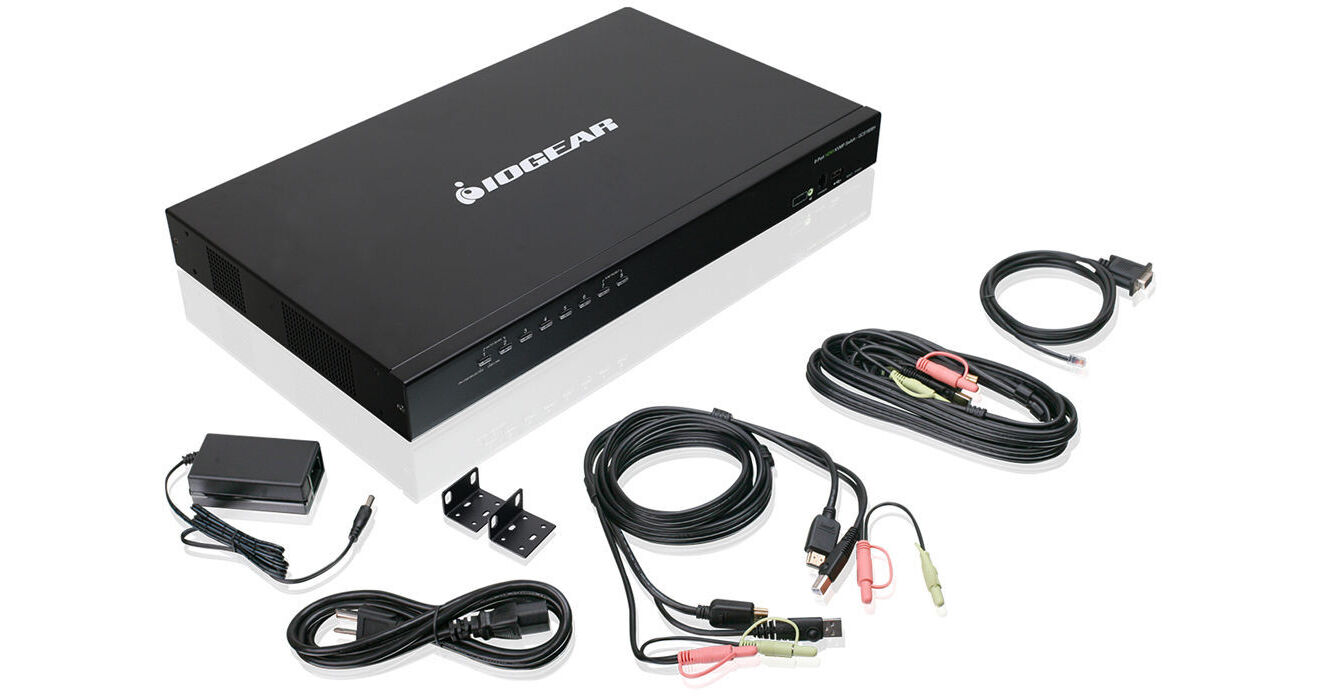
IOGEAR 8-Port USB HDMI KVMP Switch with 2 KVM Cable Sets

BH #IOGCS1808H • MFR #GCS1808H
Print
IOGEAR 8-Port USB HDMI KVMP Switch with 2 KVM Cable Sets
Key Features
  • Control up to 8 Computers
  • HDMI & 2.1 Stereo Audio Support
  • Video Resolution up to 1920 x 1200
  • Cascade up to 3 Levels
Control up to 8 computers using a single HDMI monitor, keyboard, and mouse with the 8-Port USB HDMI KVMP Switch from IOGEAR. Boasting 8 HDMI inputs and capable of video resolution up to 1920 x 1200, the 8-port switch supports 2.1 stereo surround audio, and it allows you to control up to 512 computers by cascading 3 levels of the switch.
More Details
In Stock
No Store Display
$539.99
Calculate Shipping
Protect Your Gear
Add a protection plan from $44.99
KVM Cables Included
Ports
Ask an Expert
800-891-3971

IOGEAR GCS1808 Overview

Control up to 8 computers using a single HDMI monitor, keyboard, and mouse with the 8-Port USB HDMI KVMP Switch from IOGEAR. Boasting 8 HDMI inputs and capable of video resolution up to 1920 x 1200, the 8-port switch supports 2.1 stereo surround audio, and it allows you to control up to 512 computers by cascading 3 levels of the switch.

The rack-mountable 8-port KVMP switch features IOGEAR's DynaSync technology with EDID support, which helps to ensure that there is little or no delay or change in video resolution while switching between computers. Two USB 2.0 ports allow you to share peripherals such as printers or USB storage devices. The switch is firmware-upgradable and supports Windows, Mac, Linux, UNIX, and Solaris systems. Two sets of KVM cables are included.

Expanded Connectivity
IOGEAR's 8-Port USB HDMI KVMP Switch is designed to control up to 512 computers by cascading 3 levels of the switch. The built-in USB 2.0 Type-A hub allows peripheral sharing between the connected system and is backwards compatible with USB 1.1. Administrators can broadcast messages, announcements, firmware updates, or notifications to all connected sources.
EDID Support
IOGEAR's Video DynaSync technology optimizes the display resolution by reading and remembering the monitor's parameters (EDID), which helps to ensure there is no delay or change in video resolution when switching between or booting computers.
Simple Switching Methods
Easily switch between connected computers by either manually pressing the front panel push-buttons, entering hotkey combinations from the keyboard, or via the On-Screen Display (OSD) system. The KVM's convenient Auto-Scan feature permits automatic scanning and monitoring of activities on all connected devices.
2.1 Surround Sound
This 8-port HDMI KVMP switch provides 2.1 audio support allowing you to enjoy stereo surround sound through connected speakers.
Multi-Display Setup
Enhance productivity and view all connected sources on up to eight displays by stacking eight switches together.
Additional Features
Supports up to 1080p (1920 x 1200) HD video resolution
Independent KVM and USB focus switching
Password protection security for On-Screen Display (OSD)
OSD Backup/Restore configuration and user profile information
Broadcast Mode sends commands to all connected computers
Auto Scan Mode monitors connected computers
HDMI input connectors equipped with screw lock for secure connection
Rack mountable in a 19" (1U) system rack
Console mouse port emulation & bypass feature supports most mouse drivers and multifunction mice
Complete keyboard emulation designed for error-free booting
Mac/Sun keyboard support and emulation (PC keyboard combinations emulate Mac/Sun keyboards; Mac/Sun keyboards work only with their own OS)
Multilingual OSD supports English, German, Japanese, Chinese, Spanish, Russian, and French
Multilingual keyboard mapping supports English (US), English (UK), German, Japanese, Traditional Chinese, Spanish, Korean, and French
HDCP compatible
Firmware upgradable
Console Requirements
HDMI display
Standard 104-key wired USB keyboard
Standard 2- or 3-button wired USB mouse
Source Device Requirements
HDMI output
USB Type-A port
OS Requirements
Windows 10, 8.1, 8, 7, Vista
macOS
Solaris, Linux, Unix, and other USB supported systems
UPC: 881317518378

IOGEAR GCS1808 Specs

Key Specs
# of Systems Supported
8 (512 Cascade)
Console I/O
1x HDMI Female
1x USB-A (Keyboard) Female
1x USB-A (Mouse) Female
KVM I/O
8x HDMI Female
8x USB-B Female
8x 1/8" / 3.5 mm Female
Supported Resolutions
1920 x 1200 @ 60 Hz
# of Systems Supported
8 (512 Cascade)
Console I/O
1x HDMI Female
1x USB-A (Keyboard) Female
1x USB-A (Mouse) Female
KVM I/O
8x HDMI Female
8x USB-B Female
8x 1/8" / 3.5 mm Female
OS Compatibility
Linux / UNIX / Windows / macOS
Supported Resolutions
1920 x 1200 @ 60 Hz
USB Keyboard/Mouse Emulation
Yes
Power Source
AC Adapter
Power Consumption
12.2 W
Operating Conditions
32 to 122°F / 0 to 50°C up to 80% Humidity
Storage Conditions
-4 to 140°F / -20 to 60°C
Rack Mountable
Yes 1 U
Material of Construction
Metal
Cable Length
6' / 1.8 m (KVM)
Dimensions
17.0 x 10.0 x 1.8" / 43.2 x 25.4 x 4.5 cm
Weight
7.8 lb / 3.5 kg
Packaging Info
Package Weight
11.405 lb
Box Dimensions (LxWxH)
20 x 14.1 x 5.3"

IOGEAR GCS1808 Reviews

Works great

By John
Rated 5 out of 5
Date: 2020-04-19

I've only had a for a couple weeks but so far it has been great

Tried the rest - this is the best

By Keith Eggel
Rated 5 out of 5
Date: 2014-12-08

We use several USB KVM's and this one is great for two reasons: 1. it comes complete with a full set of cables, and 2. it has keyboard commands that allow switching capability from the keyboard if the KVM itself is not located conveniently in the rack. - I have ordered more of these. Keith Eggel

See any errors on this page?

Can this KVM switch be controlled via http or ...

Can this KVM switch be controlled via http or other network commands? I am looking to integrate this with Companion.
Asked by: Larry
The IOGEAR 8-Port USB HDMI KVMP Switch does not have network support.
Answered by: Calvin M
Date published: 2023-02-20

question

is this product UL certified?
Asked by: Anonymous
Iogear lists this with FCC, and CE certifications. They do not provide documentation of UL certification.
Answered by: James B.
Date published: 2018-08-27

question

Can i connect 8 Mac Mini to 1 monitor/keyboard/mouse with this or do I need to by additional equipment?
Asked by: Christian R.
Thank you for choosing IOGEAR and we apologize for the inconvenience. We would need to know more about your setup. To better service you and understand your set up, please feel to contact our customer support at 1-866-946-4327 or email us: [email protected]. Once again, thank you for choosing IOGEAR.
Answered by: Larry L. IOGEAR Expert
Date published: 2018-08-27
  • y_2026, m_7, d_28, h_9CST
  • bvseo_bulk, prod_bvqa, vn_bulk_3.0.48
  • cp_1, bvpage1
  • co_hasquestionsanswers, tq_3
  • loc_en_US, sid_1462677, prod, sort_[SortEntry(order=HAS_STAFF_ANSWERS, direction=DESCENDING)]
  • clientName_bhphotovideo
Whatever You Need, We've Got It