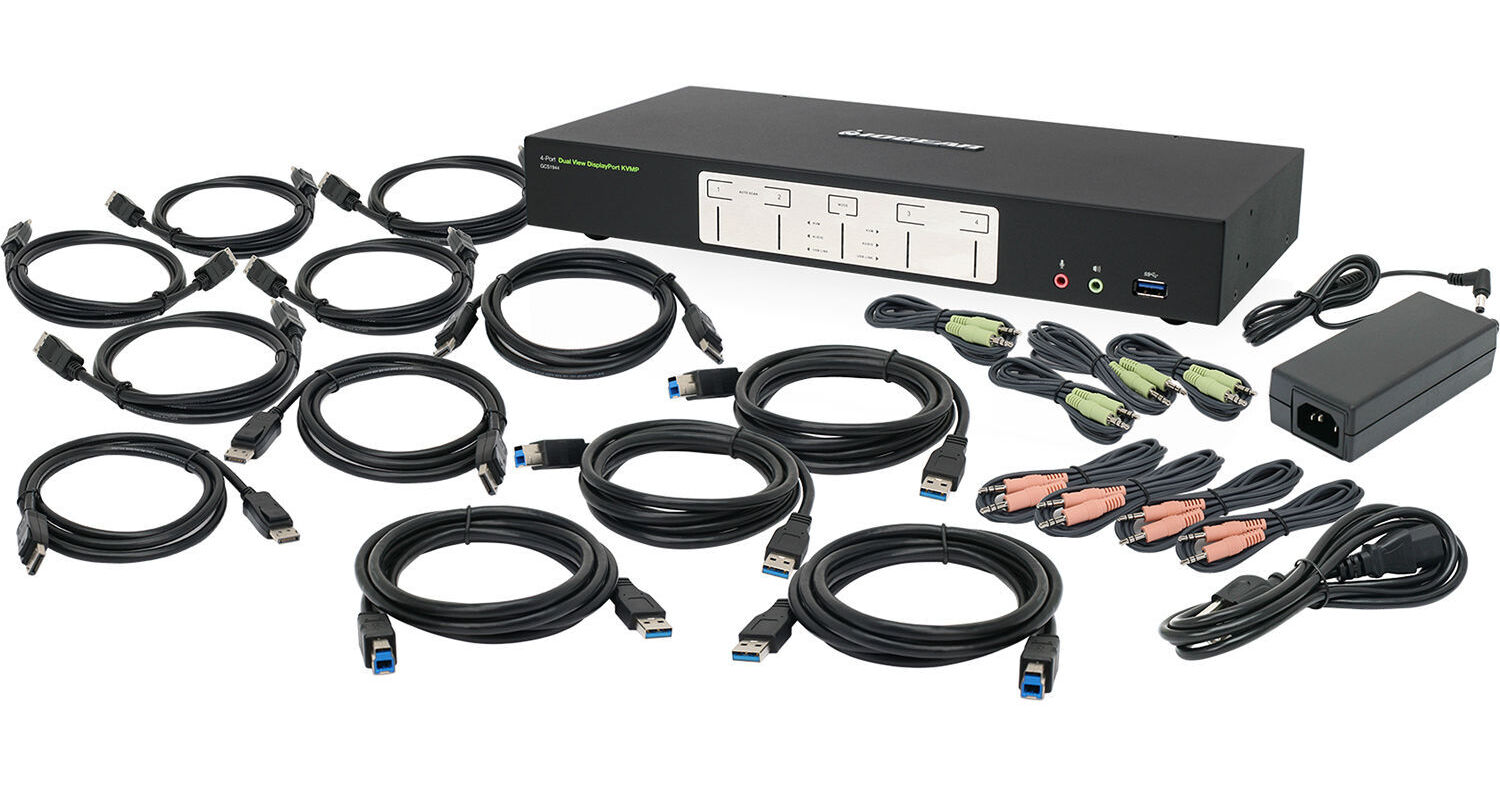
IOGEAR 4-Port 4K Dual View DisplayPort KVMP Switch with USB 3.0 Hub and Audio (TAA Compliant)

BH #IOGCS1944 • MFR #GCS1944
Print
IOGEAR 4-Port 4K Dual View DisplayPort KVMP Switch with USB 3.0 Hub and Audio (TAA Compliant)
Key Features
  • Dual Monitor Support
  • DisplayPort Interface
  • 2-Port USB 3.0/3.1 Gen 1 Hub
  • Resolution up to 4096 x 2160
The TAA compliant 4-Port 4K Dual View DisplayPort KVMP Switch from IOGEAR lets you control four desktop computers using a single set of peripherals, which consists of two monitors along with a keyboard, mouse, and set of speakers. The switch supports up to 4K resolutions and is compatible with DisplayPort-equipped monitors and systems. Using buttons on the switch, keys on the keyboard, or the wheel button on the mouse, you can quickly switch between the four computer systems. Moreover, the switch comes with an integrated 2-port USB 3.0/3.1 Gen 1 hub, allowing you to share a printer and scanner between the computers. Included with the switch are 8 DisplayPort cables, 4 USB 3.0 cables, and 4 audio cable sets.
More Details
In Stock
No Store Display
Free Expedited Shipping
Protect Your Gear
Add a protection plan from $38.99
Ports
Ask an Expert
800-606-6969

IOGEAR GCS1944 Overview

The TAA compliant 4-Port 4K Dual View DisplayPort KVMP Switch from IOGEAR lets you control four desktop computers using a single set of peripherals, which consists of two monitors along with a keyboard, mouse, and set of speakers. The switch supports up to 4K resolutions and is compatible with DisplayPort-equipped monitors and systems. Using buttons on the switch, keys on the keyboard, or the wheel button on the mouse, you can quickly switch between the four computer systems. Moreover, the switch comes with an integrated 2-port USB 3.0/3.1 Gen 1 hub, allowing you to share a printer and scanner between the computers. Included with the switch are 8 DisplayPort cables, 4 USB 3.0 cables, and 4 audio cable sets.

Maximize your high-end multi-monitor workstation with superior video resolution
Share dual Cinema 4K DisplayPort monitors (4096 x 2160 @ 60 Hz)
Operate 4 DisplayPort computers with 1 keyboard, mouse, and 2 monitors
Add another switch to expand up to four 4K monitors
DisplayPort 1.2 and HDCP compliant
Allows independent switching of the KVM, USB, and audio devices
Control/share USB 3.0/3.1 Gen 1 peripherals between 2 computers
Work on computer "A" without interrupting USB peripheral connectivity on computer "B"
USB 3.0/3.1 Gen 1 SuperSpeed 5 Gb/s transfer rate
MST (Multi-Stream Transport) support
DP++ supports HDMI and DVI outputs
Computer selection via front panel pushbuttons, hotkeys, or mouse
Supports 7.1 HD audio through DisplayPort
Full bass response for 2.1-channel audio
Mouse emulation or bypass feature supports most mouse drivers and multifunction mice
Windows 7, Windows 8.1, Windows 10, macOS, and Linux compatible
Multilingual keyboard mapping support (English, French, and German keyboards)
Mac keyboard support and emulation
RS-232 Commands
Auto-scan mode to monitor all computers
Power-on detection
Hot pluggable
Firmware upgradable
UPC: 881317516688

IOGEAR GCS1944 Specs

Key Specs
# of Systems Supported
4 (4 Cascade)
Console I/O
1x RJ45 Female
1x USB-A (Keyboard)
1x USB-A (Mouse)
2x 1/8" / 3.5 mm Audio
2x 1/8" / 3.5 mm Microphone
2x DisplayPort
2x USB-A 3.0 / 3.1/USB 3.2 Gen 1 Female
KVM I/O
2x 1/8" / 3.5 mm Audio
2x 1/8" / 3.5 mm Microphone
2x USB-B 3.0 / 3.1/3.2 Gen 1
4x DisplayPort Female
Supported Resolutions
4096 x 2160 @ 60 Hz
# of Systems Supported
4 (4 Cascade)
Console I/O
1x RJ45 Female
1x USB-A (Keyboard)
1x USB-A (Mouse)
2x 1/8" / 3.5 mm Audio
2x 1/8" / 3.5 mm Microphone
2x DisplayPort
2x USB-A 3.0 / 3.1/USB 3.2 Gen 1 Female
KVM I/O
2x 1/8" / 3.5 mm Audio
2x 1/8" / 3.5 mm Microphone
2x USB-B 3.0 / 3.1/3.2 Gen 1
4x DisplayPort Female
OS Compatibility
Linux / Windows / macOS
Supported Resolutions
4096 x 2160 @ 60 Hz
USB Keyboard/Mouse Emulation
Yes
Power Source
AC Adapter
Operating Conditions
32 to 104°F / 0 to 40°C up to 80% Humidity
Storage Conditions
-4 to 140°F / -20 to 60°C
Rack Mountable
No
Material of Construction
Metal
Dimensions
13.9 x 6.1 x 2.1" / 35.3 x 15.5 x 5.3 cm
Weight
3.6 lb / 1.6 kg
Packaging Info
Package Weight
9 lb
Box Dimensions (LxWxH)
21.4 x 9.3 x 5"

IOGEAR GCS1944 Reviews

Not Great - Avoid

By John
Rated 1 out of 5
Date: 2022-09-21

I got this to work from home. It is completely disappointing. My 3 Win10 computers and both monitors are native Display Port but the unit does not recognize them - giving me one monitor at times, but most of the time it just 'searches' for a signal. I have to reboot them to have the computers recognized again. My work laptop with OEM dock shows different resolutions from the same make/model of monitors, identical (supplied) cables. Vendor support was ridiculous.

Pretty solid

By Adam
Rated 4 out of 5
Date: 2020-04-18

In general, this is a great unit. Most systems can struggle with detecting the screens if the system was asleep, so you sometimes need to restart the displays for them to detect. If the system fails hard to detect then you have to power cycle everything to get the system to recognize devices.

See any errors on this page?

Is there a mode where i view 2 computers , one ...

Is there a mode where i view 2 computers , one per screen and abble to toggle the keyboard/mouse between those two?
Asked by: Ido
Yes. All you need is a 2 port KVM switch. Here is one option: https://www.bhphotovideo.com/c/product/1445913-REG/iogear_gcs1942_2_port_4k_dual_view.html
Answered by: Sagi C
Date published: 2020-11-20

Hello, Do you know if most of wireless mice or ...

Hello, Do you know if most of wireless mice or bluetooth keyboards works with this device? Thanks!
Asked by: pedro
The KVM has two kinds of USB ports, keyboard / mouse specific and general. The specific ones are connected to KVM itself then repeated as emulated device to computers. The general one just works as directly attached USB device. If you connect your mouse or keyboard on generic USB port, they works just like they are connected to computer so they should work as expected. However if you connect through specific port, the mouse or keyboard needs to be a standard USB HID mouse or keyboard to work properly. That means generally bluetooth technology won't work, and some keyboard and mouse with advanced features won't work.
Answered by: Carlton
Date published: 2019-07-29

What other Hz is supported by the device at lower ...

What other Hz is supported by the device at lower resolutions? For example, 4096x2160 @60Hz is what is says but what about at 2560x1440 and lower?
Asked by: Tito
The manufacturer only specifies 4096 x 2160 @60 Hz (4K DCI).
Answered by: Reuben K
Date published: 2022-02-03

Is it compatible with #IOGXD24KIT or/and ...

Is it compatible with #IOGXD24KIT or/and #IOGXS24KIT?
Asked by: Yegor
As per the manufacturer, the rack ears that are compatible with the IOGEAR 4-Port 4K Dual View HDMI KVMP Switch with USB Hub and Audio are the BH #IOGXS24KIT • MFR #GXS24KIT.
Answered by: Zev
Date published: 2022-10-26
  • y_2026, m_7, d_29, h_9CST
  • bvseo_bulk, prod_bvqa, vn_bulk_3.0.48
  • cp_1, bvpage1
  • co_hasquestionsanswers, tq_4
  • loc_en_US, sid_1462687, prod, sort_[SortEntry(order=HAS_STAFF_ANSWERS, direction=DESCENDING)]
  • clientName_bhphotovideo
Whatever You Need, We've Got It