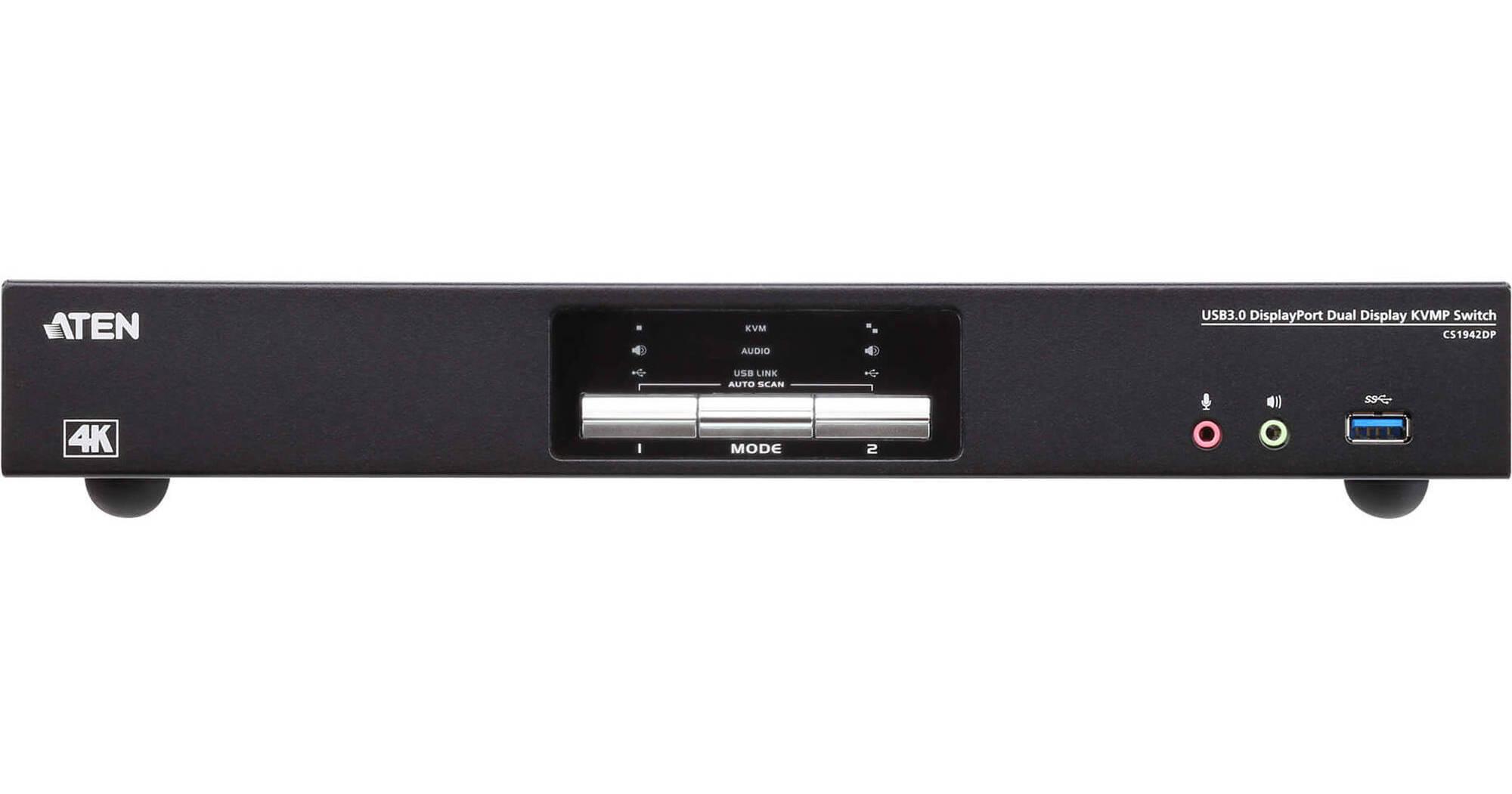
ATEN 2-Port USB 3.0 4K DisplayPort Dual-Display KVMP Switch

BH #ATCS1942DP • MFR #CS1942DP
Print
ATEN 2-Port USB 3.0 4K DisplayPort Dual-Display KVMP Switch
Key Features
  • Control up to 2 Computers
  • Share USB Keyboard/Mouse & Two Monitors
  • 2 x DisplayPort Monitor Connections
  • Up to 4K (4096x2160/3840x2160) at 60 Hz
Organize your desktop with the 2-Port USB 3.0 4K DisplayPort Dual-Display KVMP Switch from ATEN. Especially convenient when managing a multimedia workstation at a large organization, this switch provides you with instant access to two computers, all through a single USB keyboard, USB mouse, and two DisplayPort monitors.
More Details
In Stock
No Store Display
Free 2-Day Shipping
Protect Your Gear
Add a protection plan from $26.00
Computer Connections
Ask an Expert
800-606-6969

ATEN CS1942DP Overview

Organize your desktop with the 2-Port USB 3.0 4K DisplayPort Dual-Display KVMP Switch from ATEN. Especially convenient when managing a multimedia workstation at a large organization, this switch provides you with instant access to two computers, all through a single USB keyboard, USB mouse, and two DisplayPort monitors.

The switch supports video resolutions up to 4K (4096 x 2160 / 3840 x 2160) at 60 Hz. Incorporating dual-display capability, it allows you to enjoy a wider screen and easily switch between two DisplayPort systems. In addition, featuring a built-in USB 3.1 Gen 1 hub, the CS1942DP delivers data transfer rates up to 5 Gb/s, allowing you to maximize multimedia operations.

Engineered to meet the demand for dual display, ultra-fast data transmission rates, and lossless 4K video resolution, the CS1942DP is suited to multitasking applications such as design, financial trading, and video post production.

One USB keyboard and mouse control two DisplayPort computers and share two USB peripherals
Supports quad display by connecting two dual-display KVM switches
Up to 4K (4096 x 2160 / 3840 x 2160) resolution at 60 Hz
Computer selection via front panel, hotkeys, mouse, and RS-232 commands
Two-port USB 3.1 Gen 1 hub with SuperSpeed 5 Gb/s data transfer rates
Supports DisplayPort Dual-Mode technology (DP++)
Supports MST (Multi-Stream Transport)
Console mouse and keyboard emulation/bypass
Independent switching of KVM, USB, and audio
Multilingual keyboard mapping—supports English, French, Japanese, and German keyboards
HDCP compliant
Supports HD audio
Note:
HD audio through DisplayPort cannot be switched independently.
Power-on detection
Firmware upgradable
UPC: 672792007880

ATEN CS1942DP Specs

Key Specs
# of Systems Supported
2
Console I/O
2x USB-A Female
2x DisplayPort Female
2x 1/8" / 3.5 mm Line-In Female
2x 1/8" / 3.5 mm Microphone
1x RJ45
2x USB-A 3.0 / 3.1/USB 3.2 Gen 1
KVM I/O
2x USB-B 3.0 / 3.1/3.2 Gen 1 Female
4x DisplayPort Female
2x 1/8" / 3.5 mm Line-Out
2x 1/8" / 3.5 mm Headphone
Supported Resolutions
4096 x 2160 @ 60 Hz
# of Systems Supported
2
Console I/O
2x USB-A Female
2x DisplayPort Female
2x 1/8" / 3.5 mm Line-In Female
2x 1/8" / 3.5 mm Microphone
1x RJ45
2x USB-A 3.0 / 3.1/USB 3.2 Gen 1
KVM I/O
2x USB-B 3.0 / 3.1/3.2 Gen 1 Female
4x DisplayPort Female
2x 1/8" / 3.5 mm Line-Out
2x 1/8" / 3.5 mm Headphone
OS Compatibility
Windows
Supported Resolutions
4096 x 2160 @ 60 Hz
Scan Interval Range
1 to 99 secs (5 secs Default)
USB Keyboard/Mouse Emulation
Yes
Power Source
AC Adapter
Input Power
12 VDC
Power Consumption
3.48 W
Operating Conditions
32 to 82°F / 0 to 50°C up to 80% Humidity
Storage Conditions
-4 to 140°F / -20 to 60°C
Certifications
RoHS, UKCA, WEEE
Rack Mountable
No
Material of Construction
Metal
Dimensions
13.2 x 6.2 x 1.7" / 33.5 x 15.7 x 4.4 cm
Weight
52.9 oz / 1.5 kg
Packaging Info
Package Weight
7.275 lb
Box Dimensions (LxWxH)
21.4 x 9.4 x 4.8"

ATEN CS1942DP Reviews

Does the job, but not without issues

By Robert
Rated 3 out of 5
Date: 2022-03-25

First up, the pros: this product does what it says. It provides dual-monitor KVM switching for DisplayPort monitors and USB 3.0. I've got two 4K monitors attached, and there's no issue with the signal getting to them. Also, unlike most alternatives, there are plenty of USB ports for sharing not just a keyboard & mouse, but also other USB 3.0 peripherals. The device itself is also well-constructed, feeling quite sturdy, and it comes with all the connecting cables you could possibly need. Technically it does what it's supposed to do, but honestly I'm a bit disappointed, especially for something so expensive. I bought this in the hopes that it would be easier than individually switching the inputs on my 2 monitors between PCs and using a separate USB switch to pass peripherals back and forth. It does do that, but with some quirks. The biggest one for me is that, instead of both computers seeing 2 displays connected and the box simply switching between which gets fed to the actual displays, whenever you switch away from one computer, it's as if you're physically unplugging the cable. In practice, this means whenever you switch back, it's like plugging in a new pair of monitors and Windows will reset the positions/sizes of all your programs, which is annoying. I've only been using this a short while, and it worked fine at first when switching, but I quickly encountered an issue where one of the PCs would just refuse to recognize the internal USB hub of the KVM after switching, and wouldn't recognize it until I rebooted that computer (unplugging/re-plugging all USB connections had no effect). I'm not sure if this will be a recurring issue, or was a one-off glitch. Also, this does offer some flexibility in what's getting switched. You can switch everything (video/audio/USB), or you can switch just video, just audio, or just USB. Unfortunately, there's no option to split the displays between the 2 attached computers, in the event that you want a side-by-side. Overall, this does what it says it will do, but it ended up not being as hassle-free and flexible as I was hoping it would be. It's not bad enough that I want to return it, but I probably wouldn't buy it again, not at this price.

Great KVM for dual 4K@60Hz monitors

By Ryan
Rated 4 out of 5
Date: 2021-02-07

I work for a company that provides a company issued laptop that is locked down heavily. I have a my desktop sharing the same space at home with 4K monitors running at 60 Hz. So this in and of itself limits the options of KVMs greatly. I looked at a few others that either didn't offer and more benefits for the increase in price, or didnt work with my equipment. Note that KVM switches can have a lot of peculiarities so reach out to the vendor with you list of equipment ahead of time to save some trial and error. All in all, it works well and consistently with a few tweaks and gotchas: 1. This is due to display port technology, the screen will rearrange when you switch. This is due to DP being plug and play so your windows will get rearranged. I believe that there are some ways to fix this with an app that will automatically rearrange your windows. Also you can hard code in the EDID in a config file, which I will test at some point on my desktop. 2. Logitech Unifying receiver equipment does not work fully with the KVM commands. If you plug it into the keyboard USB port, the special features of the Logitech gear are no longer usable. If you plug it into one of the typical ports, you cannot use the keyboard commands to control the KVM, biggest loss here is the ability to switch between sources without having to press the physical button on the KVM. My solution to this was to get a one key keyboard from Techkeys that I am using for the sole purpose of switching the KVM since I have it mounted behind my desk. 3. I had to disable the auto detect source function. I am using a Surface Dock 2 and when auto detect was running it would not stay on the source when i was connecting it causing issues. I was able to switch back, but 50% of the time one of the monitors would not be working. One I disabled the feature on the KVM I have not had issues. 4. There is only one high speed USB port on the back of the KVM to connect to peripherals. I already had a hub but there were not enough ports. I needed to get another hub, after which I realized that I was having power issues running everything off of one port. So I got a powered USB hub with more ports and all is well again. Would be nice if it had more than one high speed USB port, but this seems to be common to KVMs. So just plan on buying a powered USB hub. In summary it works well for what I am doing with the only caveat left is the window rearrangement. The Connectpro UDP2-12AP-KIT seems to have all the features I was hoping for, however when I reached out them they said there were issues with the Surface Dock so that ruled it out, leaving the Aten as the best fit.

See any errors on this page?

Does this device make the connected computers ...

Does this device make the connected computers think the monitors are connected even when it is switched away, or will my computer redetect my monitors (and move my windows around) every time I switch systems?
Asked by: Anonymous
The computer should not change the desktop as you swap between computers.
Answered by: Reuben K
Date published: 2021-06-07

can this do 2560x1440 @ 144hz or greater?

can this do 2560x1440 @ 144hz or greater?
Asked by: Erik
Refresh rates are locked. You may want to find a kvm box that specifically supports free-sync and higher fresh rates. I'm not sure they exist but if you push google hard enough you may find it.
Answered by: AudioBob
Date published: 2020-12-18
  • y_2026, m_9, d_11, h_10CST
  • bvseo_bulk, prod_bvqa, vn_bulk_3.0.48
  • cp_1, bvpage1
  • co_hasquestionsanswers, tq_2
  • loc_en_US, sid_1471623, prod, sort_[SortEntry(order=HAS_STAFF_ANSWERS, direction=DESCENDING)]
  • clientName_bhphotovideo
Whatever You Need, We've Got It