Video Chat with a Pro Audio Expert - Live

Zynaptiq INTENSITY Loudness & Density Software for Pro Audio & Sound Design (Download)

BH #ZYNIN1 • MFR #ZYN-IN1
Print
Zynaptiq INTENSITY Loudness & Density Software for Pro Audio & Sound Design (Download)
Key Features
  • For Mixing, Mastering, and Sound Design
  • Adds Clarity, Detail, and Loudness
  • Uses Neural Networks and I/O Transforms
  • Intensity Knob for Simple Control
Available for download, Zynaptiq's INTENSITY is software designed to bring detail, clarity, loudness, and a sense of density to audio tracks. Equally suited to mixing, mastering, and sound-design purposes, INTENSITY is not a compressor or a dynamics processor per se. Instead, it uses algorithms borrowed from the world of facial recognition software to bolster and enhance a signal's inherent qualities. Use it on the drum bus to make a loop of percussion hit harder or feel more crispy, run ambient sounds through its algorithms to bring out details within the sound bed, or slap it on the master bus to bring out the detail of individual elements within the mix.
More Details
Digital
Electronic Download
No Store Display
$149.00
This item cannot be returned.
Emailed within 1-3 Business Days
Ask an Expert
800-606-6969

Zynaptiq Intensity Overview

Available for download, Zynaptiq's INTENSITY is software designed to bring detail, clarity, loudness, and a sense of density to audio tracks. Equally suited to mixing, mastering, and sound-design purposes, INTENSITY is not a compressor or a dynamics processor per se. Instead, it uses algorithms borrowed from the world of facial recognition software to bolster and enhance a signal's inherent qualities. Use it on the drum bus to make a loop of percussion hit harder or feel more crispy, run ambient sounds through its algorithms to bring out details within the sound bed, or slap it on the master bus to bring out the detail of individual elements within the mix.

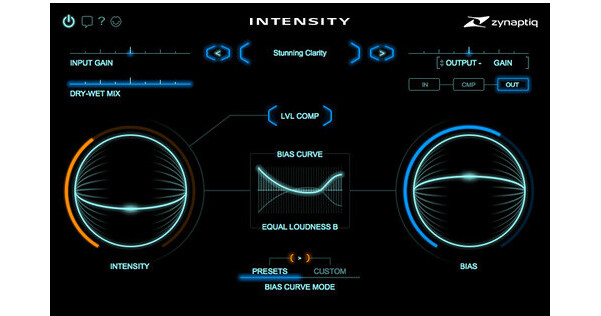
Operation is rather simple, with two prominent knobs—one called Intensity, which dictates the level of processing brought to the signal, and one called Bias, which makes the processing frequency-dependent. If you use Bias, it will work in conjunction with the Bias Curve control, and here you can select among presets or create custom curves. You can add output saturation with it, or mix the dry and wet amounts as well. Both of these operations can be implemented through sliders at the top of the GUI.

This software is compatible with Mac and Windows platforms. It can operate in AU, RTAS, AAX, and VST formats. With most of these formats, the software can work either at 32-bit and 64-bit, making it usable with the systems of many different users. You will need a free iLok account to use the software, though the iLok dongle itself is not required.

Controls at a Glance
Intensity
At the heart of the plug-in lies the Intensity knob. A combination of neural-network-based analysis and proprietary input and output transforms is used to separate the signal into broad strokes and detailed features. By boosting the details while leaving the broad strokes in place, the sound's characteristics are amplified. Though its masking effects are mitigated, its details are carved out, and the density and perceived loudness are increased.
Bias
In most cases, the Intensity control is all you'll need. But the processing amount can be controlled in a frequency-dependent manner using the Bias control in conjunction with the Bias Curves.
Bias Curves
The plug-in features ten preset bias curves, including two equal loudness curves, a presence boost curve, linear tilt curves, and more. Curves are selected using a proprietary visual menu widget, which allows you to preview a setting simply by hovering your mouse over it. However, you can also create your own custom curve, which is supported by multiple macro functions.
Saturate
A traditional soft-knee saturating limiter can be switched into the output stage. From subtle glue, to mastering-style limiting, to overdrive, the Saturate circuit delivers a warm, meaty tone that can also drive the level higher.
Wet/Dry Slider
This conventional control introduces dry, unprocessed signal back into the mix.

Zynaptiq Intensity Specs

Delivery Format
Download
License Type
Standard: Perpetual License
User Support
1 User
Standalone Operation
No
System Compatibility/Requirements
Operating System: Windows/macOS
Plug In Formats: AAX (Native) / AU / AudioSuite / RTAS / VST2 / VST3
USB Key Authentication: Required (iLok2)

Zynaptiq Intensity Reviews

See any errors on this page?
Whatever You Need, We've Got It